
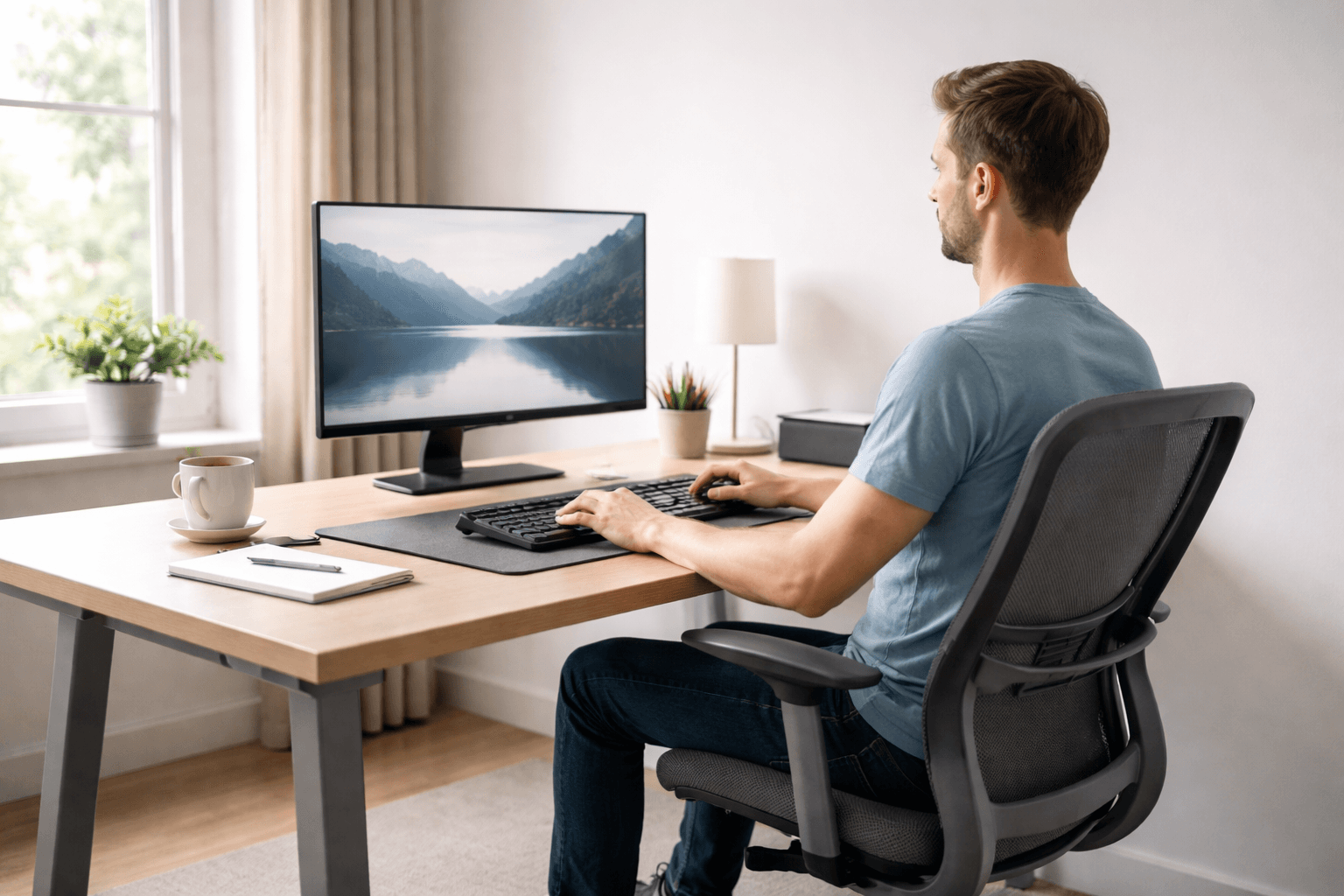
Desk depth directly impacts monitor viewing distance, keyboard positioning, arm support, posture comfort, and overall workstation usability.
A shallow desk can create subtle ergonomic problems users may not immediately notice, such as monitors sitting too close, compressed keyboard space, and the body shifting forward to compensate for limited workspace.
Over time, this can contribute to:
- neck tension,
- rounded shoulders
- visual fatigue
- cramped arm positioning
- reduced comfort.
Many attribute discomfort to their chair, monitor, or habits, when often insufficient desk depth restricts ergonomic movement.
Before diving into the details, this guide first outlines how desk depth affects workstation ergonomics. This context clarifies why shallow desks frequently feel uncomfortable and sets the stage for understanding how proper depth improves monitor placement, posture flexibility, arm support, and long-term visual comfort.
Table of Contents
Desk Depth Is More Important Than Most People Realize
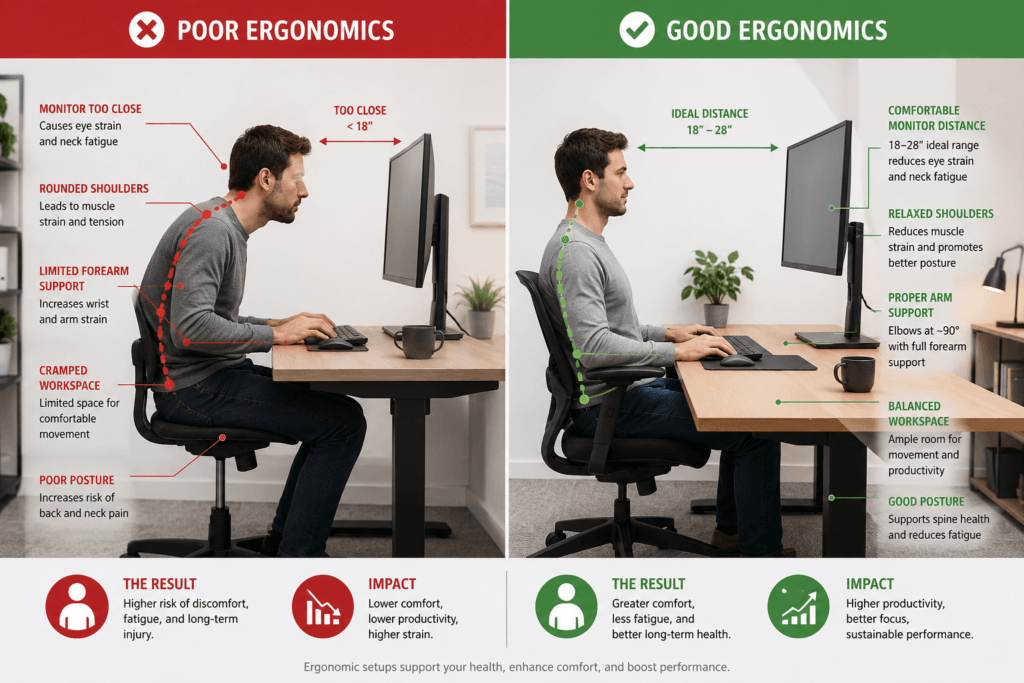
Most people focus heavily on:
- desk width,
- desk height,
- monitor size,
- or chair adjustments.
People often overlook desk depth.
Desk depth affects many relationships that determine whether a setup feels comfortable.
A shallow desk limits:
- monitor viewing distance,
- keyboard placement flexibility,
- mouse movement space,
- forearm support,
- and posture freedom.
This leads to a compressed workspace where components sit too close together, limiting comfort.
When that happens, users often begin compensating unconsciously:
- leaning forward toward the monitor,
- pulling shoulders inward,
- tensing the neck,
- or sitting in awkward static positions for long periods.
The problem becomes even more noticeable with:
- larger monitors,
- ultrawide displays,
- dual-monitor setups,
- mechanical keyboards,
- and modern workstations that require more visual and movement space.
Desk depth shapes ergonomic comfort and performance during daily use.
Desk Depth and Monitor Distance
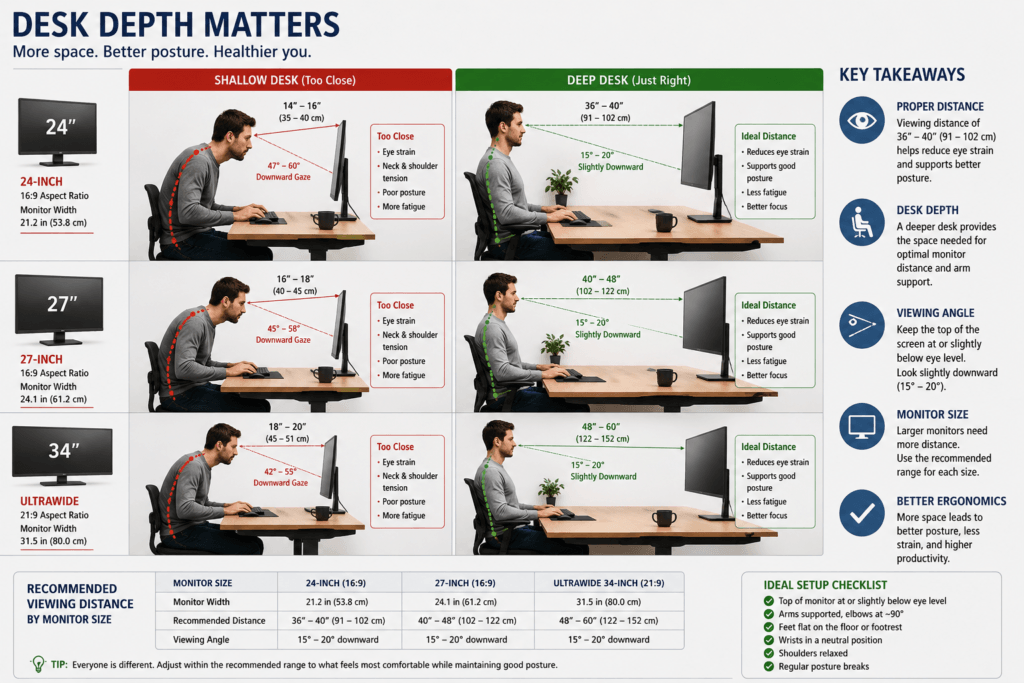
Desk depth is crucial for monitor comfort during long computer sessions.
A deeper desk allows for natural monitor distance and relaxed viewing, while a shallow desk forces the screen closer, reducing flexibility.
This matters because the monitor distance directly affects:
- neck posture,
- eye movement,
- visual scanning behavior,
- and upper-body positioning.
When monitors sit too close:
- Users often lean backward awkwardly,
- neck posture becomes unstable,
- Eye fatigue increases faster,
- and larger screens require excessive eye movement to scan comfortably.
Users may lean forward as they adapt to inadequate desk depth, seeking comfortable viewing angles.
The issue becomes far more noticeable with:
- 27-inch monitors,
- 32-inch displays,
- ultrawide screens,
- and dual-monitor setups.
Larger monitors naturally require:
- greater viewing distance,
- wider visual scanning range,
- and more ergonomic positioning flexibility.
On shallow desks, larger displays can feel overwhelming because the eyes and neck must work harder at close range.
This is one reason many users experience:
- neck stiffness,
- upper-back fatigue,
- or eye strain,
even after upgrading to larger “ergonomic” monitors.
Often, the issue is the desk lacking enough depth for comfortable viewing, not the monitor itself.
A deeper desk helps restore ergonomic flexibility by allowing:
- more natural monitor placement,
- relaxed visual distance,
- improved keyboard spacing,
- and a less forward-leaning posture during long work sessions.
Addressing desk depth can offer greater ergonomic benefits than just changing the chair or monitor.
Why Shallow Desks Cause Forward Leaning
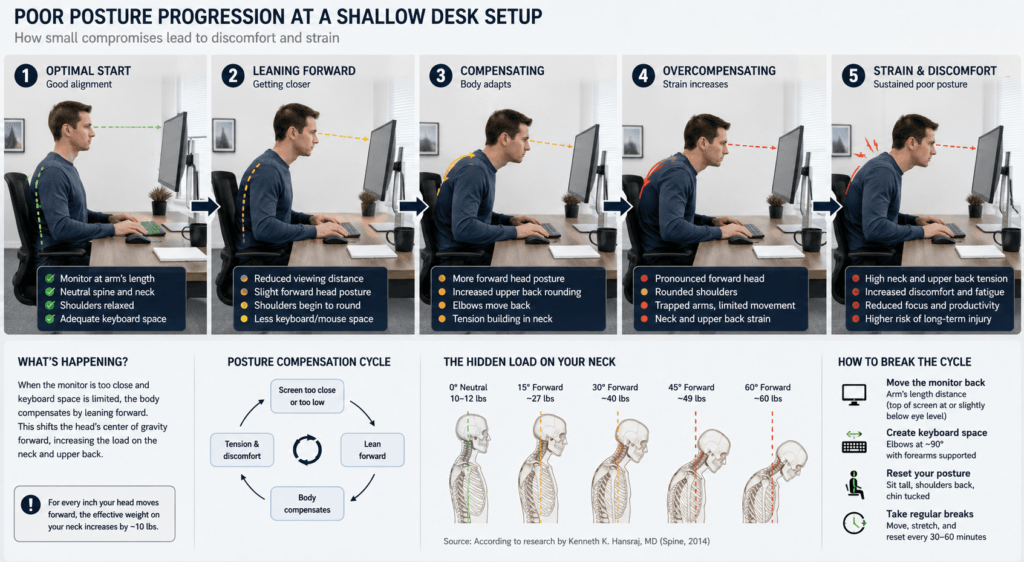
One of the most common problems with shallow desks is that they gradually encourage forward-leaning posture during computer work.
Users rarely choose to sit close; their body adapts when workspace feels compressed.
When desk depth is limited:
- The monitor sits closer to the eyes,
- keyboard and mouse space becomes restricted,
- forearm support decreases,
- and overall movement freedom becomes reduced.
As space becomes scarce, users lean forward to improve focus or create more room—a habit that develops over long sessions.
Many users attempt to compensate by changing chair position even when the workstation lacks sufficient desk depth.
This forward-leaning behavior often increases:
- neck tension,
- upper-back fatigue,
- shoulder rounding,
- and pressure around the upper trapezius muscles.
In many setups, the issue becomes even worse with:
- large monitors,
- ultrawide displays,
- dual-monitor setups,
- or shallow desks cluttered with accessories.
If monitors can’t be placed far enough apart, users often tilt their heads and upper bodies forward rather than adjust the workstation.
This is one reason shallow desks frequently feel uncomfortable even when:
- The chair is ergonomic,
- The monitor height appears correct,
- Or the desk technically matches “standard” dimensions.
The workstation may still lack sufficient depth to support natural posture.
Common Signs a Desk May Be Too Shallow
A desk may not provide enough depth if you frequently notice:
- leaning closer to the monitor,
- rounded shoulders during typing,
- neck tightness after long sessions,
- cramped keyboard or mouse positioning,
- limited forearm support,
- or the feeling that everything sits too close together.
These signs show how the body compensates for limited desktop space.
Why Forward Leaning Happens
Forward leaning is usually a response to workspace limitations, not a posture mistake.
The body naturally tries to improve:
- visual clarity,
- monitor comfort,
- arm positioning,
- and working space efficiency.
When the monitor sits too close:
- The eyes may feel visually overloaded,
- Larger screens become harder to scan comfortably,
- and the neck begins adjusting its position to reduce visual strain.
Compressed keyboard and mouse space can pull the arms inward and reduce shoulder relaxation, making the posture feel more constrained.
Limited desk depth creates compressed spacing, triggering posture compensation and discomfort.
How to Reduce Forward-Leaning Behavior
Improving desk depth is the most effective way to support natural posture.
Helpful adjustments may include:
- increasing monitor distance,
- repositioning the keyboard farther back,
- reducing desk clutter,
- using a monitor arm,
- improving forearm support,
- or upgrading to a deeper desk setup.
Even small increases in usable desk depth can significantly improve:
- visual comfort,
- posture flexibility,
- arm positioning,
- and overall workstation usability during long computer sessions.
What Is Standard Desk Depth? (Exact Measurements)
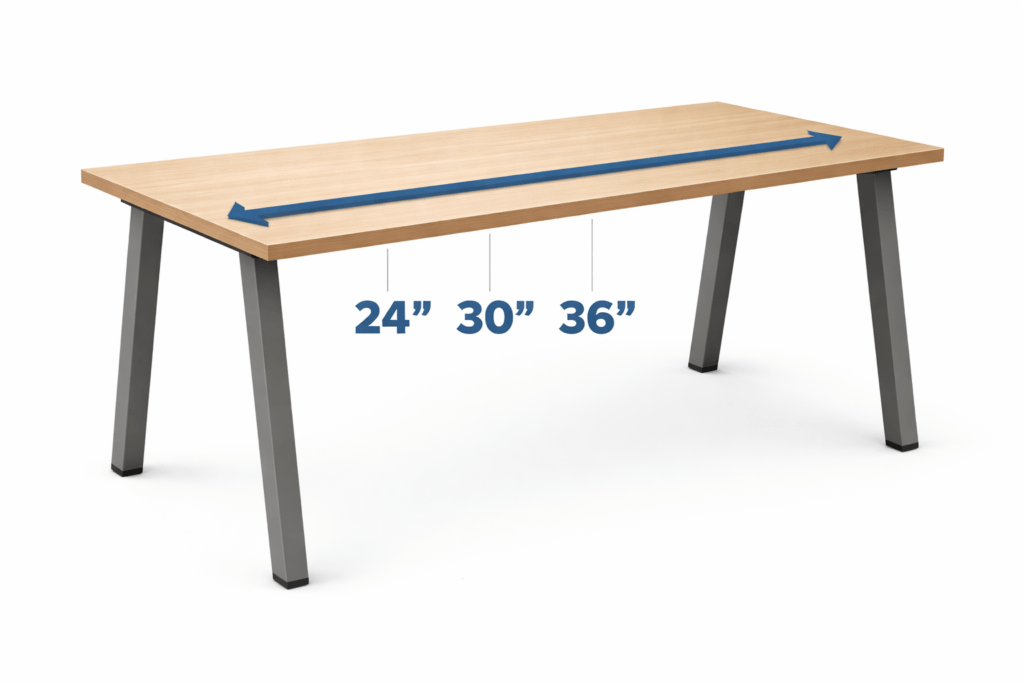
Desk depth is measured front to back. Here are the most common sizes:
| Compact desk | 20–24″ | 50–60 cm | Small rooms, laptops |
| Standard desk depth | 20–24″ | 60–76 cm | Most home offices |
| Deep productivity desk | 20–24″ | 76–91 cm | Dual monitors, accessories |
| Executive desk | 20–24″ | 91–107 cm | Large setups |
Most ergonomic setups use a desk depth of 24-30 inches (60–76 cm).
Why Desk Depth Is Critical for Ergonomics
The right desk depth helps you achieve:
✔ Correct Monitor Distance
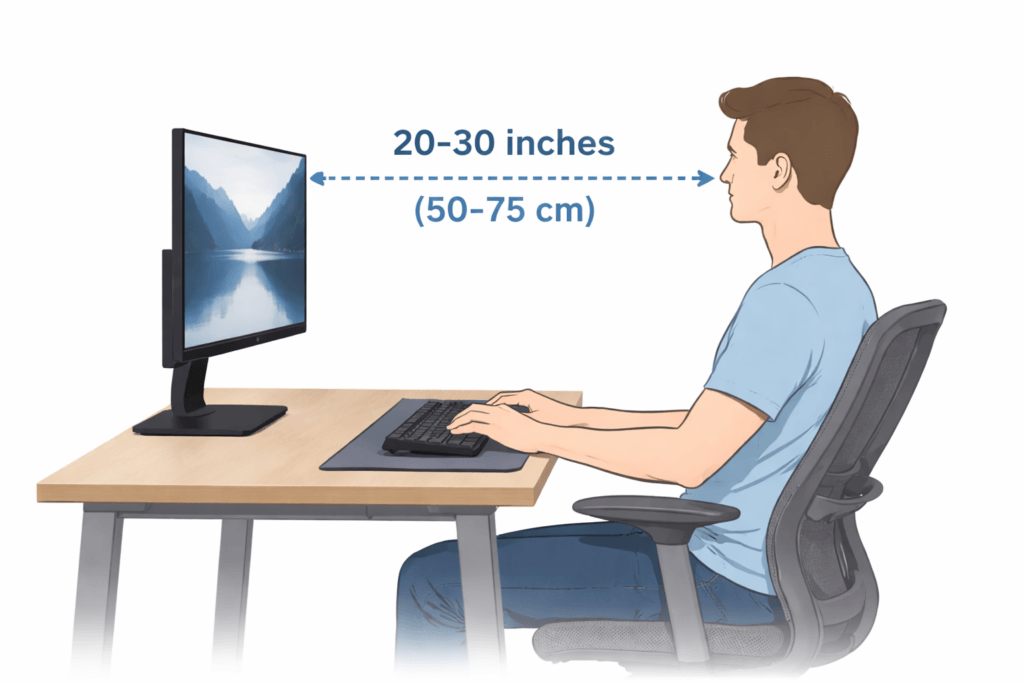
Your eyes should be about 20 to 30 inches from your screen.
If you sit too close, you’ll strain your eyes.
If you sit too far away, you’ll end up leaning forward.
✔ Neutral Posture
With the right desk depth, you can:
- Shoulders relaxed
- Back straight
- Elbows at 90°
- Wrists neutral
✔ Workspace Organization
A deep enough desk gives you space for:
- Keyboard
- Mouse
- Monitor stand
- Desk accessories
If your desk isn’t deep enough, your workspace can feel cramped and less efficient. To help, let’s explore recommendations for choosing desk depth in various real-world scenarios.
Best Desk Depth by Scenario (Practical Recommendations)
Small Office or Compact Room (600 mm Desk)
Recommended depth: 600 mm (24 inches)
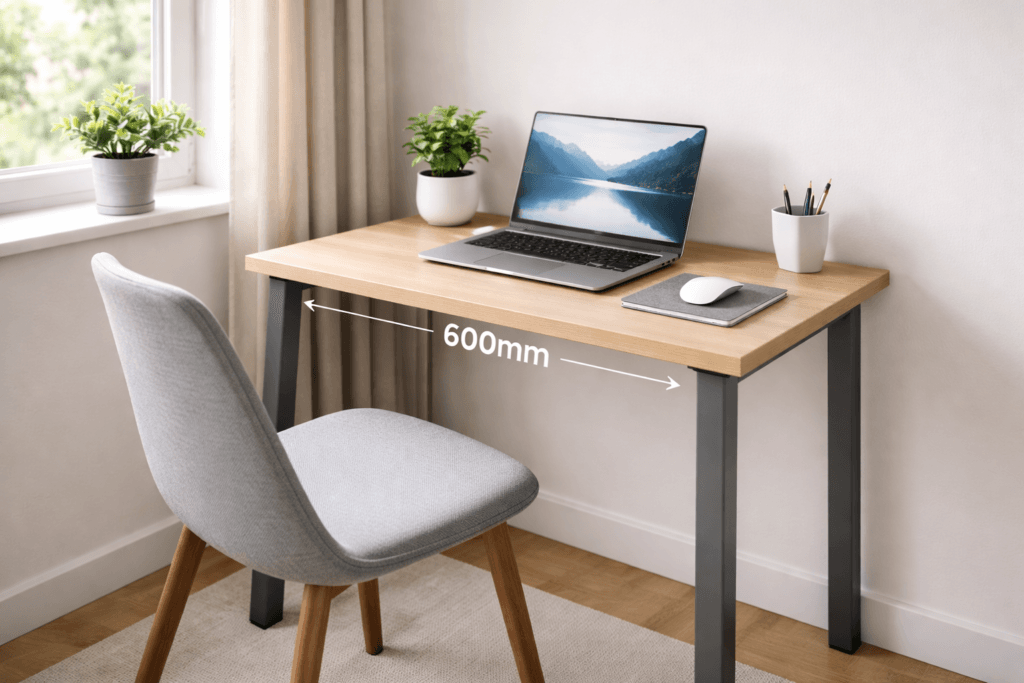
Perfect for:
- Laptop users
- Small apartments
- Minimal setups
- Wall-mounted desks
Pros:
- Saves space
- Affordable
- Minimal footprint
Cons:
- Limited monitor distance
- Not ideal for dual monitors
Tip: Use a monitor arm to get the most out of your desk space.
Proper desk depth plays an important role in maintaining comfortable monitor positioning. If the monitor sits too close to the user, it becomes harder to maintain ideal monitor height and natural viewing distance during long work sessions.
Single Monitor Setup
Recommended depth: 24 to 28 inches (60–70 cm)
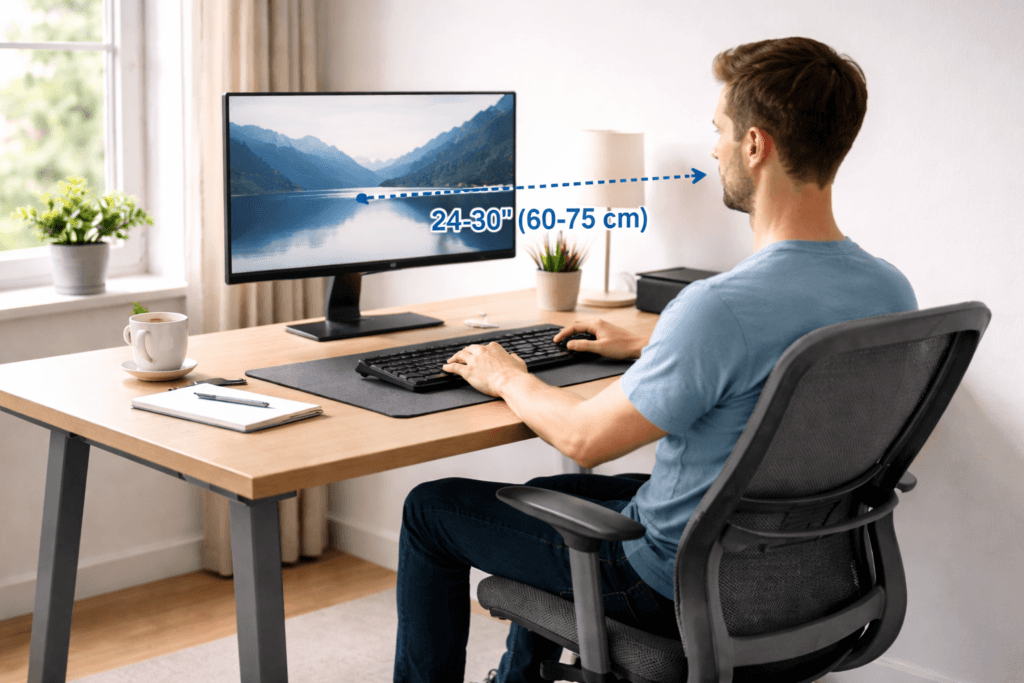
This provides:
- Comfortable viewing distance
- Space for keyboard & mouse
- Room for desk accessories
Best for:
- Home office workers
- Students
- Light productivity
Dual Monitor Setup
Recommended depth: 28 to 34 inches (70–86 cm)
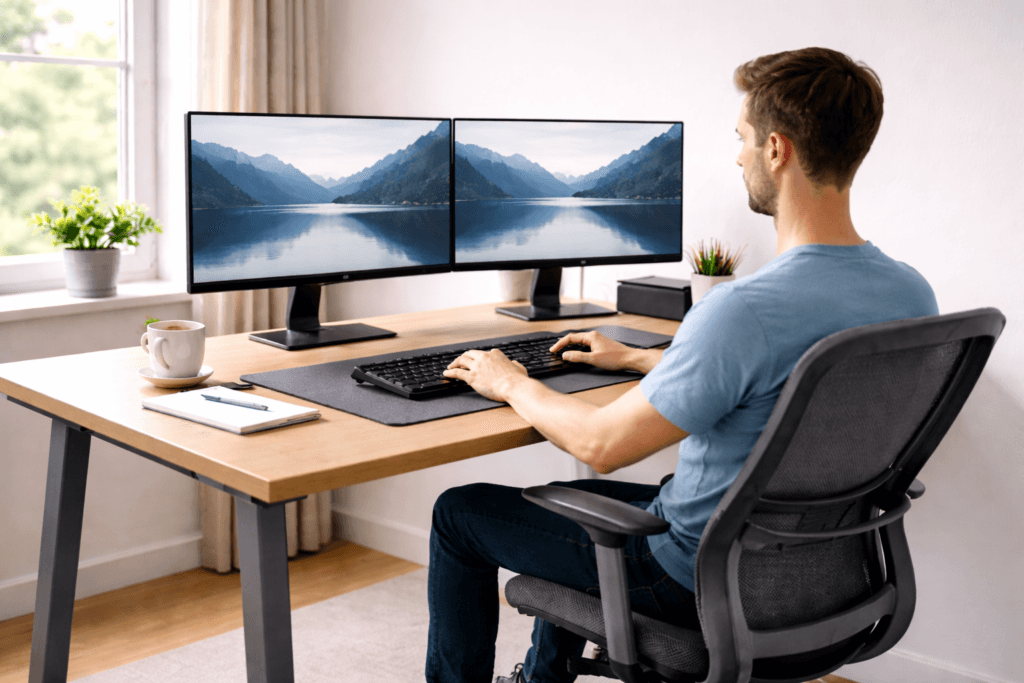
Dual monitors require extra distance to:
- Avoid neck turning
- Maintain ergonomic alignment
- Fit monitor stands
Dual-monitor workstations usually require more ergonomic spacing to prevent excessive neck rotation and visual compression.
Minimum recommended depth: 30 inches (76 cm)
Multiple Monitor / Productivity Setup
Recommended depth: 30 to 36 inches (76–91 cm)
Ideal for:
- Developers
- Designers
- Traders
- Video editors
Benefits:
- Better viewing distance
- More desk organization
- Less clutter
Monitor Distance Guide Based on Desk Depth
| 20″ | Too close | ❌ Poor |
| 20″ | Acceptable | ⚠️ Moderate |
| 20″ | Ideal | ✅ Good |
| 20″ | Optimal | ⭐ Excellent |
| 24″ | Premium setup | ⭐⭐⭐ Best |
Should You Use a Monitor Arm?
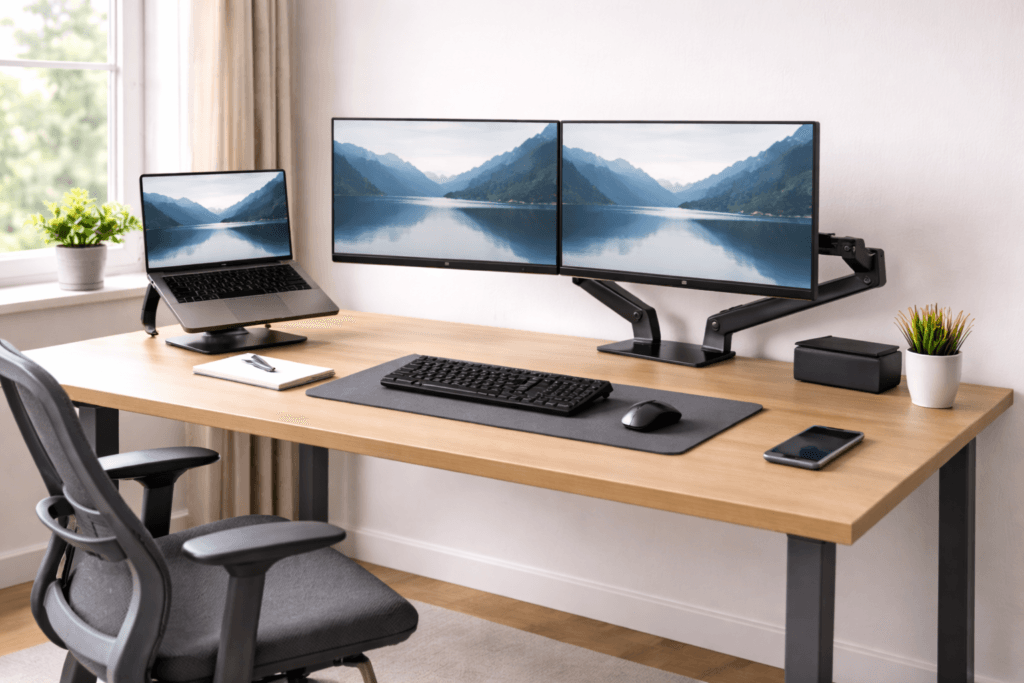
Monitor arms help smaller desks work like deeper ones.
Benefits:
- Push the monitor further back.
- Free desk space
- Improve ergonomics
- Adjustable height
Best for:
- 600mm desks
- Dual monitors
- Minimal setups
Desk Depth for Different Monitor Sizes
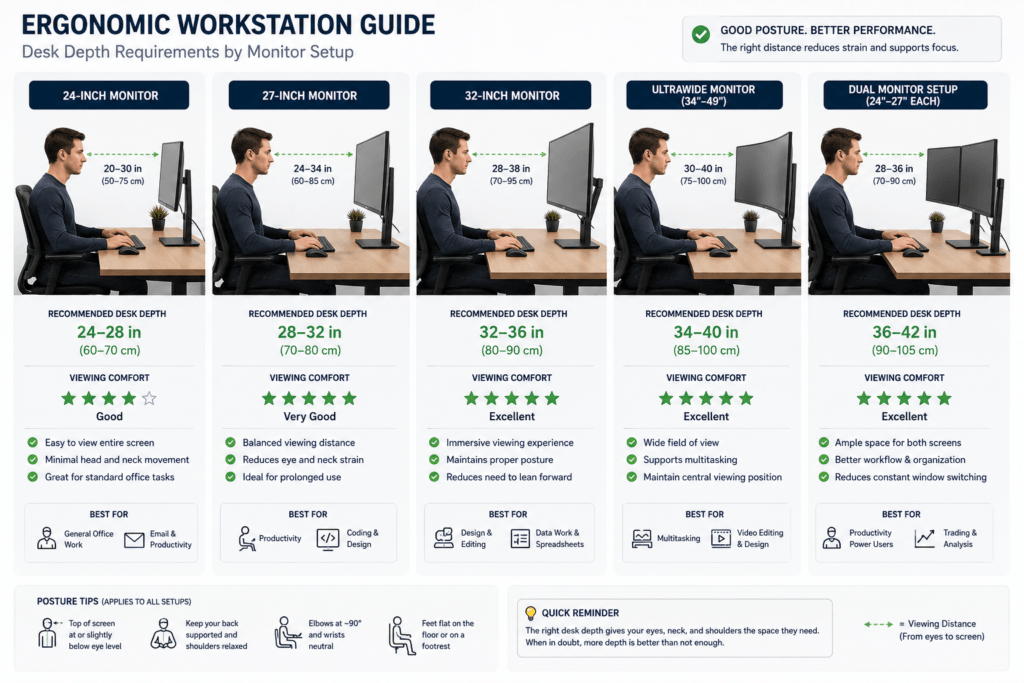
The right desk depth depends on your monitor size. A setup that feels fine on a small screen might feel cramped or awkward on a larger monitor.
This is because larger monitors change several factors, such as:
- viewing distance needs,
- eye scanning behavior,
- neck movement,
- and overall workstation spacing.
Larger screens usually require more space, so you can stay comfortable and maintain good posture for long periods at your computer.
24-Inch Monitors
A 24-inch monitor is usually the easiest size to set up comfortably on a standard desk. Most standard desks provide enough depth for comfortable viewing, with 24 inches or more recommended for this size.
With a smaller screen, you might notice:
- The eyes scan the display more easily,
- neck movement remains minimal,
- And moderate viewing distances typically feel natural.
For most people, a standard desk provides enough space for:
- comfortable monitor placement,
- keyboard positioning,
- and forearm support.
This is why smaller monitors often feel comfortable, even on compact desks.
A shallow desk can start to feel uncomfortable if:
- The monitor sits too close,
- Clutter reduces usable desk space,
- or keyboard placement becomes compressed near the edge of the desk.
27-Inch Monitors
When you use a 27-inch monitor, desk depth becomes much more important. For a 27-inch screen, a desk depth of at least 28 inches is typically recommended for proper viewing distance.
As the screen size increases, you might notice:
- visual scanning expands,
- viewing distance becomes more sensitive,
- And shallow desks may start to feel visually compressed.
People with 27-inch monitors often lean back or forward throughout the day to find a comfortable position.
On a shallow desk, the screen can feel overwhelming up close, especially when:
- reading,
- design work,
- spreadsheets,
- or multitasking.
This can cause more:
- eye fatigue,
- neck tension,
- and posture adjustments during long sessions.
A slightly deeper desk helps by providing:
- more relaxed viewing distance,
- reduced visual crowding,
- and better ergonomic spacing between the keyboard and monitor.
32-Inch Monitors
Large 32-inch monitors demand much more workstation depth. For this size, a desk depth of at least 30 inches is usually recommended to ensure comfort and proper viewing distance.
If you sit close to a 32-inch screen, you might need:
- excessive eye movement,
- larger head adjustments,
- and more visual scanning effort throughout the day.
On a shallow desk, a big monitor can feel too close, even when set up properly.
This frequently causes:
- forward-backward posture shifting,
- neck stiffness,
- visual fatigue,
- and difficulty maintaining a relaxed posture.
The problem isn’t always the monitor. Often, the desk isn’t deep enough for comfortable viewing.
Deeper desks help large monitors feel significantly more natural by creating:
- wider visual breathing room,
- improved neck posture,
- and less aggressive eye scanning behavior.
Ultrawide Monitors
Ultrawide monitors change how you use your desk even more because they make you look side-to-side more often. For ultrawides, a desk depth of at least 30 inches is often recommended to maintain a comfortable distance from the screen.
Compared to regular monitors, ultrawides often mean you need:
- wider eye movement,
- increased peripheral viewing,
- and more neck rotation during multitasking.
If an ultrawide monitor is too close to a shallow desk, you might notice:
- neck movement increases,
- and users may repeatedly shift posture throughout the day.
This is common during:
- editing work,
- programming,
- gaming,
- financial dashboards,
- and multi-window workflows.
A deeper desk lets you place an ultrawide monitor farther back, helping:
- visual movement feels smoother,
- posture remains more relaxed,
- and neck rotation becomes less aggressive.
Monitor arms help you adjust depth without taking up more desk space.
Dual Monitor Setups
Using two monitors means you need more space because your desk setup gets wider and busier. For most dual-monitor arrangements, a desk depth of 30 inches or more is typically recommended to provide comfortable viewing distance and workspace.
Users frequently:
- rotate slightly between screens,
- shift eye focus repeatedly,
- and adjust posture more during the day.
On a shallow desk, two monitors can quickly lead to:
- cramped viewing distance,
- limited keyboard space,
- restricted mouse movement,
- and increased neck rotation.
This is why many dual-monitor setups feel uncomfortable despite the use of ergonomic equipment.
Deeper desk setups generally improve dual-monitor ergonomics by creating:
- better viewing balance,
- more relaxed screen transitions,
- improved arm positioning,
- and more flexible monitor placement options.
For many people, desk depth is one of the most important factors for making bigger or multi-monitor setups comfortable during long work sessions.
Desk Depth for Keyboard and Mouse Positioning
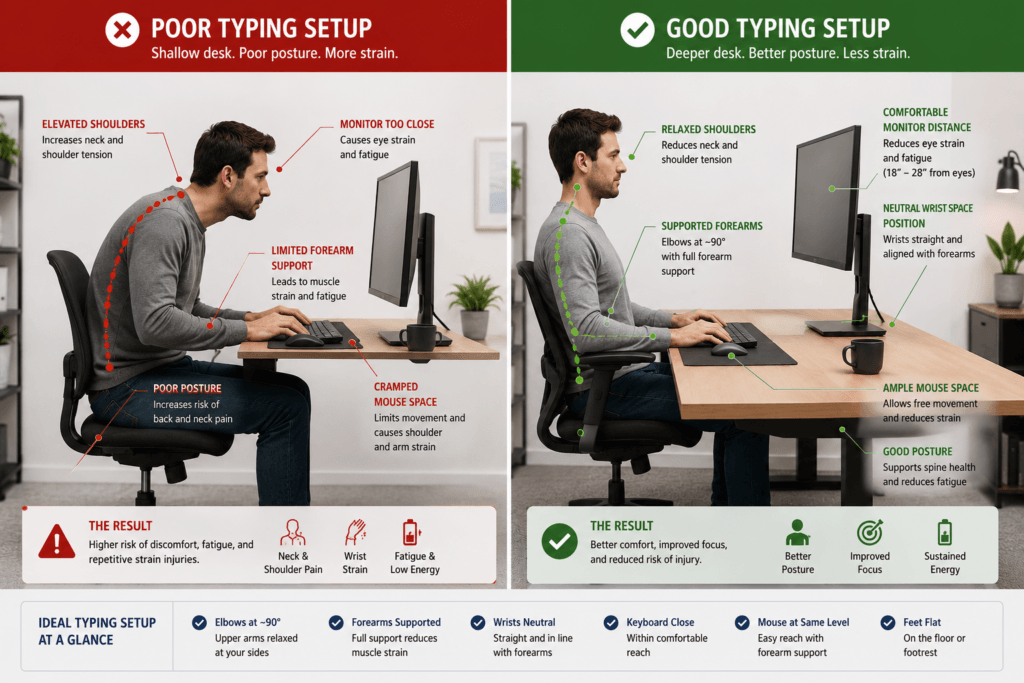
Desk depth is important for more than monitor placement. It also affects how your keyboard, mouse, arms, shoulders, and upper body work together during long hours at your computer.
Many common workstation discomforts, such as:
- wrist strain,
- shoulder tightness,
- cramped mouse movement,
- or awkward typing posture,
can sometimes be caused by a desk that is not deep enough, rather than by the keyboard or mouse.
Even a properly sized desk can feel uncomfortable if desk height and desk depth fail to support relaxed arm positioning together.
A cramped workspace often changes your upper body posture without you noticing.
Why Shallow Desks Feel Restrictive During Typing
A shallow desk makes it hard to place your keyboard and mouse in a comfortable, natural position.
When there is insufficient depth:
- Keyboards are often pushed too close to the desk edge,
- mouse space becomes restricted,
- forearm support decreases,
- and shoulder positioning becomes less relaxed.
This leads to a cramped posture and restricts your upper-body movement.
Over time, many users begin:
- tensing their shoulders,
- pulling elbows inward,
- overusing wrist movement,
- or leaning forward while typing and using the mouse.
These posture changes happen gradually as your body adapts to small spaces.
Forearm Support and Shoulder Relaxation
One of the main ergonomic benefits of having sufficient desk depth is better forearm support.
When there is enough desk space in front of the keyboard:
- The forearms can rest more naturally,
- shoulders remain more relaxed,
- And you often feel less tension in your upper body.
A shallow desk removes these benefits.
If the keyboard sits too close to the edge:
- wrists may hang unsupported,
- elbows lose comfortable positioning,
- And your shoulder muscles may have to work harder during long periods at your desk.
This can cause:
- upper trapezius tension,
- shoulder fatigue,
- neck tightness,
- and typing discomfort.
People often focus on their chairs and overlook how desk depth supports their arms.
Mouse Space and Movement Freedom
A desk that is too shallow makes it much harder to position your mouse well.
Shallow desks reduce:
- mouse movement range,
- elbow freedom,
- and shoulder relaxation space.
As usable workspace gets smaller, people often:
- tuck their mouse arm inward,
- rotate the wrist excessively,
- or position the mouse too close to the body.
This can increase gradually:
- wrist fatigue,
- shoulder tightness,
- forearm tension,
- and awkward ways of moving your arm and hand during long hours at the computer.
The problem is more noticeable during:
- design work,
- editing,
- spreadsheet tasks,
- and workflows involving constant mouse movement.
A deeper desk usually provides:
- smoother arm movement,
- more relaxed shoulder positioning,
- and improved separation between the keyboard and mouse.
Mechanical Keyboards and Wrist Positioning
Mechanical keyboards, wrist rests, and other accessories take up extra desk space. This changes how desk depth works in real use.
Mechanical keyboards are usually thicker than low-profile keyboards, which can:
- increase wrist extension,
- raise hand positioning,
- and alter elbow alignment.
Wrist rests require extra space in front of your keyboard.
On shallow desks, this can create a compressed typing zone where:
- wrists sit too close to the edge,
- forearm support decreases,
- And your posture can tighten without you realizing it.
This is why some people still feel uncomfortable even after buying ‘ergonomic’ accessories.
Sometimes, your desk is not deep enough for comfortable arm positioning.
Signs Your Desk Depth May Be Limiting Keyboard Comfort
Your desk depth may not be enough if
- You often notice your wrists hanging near the desk edge,
- cramped mouse movement,
- shoulders rounding forward,
- elbows feeling restricted,
- forearms lacking support,
- keyboard placement feels too close,
- or tension increases during long typing sessions.
These signs show that your desk restricts natural arm movement and flexibility.
Why Arm Support Requires More Space Than Most People Expect
Few people realize how much desk depth drives upper-body comfort.
Relaxed arm positioning requires enough space for:
- keyboard placement,
- forearm support,
- mouse movement,
- posture shifting,
- and the ability to adjust your posture naturally during the day.
When desk depth is too limited, the body often compensates with:
- static posture,
- elevated shoulders,
- wrist overuse,
- and less freedom to move comfortably.
Even small workspace limits add up over time, making you more tired and uncomfortable than necessary.
How to Test If Your Desk Depth Is Correct
Desk depth matters for a comfortable workspace every day, not just by the measurement.
Many users assume their setup is ergonomic because:
- The desk matches standard dimensions,
- The chair is adjustable,
- Or the monitor height appears correct.
Comfort depends on how your setup feels over long periods, not on meeting guidelines.
A desk can meet the ‘recommended’ size but still feel cramped or uncomfortable to use.
Test your desk depth by noticing how your body feels as you work.
Signs Your Desk Depth Feels Comfortable
With a proper desk depth, your workspace feels comfortable, and you don’t need to adjust constantly.
Good ergonomic depth often feels like:
- The monitor sits at a comfortable visual distance,
- keyboard placement feels natural,
- forearms rest comfortably,
- mouse movement feels unrestricted,
- shoulders stay relaxed,
- Posture changes happen naturally throughout the day.
In many comfortable setups, users do not feel the urge to:
- lean toward the screen,
- reposition constantly,
- or pull themselves backward away from the monitor.
Your workspace should provide room for easy movement and clear visibility of the screen without straining your eyes.
Warning Signs Your Desk May Be Too Shallow
A desk that is too shallow can cause long-term discomfort and poor posture.
Common warning signs include:
- The monitor is feeling too close,
- leaning forward during work,
- cramped keyboard or mouse positioning,
- limited forearm support,
- shoulders tightening during mouse use,
- neck movement increases throughout the day,
- or the workstation feels crowded and visually compressed.
Over time, your body compensates for a lack of space, creating ongoing issues.
Many users mistakenly blame:
- their chair,
- monitor,
- posture habits,
- or fatigue levels,
When the real problem might be that your desk is not deep enough to be comfortable.
The Lean Test
Check if you frequently lean toward your monitor as a sign of insufficient desk depth.
Forward leaning happens when:
- The screen sits too close visually,
- The monitor distance feels uncomfortable,
- Or keyboard positioning compresses upper-body posture.
If you notice yourself:
- sliding forward in the chair,
- moving your head closer to the screen,
- or collapsing toward the desk during focused tasks,
Your desk might not give you enough space to work comfortably.
This is common during:
- reading,
- coding,
- editing,
- spreadsheets,
- and other visually demanding work.
People often unconsciously lean forward when the desk and screen feel too close.
The Visual Comfort Test
Proper desk depth makes the monitor feel balanced—not overwhelming.
When the viewing distance is appropriate:
- eye focus feels more relaxed,
- screen scanning becomes easier,
- and neck movement tends to decrease naturally.
If the monitor constantly feels:
- visually dominant,
- difficult to scan comfortably,
- too close to the face,
- or mentally fatiguing during long sessions,
Your desk might not be deep enough to let you place your monitor at a comfortable distance.
This is more noticeable with:
- large monitors,
- ultrawide displays,
- dual-monitor setups,
- and shallow desks with limited monitor distance.
The Arm Support Test
Desk depth should allow arms to remain relaxed while typing or using a mouse.
A comfortable setup usually allows:
- forearms to rest naturally,
- elbows to remain relaxed,
- and the mouse to move freely without shoulder tension.
If you frequently notice:
- wrists hanging near the edge,
- elbows feeling compressed,
- shoulders tightening,
- or limited mouse movement space,
Your desk might not have enough space for how you work. This matters during long work sessions because even small limits on comfort can make you tired over time.
Good Ergonomics Should Feel Flexible
Many people think good posture means sitting still in one position, but that is a common ergonomics myth.
In reality, comfortable workstations allow:
- posture variation,
- relaxed movement,
- visual flexibility,
- and natural adjustment throughout the day.
The right desk depth helps you stay flexible by providing enough space to adjust to different tasks and positions.
If your desk is too shallow, you might end up sitting stiffly because you do not have enough room to move comfortably.
Desk Depth and Eye Strain
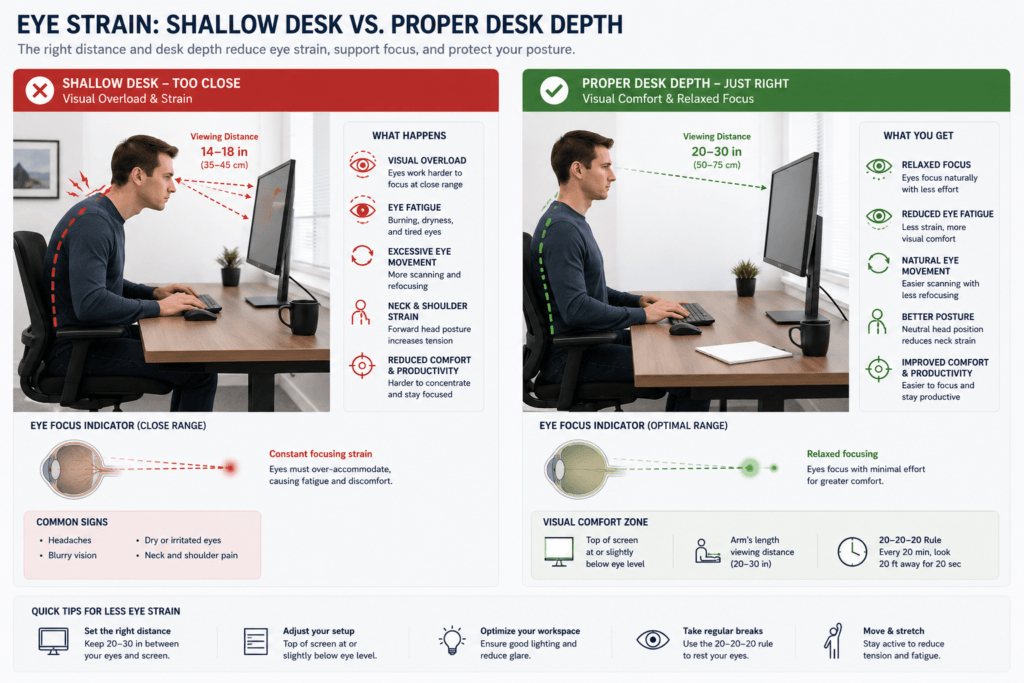
The depth of your desk can make a big difference in how comfortable your eyes feel during long hours at the computer.
Most people associate eye strain with:
- screen brightness,
- blue light,
- or excessive screen time.
Those factors are important, but the space on your desk also affects your comfort.
If your desk is too shallow, your monitor may sit uncomfortably close. Over time, this proximity can tire your eyes, especially during long computer sessions.
The problem becomes even more noticeable with:
- large monitors,
- ultrawide displays,
- dual-monitor setups,
- and visually dense workflows.
Why Desk Depth Affects Eye Comfort
Desk depth directly influences monitor viewing distance.
When enough depth exists:
- The monitor can sit farther away naturally,
- visual scanning feels more relaxed,
- and the eyes do not need to work as aggressively during long sessions.
Shallow desks take away this flexibility.
As the monitor distance shortens:
- The eyes refocus more frequently,
- screen scanning becomes more intense,
- And your eyes can get tired more quickly.
This is especially common when users spend long periods:
- reading,
- editing,
- coding,
- multitasking,
- or working with large visual interfaces.
Key takeaway: Even when ergonomic guidelines are met, a limited desk depth can lead to visual and workspace discomfort over time.
Signs the Monitor May Be Too Close
When your monitor feels too close, your body and eyes often try to adjust on their own.
Common signs include:
- Eye fatigue is increasing quickly,
- difficulty focusing comfortably for long periods,
- frequent posture shifting,
- leaning backward away from the screen,
- neck adjustments during reading,
- visual overwhelm during multitasking,
- or the feeling that the monitor dominates the visual field too much.
These signs can be hard to notice at first, but they often get worse as the day goes on.
Many people blame the monitor, but limited desk depth often prevents a comfortable viewing position.
Large Monitors Increase Visual Demands
The bigger your monitor, the more important desk depth becomes for your comfort.
A large screen positioned too close to the eyes requires:
- more visual scanning,
- increased eye movement,
- and greater neck involvement throughout the day.
This is particularly noticeable with:
- 27-inch monitors,
- 32-inch displays,
- ultrawide monitors,
- and dual-monitor setups.
Large screens occupy a larger portion of your view than smaller ones. On a shallow desk, this increases the workload for your eyes and neck, making it harder to keep up with everything on the screen.
Ultrawide monitors can increase this effect further because:
- peripheral viewing expands,
- horizontal scanning increases,
- Posture shifts become more frequent during multitasking.
Monitors designed for comfort can still feel awkward if your desk isn’t deep enough to let you sit back and relax while you work.
Visual Compression and Mental Fatigue
One thing people often miss about shallow desks is how they can make your workspace feel visually cramped.
When monitors sit too close:
- The visual environment can begin feeling crowded,
- posture flexibility decreases,
- And it can be harder to stay focused without getting tired.
Users often compensate unconsciously by:
- leaning backward,
- adjusting posture repeatedly,
- or shifting head position during visually demanding tasks.
This constant adaptation increases both:
- visual fatigue,
- and upper-body tension over long sessions.
Key takeaway: A crowded workspace from shallow desks reduces relaxation and comfort over time.
How Better Desk Depth Improves Visual Comfort
A deeper desk usually gives you more options to adjust your eyes and posture for comfort.
Additional viewing space often allows:
- more relaxed visual focus,
- smoother screen scanning,
- improved monitor positioning,
- reduced neck compensation,
- and a more comfortable posture variation throughout the day.
The improvement is often most noticeable during:
- extended reading,
- creative work,
- multitasking,
- large-screen workflows,
- and long office sessions.
Takeaway: Adding desk depth opens up your workspace and provides noticeable eye-comfort benefits during extended work.
Deep Desk Tradeoffs
Deeper desks can make it easier to set up your monitor, improve visual comfort, and give you more flexibility. However, a deeper desk is not always the best choice for everyone.
For good ergonomics, choose a desk depth that suits your daily needs—not just the biggest or smallest option available.
If your desk is too deep and not set up properly, it can create new problems with how you sit and work.
This is especially true when:
- monitors sit too far away,
- Keyboards are positioned too deeply,
- or frequently used items require constant forward reaching throughout the day.
A good workstation should let you work comfortably, without forcing you to stretch or hunch over.
When Deep Desks Improve Ergonomics
A deeper desk can be very helpful for ergonomics because it gives you space for things like:
- A more comfortable monitor distance,
- improved visual breathing room,
- better forearm support,
- relaxed mouse positioning,
- and greater posture flexibility.
This becomes especially valuable for:
- large monitors,
- ultrawides,
- dual-monitor setups,
- creative workstations,
- and visually demanding workflows.
When your desk has enough depth, you can:
- position monitors more naturally,
- maintain a relaxed viewing posture,
- Many people say deeper desks help their workspace feel calmer and less cluttered, especially during long work sessions. You can also set up monitors more naturally and keep a relaxed viewing posture without feeling cramped.
When a Desk Becomes Too Deep
If your desk is too deep, it can make it harder to reach important items.
For example:
- Keyboards positioned too far back may increase shoulder reach,
- monitors placed excessively far away can reduce viewing comfort,
- And frequently used accessories may encourage forward leaning.
Over time, this may contribute to:
- unsupported upper arms,
- shoulder fatigue,
- reaching tension,
- and awkward posture adjustments.
The issue is not the depth itself. It is how the usable workspace is organized within that depth.
A deep desk works best when:
- monitor placement,
- keyboard position,
- chair distance,
- and arm support
For the best results, coordinate your monitor, keyboard, chair, and arm support to maintain proper ergonomics.
Overreaching and Mouse Fatigue
A common problem with very deep desks is that you might have to reach too far for your mouse and keyboard.
If the mouse sits too far away:
- shoulders may drift forward,
- upper arms lose support,
- and posture gradually extends throughout the day.
This is especially noticeable during:
- gaming,
- design work,
- editing,
- and tasks involving constant mouse movement.
A good ergonomic setup lets your arms stay relaxed, rather than forcing you to reach forward again and again.
The Goal Is Ergonomic Flexibility
The best desk depth usually isn’t the deepest option available.
Instead, you want enough usable space for things like:
- comfortable monitor distance,
- relaxed arm positioning,
- natural movement,
- posture variation,
- and visually comfortable working behavior.
A well-balanced workstation should feel:
- open rather than compressed,
- reachable rather than stretched,
- and flexible rather than restrictive.
Always consider desk depth as one factor in your overall ergonomic setup, and adjust it to fit your workflow and comfort needs.
Dynamic Ergonomics and Real Workstation Behavior
How comfortable your desk feels can change throughout the day.
A setup that feels comfortable during one activity may feel different during:
- focused work,
- meetings,
- gaming,
- multitasking,
- reading,
- or fatigue periods later in the day.
This is because workstation ergonomics constantly interact with:
- posture changes,
- visual focus,
- movement behavior,
- and mental workload.
Comfort comes from the ability to change posture throughout tasks.
Focused Work Often Changes Posture
During highly focused tasks such as:
- coding,
- writing,
- editing,
- or detailed reading,
Many people naturally lean a bit closer to the screen to focus.
If your desk is too shallow, this habit gets worse because the workspace already feels cramped.
Over long sessions, this can increase:
- forward head posture,
- neck tension,
- and upper-back fatigue.
A deeper desk usually offers more flexibility in how you view your screen, making it easier to adjust your posture during focused work.
Gaming and Dynamic Movement
Gaming setups often need a different ergonomic approach than regular office work.
Many gaming sessions involve:
- rapid visual scanning,
- wider mouse movement,
- posture shifting,
- and more active upper-body positioning.
Shallow desks can feel limiting for a few reasons:
- monitor distance becomes compressed,
- mouse space decreases,
- and arm movement becomes limited. That’s one reason many gaming setups work better with deeper desks,
- wider movement freedom,
- improved monitor placement,
- and more relaxed upper-body positioning.
Relaxed Tasks Change Viewing Behavior
Activities such as:
- meetings,
- browsing,
- watching content,
- or casual computer use
Often involve more reclined or relaxed posture patterns.
When the monitor distance feels too close, users may subconsciously lean back or shift their posture repeatedly to achieve greater visual comfort.
Having enough desk depth helps you adjust your posture more easily for different types of work, rather than forcing you to stay in one position all day.
Good Ergonomics Supports Movement
Many people think that good ergonomics means you have to sit perfectly still, but that’s not true.
In reality, sustainable workstation comfort depends heavily on:
- movement freedom,
- posture variation,
- visual flexibility,
- and natural adjustment throughout the day.
The right desk depth gives your workstation enough space to adapt as your tasks, focus, and body position change.
Common Desk Depth Mistakes
Desk depth problems usually come from poor workstation arrangement, not just desk design. Notice when your setup crowds your workspace.
Even if your workspace looks neat and modern, it can still cause problems such as:
- restricted monitor distance,
- cramped arm positioning,
- posture compensation,
- and eye strain if you work for long periods.
These mistakes happen often because most people focus on:
- monitor size,
- desk aesthetics,
- or equipment upgrades,
without considering how the setup actually works day-to-day.
Using Large Monitors on Shallow Desks
A common ergonomic mistake is placing large monitors on desks that lack space for comfortable viewing, often causing them to sit too close to your eyes for long periods.
Big screens need:
- more visual space,
- smoother eye scanning,
- and more ergonomic flexibility.
With shallow desks, large monitors are often uncomfortably close, especially during long work hours.
This commonly leads to:
- leaning backward awkwardly,
- increased neck movement,
- visual fatigue,
- and changing your posture repeatedly during the day.
The issue becomes even more noticeable with:
- 32-inch monitors,
- ultrawides,
- and dual-monitor setups.
People often blame the monitor, but the real issue is insufficient desk depth, which prevents comfortable placement.
Pushing the Keyboard Too Close to the Desk Edge
Don’t place your keyboard right at the front edge of the desk. This is a common mistake.
This happens because a shallow desk leaves no space behind your keyboard.
Over time, this can reduce:
- forearm support,
- shoulder relaxation,
- and comfortable elbow positioning.
As the workstation becomes compressed, users often begin:
- tensing shoulders,
- rounding posture,
- or overusing wrist movement during typing.
Ergonomic keyboards won’t feel comfortable if your desk isn’t deep enough to maintain a natural arm posture. Prioritize a workstation arrangement that allows a relaxed arm and shoulder position to support long-term comfort.
Excessive Desk Clutter Reducing Usable Depth
Desk clutter can reduce usable space, even on seemingly spacious desks, by pushing items like speakers, decorations, or laptop stands forward and shrinking your workspace.
Common items like:
- speakers,
- decorations,
- laptop stands,
- charging docks,
- and storage accessories
Often push your monitor forward, making your workspace smaller.
This can create:
- reduced monitor distance,
- cramped keyboard positioning,
- limited mouse movement,
- and make you lean forward more often.
Remember: usable desk depth matters more than overall desk size.
A desk that appears deep can still feel cramped if clutter fills crucial space, making it just as limiting as a shallow desk.
Using Laptop Stands on Small Desks
Laptop stands raise your screen, but take up valuable space on small desks. On shallow desks, raised laptops often force:
- keyboards closer to the body,
- reduced mouse space,
- and make your upper body feel cramped.
This becomes especially problematic when:
- external keyboards,
- wrist rests,
- and additional accessories
must also fit within a limited workspace depth.
The setup may appear ergonomic, but it can still feel cramped during use.
Positioning Dual Monitors Too Close
Using two monitors requires more space than most people think. If both monitors sit too close:
- neck rotation increases,
- eye scanning becomes more aggressive,
- and posture adjustments occur more frequently during the day.
On shallow desks, two monitors quickly crowd your workspace.
Users often compensate without realizing it by:
- leaning backward,
- rotating posture repeatedly,
- or shifting head position during multitasking.
You’ll develop neck and upper back fatigue during long sessions. To reduce this, ensure your desk is deep enough to keep monitors properly spaced and prevent overcrowding.
Unthinkingly Following “Standard” Desk Dimensions
A major ergonomic mistake is assuming that standard desk sizes always mean a comfortable setup.
Standard desk recommendations cannot fully account for:
- monitor size,
- work style,
- body proportions,
- keyboard thickness,
- viewing preferences,
- or how complex your workstation is.
A desk depth comfortable for:
- a small laptop setup
may feel very restrictive for:
- ultrawide monitors,
- creative workflows,
- gaming setups,
- or dual-monitor workstations.
Good ergonomics is less about standard measurements and more about allowing natural posture, comfortable viewing, and easy movement.
Recommended Desk Depth by Use Case
| Laptop only | 20–24″ |
| Single monitor | 20–24″ |
| Dual monitors | 20–24″ |
| Triple monitors | 20–24″ |
| Gaming setup | 24–28″ |
| Small room | 28–34″ |
| Productivity setup | 30–36″ |
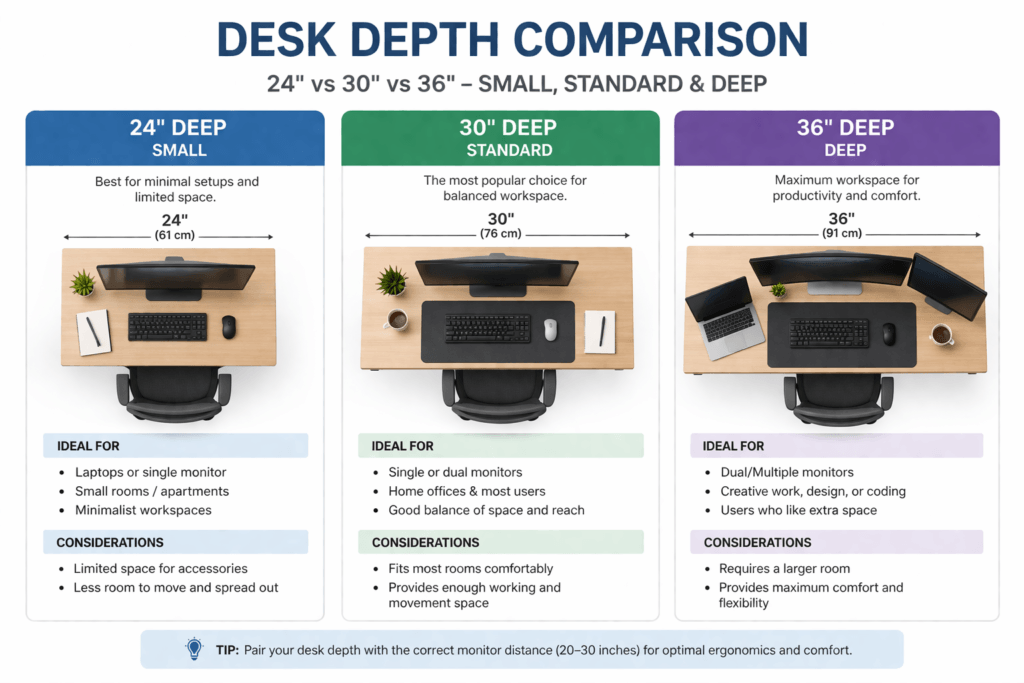
Desk Depth vs Desk Size (Space Planning Guide)
Small Room Layout
- Desk depth: “24”
- Desk width: 40 “48”
- Best for: minimal workspace
Standard Home Office
- Desk depth: 27 “30”
- Desk width: 48 “60”
- Best balance
Productivity Setup
- Desk depth: 30 “36”
- Desk width: 60 “72”
- Best comfort
Product Recommendations (Best Desk Depth Options)
Compact Desk (Small Rooms)
| Minimalist Home Desk | 24″ | Small office | Buy on Amazon |
| Minimalist Home Desk” | 24″ | Laptop setup | Buy on Amazon |
| Wall-Mounted Desk | Compact Workstation” | Tight spaces | Buy on Amazon |
Standard Ergonomic Desks
| Adjustable Standing Desk | 28″ | Home office | Buy on Amazon |
| Modern Office Desk | 2″” | Single monitor | Buy on Amazon |
| Ergonomic Computer Desk | 2″” | Balanced setup | Buy on Amazon |
Deep Productivity Desks
| Executive Work Desk | 36″ | Multi monitors | Buy on Amazon |
| Gaming Desk Pro | 3″” | Gamers | Buy on Amazon |
| L-Shaped Desk | 3″” | Productivity | Buy on Amazon |
How to Measure Your Ideal Desk Depth
Follow these steps:
- Sit comfortably in your chair.
- Extend arms naturally
- Place keyboard position
- Measure to monitor the location.
- Ensure 20–30″ viewing distance.
That measurement is your ideal desk depth.
FAQ
What is the standard desk depth?
The standard desk depth is typically 24 to 30 inches (60–76 cm). This range supports ergonomic monitor distance and a comfortable workspace layout.
Is a 600mm desk depth enough?
Yes, a 600mm (24-inch) desk works for laptops or single monitors, but may feel tight for dual monitor setups.
What desk depth is best for dual monitors?
A desk depth of 28–34 inches (70–86 cm) is ideal for dual monitors to maintain proper viewing distance.
Does desk depth affect posture?
Yes. An incorrect desk depth forces you to lean forward or sit too close, which can strain your neck and back.
Should I choose a deeper desk for productivity?
Yes. A 30-inch deeper desk improves organization, comfort, and multi-monitor efficiency.
Conclusion
Desk depth determines the comfort and productivity of your workspace. The right depth is essential for effective computer work.
If your desk is too shallow, you might notice some small but important ergonomic problems, such as:
- monitors sit too close,
- arm positioning becomes restricted,
- posture flexibility decreases,
- and your body tries to adjust by leaning, tensing, or making small repeated movements.
Over time, these small issues can lead to:
- neck fatigue,
- visual discomfort,
- shoulder tension,
- cramped movement,
- and your workstation feels less comfortable during long work periods.
A deeper desk isn’t always better. Good ergonomics means balancing enough space for your viewing distance and relaxed arms, and maintaining a posture that suits various tasks.
Desk depth is a central factor in ergonomic workstation design.
It’s part of a bigger ergonomic picture that includes:
- monitor placement,
- keyboard positioning,
- viewing behavior,
- arm support,
- and workstation flexibility.
The most comfortable workstations don’t rely on strict measurements. Instead, they allow your body to move and adapt naturally throughout the day.
When desk depth supports:
- visual comfort,
- movement freedom,
- and ergonomic spacing,
When desk depth supports visual comfort, movement, and ergonomic spacing, your workstation becomes easier and more comfortable to use for long periods.