
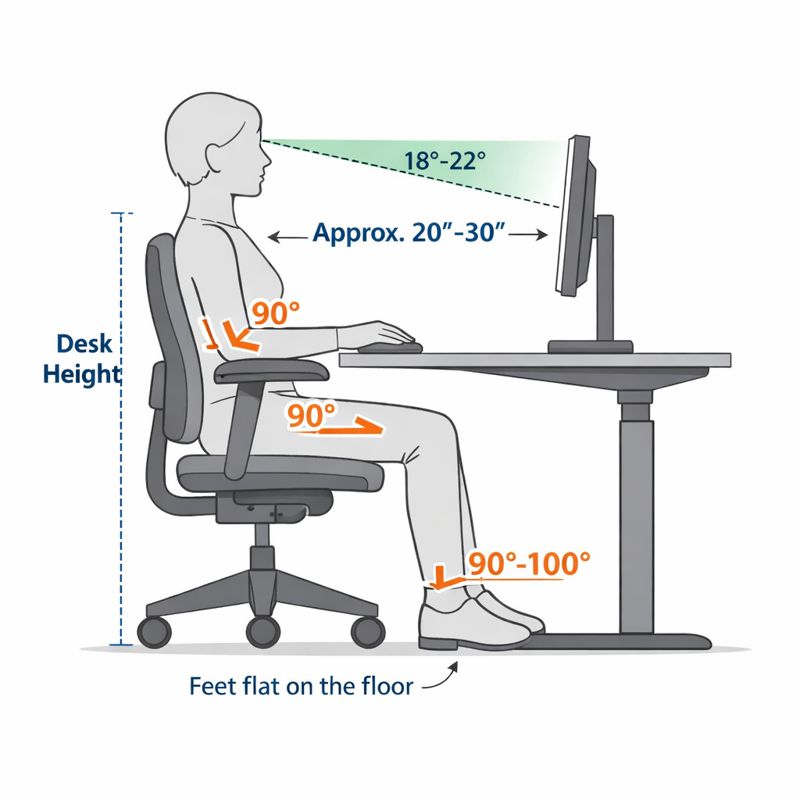
Most standard desks are about 28 to 30 inches high. However, having the right height does not guarantee an ergonomic setup. Many office workers still experience shoulder tension, wrist pain, neck stiffness, and poor posture even with a standard desk.
Desk height affects your entire workstation. It impacts your monitor, chair, keyboard, elbow position, and how you view your screen.
This guide will show how desk height affects ergonomics. It explains why standard sizes can feel uncomfortable. It also covers how to adjust your setup to fit your body and working style. To better understand how desk height affects it, let’s examine its interactions with individual user needs and workstation components.
Table of Contents
How to Test If Your Desk Height Is Actually Correct
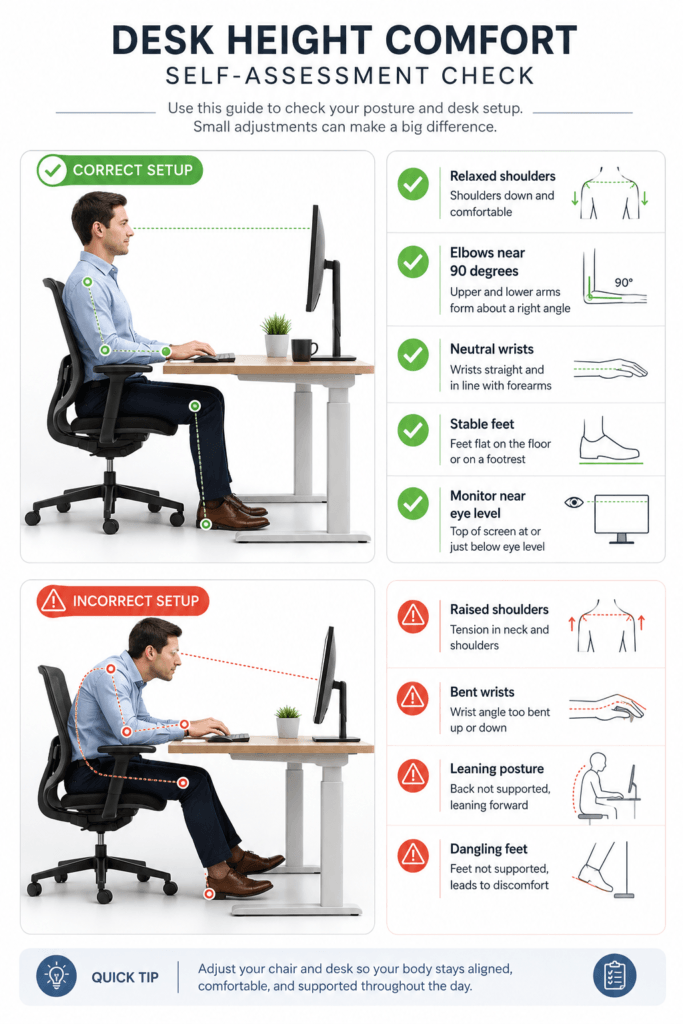
Standard desk measurements are a good place to start, but true comfort comes from how your body actually feels when you use your workspace.
Even if your desk is the standard height, it can still feel uncomfortable if your monitor, chair, keyboard, or arm position is not set up well.
Rather than focusing solely on measurements, pay attention to how your body feels when you type, read, or use the mouse throughout the day.
Your desk height may be correct if:
- shoulders remain relaxed while typing
- elbows rest naturally near 90 degrees
- wrists stay relatively neutral
- forearms feel supported without pressure
- The monitor aligns comfortably without neck strain.
- feet remain stable on the floor
- Posture feels sustainable for longer sessions.
Your desk height may need adjustment if:
- shoulders rise while typing
- wrists bend upward constantly
- You lean toward the monitor.
- neck tension increases throughout the day
- feet lose comfortable floor contact
- elbows flare outward awkwardly
- Upper-back fatigue appears during computer work.
Practical adjustment logic
If your desk feels slightly too high:
- lower keyboard height if possible
- Reduce armrest interference
- raise chair carefully
- Use a footrest if your feet no longer rest flat on the floor.
If the desk feels too low:
- improve monitor positioning
- Reduce forward leaning
- Increase work surface height gradually.
- improve lumbar support
What Is the Standard Desk Height in Inches?
The average desk height is considered the standard desk dimension because it aligns with the intended user’s working height, making work easier. It’s designed to encourage a neutral arm posture — your arms, shoulders, and back are all relaxed while you’re typing, writing, or reading.
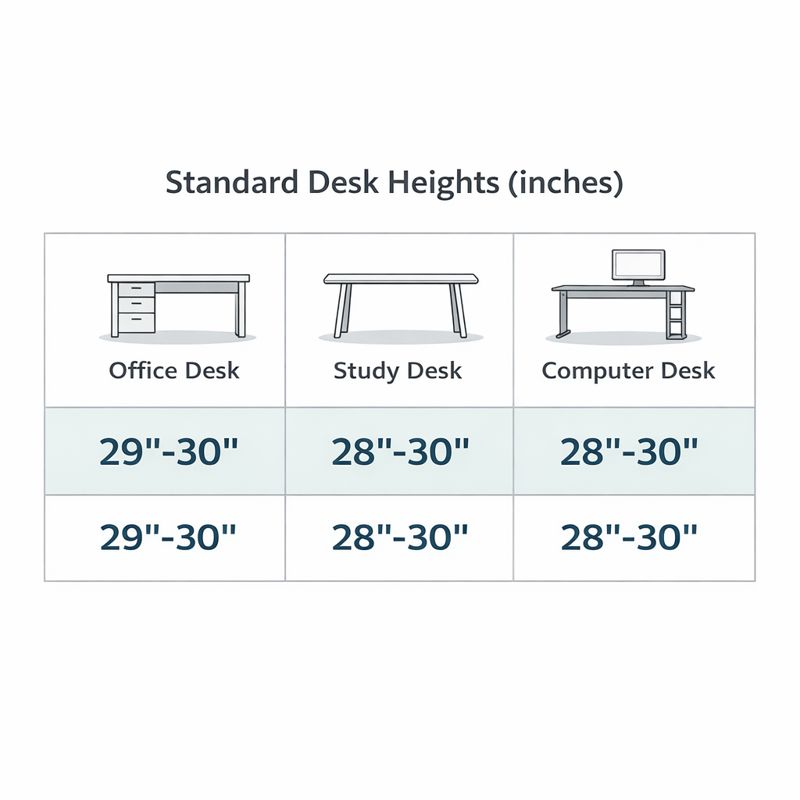
Standard desk height is 29 to 30 inches (74–76 cm) from the floor to the desktop surface.
This height was established as the norm because it fits most people between 5’6″ and 5’10” when used with a properly adjusted chair. In this position, elbows are supported at or near 90 degrees, shoulders are relaxed, and wrists fall more naturally in line with the desk surface.
Furniture makers have used this measurement for years to design desks for offices, schools, and even homes. For many people, that works reasonably well, but let’s be clear: It is a rough estimate, not a one-size-fits-all blueprint.
The feel of the desk depends on body proportions, chair height, and task type. That’s why some people are uncomfortable even in a so-called “standard” desk. The desk’s height might actually be okay, but the overall setup is probably not well matched.
Section for Desk Height by Body Height
| User Height | Recommended Desk Height |
|---|---|
| Under 5’2″ | 27–28 in (68–71 cm) |
| 5’3″–5’8″ | 28–30 in (71–76 cm) |
| 5’9″–6’2″ | 29–31 in (74–79 cm) |
| 6’3″+ | 30–32 in (76–81 cm) |
Optimal desk height: 29–30 inches (74–76 cm)
Best for: Average-height adults with a standard office chair
Objective: Elbows at the or near desk level, relaxed shoulders, flat on the floor
Knowing this baseline can help you determine whether a standard desk is sufficient or if modifications and workarounds are needed to improve the ergonomics of your setup.
What Is the Average and Typical Desk Height?
The average height of a desk is the same as the standard desk height, so if you address that, you should be good. This measurement is the most common because it fits the body sizes of many adults and serves well for general office needs.
The typical desk height you’ll see can vary slightly depending on where the desk is used:
- Home desks: Between 29 and 30 inches, these are what you see most often for everyday use
- Office desks: Typically 29 inches, for computer work in the long run
- Desks in schools: A bit lower, especially for children and teenagers
- Dining tables as desks: Typically 29–30 inches tall, but not meant for ergonomic use
Although these values are termed “average”, they are not optimal for all. People are different heights, have differing arm lengths, and sit in different ways. But a desk that’s fine for one person may induce shoulder pain or back discomfort in another.
This is also why the height of your average desk might not support an ergonomic position. When your chair is too low, the desk can feel too high. If you’re unusually short or tall, the standard setup can lead to bad posture over time.
Knowing the average desk height can be a useful starting point, but real comfort comes from adjusting your chair, desk, and posture to accommodate your body, not just the average.
Does One Desk Height Work for Everyone?
Not one desk height is perfect for everybody. “Standard desk size is designed to fit the “average” user, and no one person is completely average. Height, leg length, arm length, and the ratio of your torso to legs all contribute to how comfortable a desk feels during daily use.
When a desk doesn’t fit the body, it can lead to poor posture. If your desk is too high, you may find yourself raising your shoulders and wrists. In some cases, a desk that’s too low can even lead to slouching and rounded shoulders. Sometimes these little annoyances can cause chronic pain.
Ergonomic desk height. A good ergonomic desk supports a neutral body posture, including keeping your elbows close to your body at desk level and keeping your shoulders relaxed. This is why desk height should be determined by who will be using the desk, not only by generalization standards.
How to Measure Desk Height Correctly
- Sit in a comfortable chair with feet flat on the floor.
- Measure from your elbow (while keeping your forearm parallel to the floor) to the top of the desk surface.
- If it’s not adjustable, consider alternatives such as a footrest or chair height adjustment.
Desk Height vs User Height
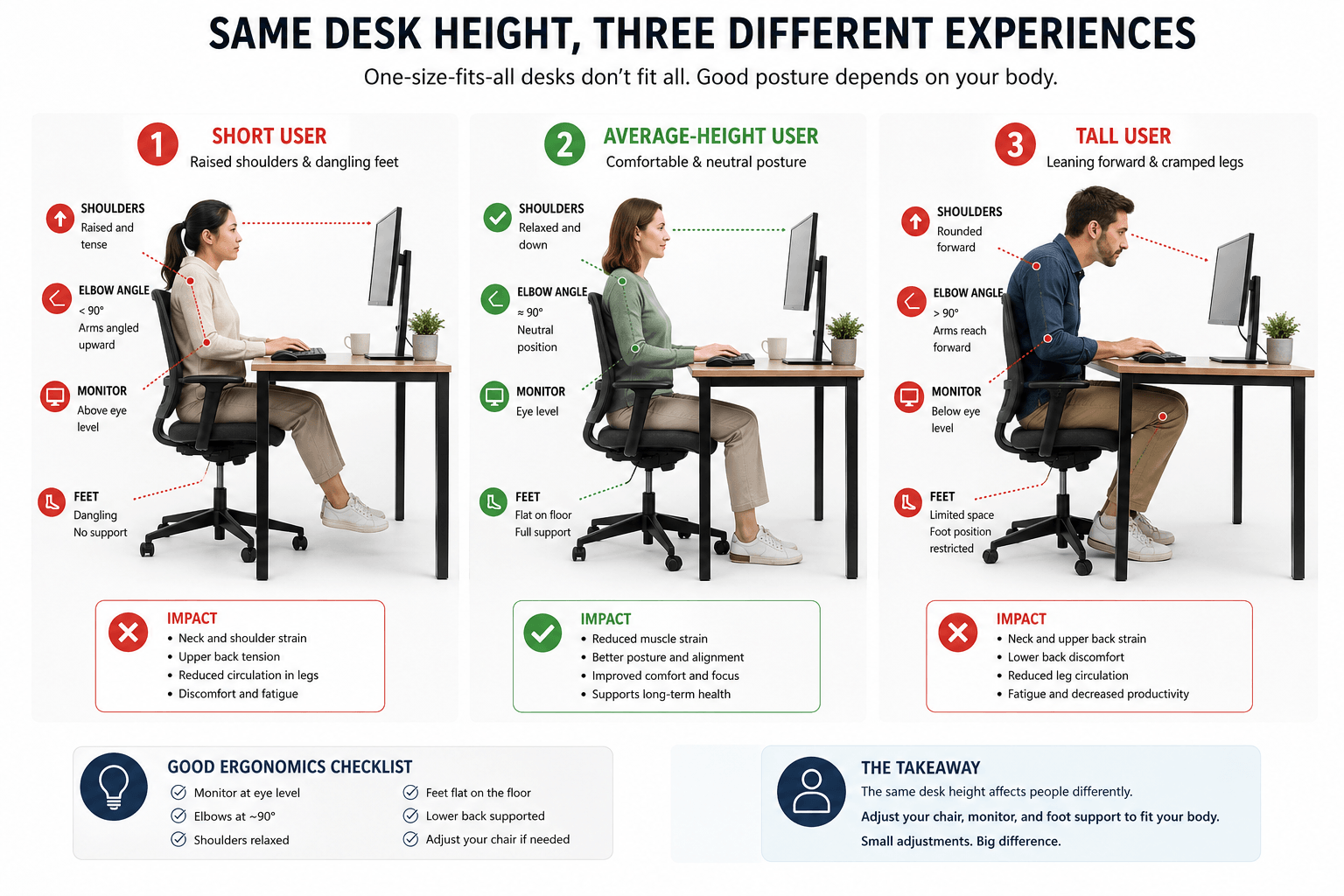
A standard desk height might work for some people, but it does not suit everyone. Your height, torso length, rm length, and even keyboard thickness all affect how comfortable your desk feels during long hours.
Two people using the same desk can have very different ergonomic issues, depending on how they set up their workstations.
For Shorter Users
Shorter people often raise their chairs too much to reach a high desk. This may temporarily help their elbows, but it can cause other problems with their setup.
Common symptoms:
- dangling feet
- shoulder elevation
- wrist extension while typing
- pressure behind the knees
- The monitor is sitting too high relative to eye level.
Recommended adjustments:
- Use a footrest.
- lower keyboard position if possible
- Adjust the monitor height independently.
- Keep your elbows close to 90 degrees while typing.
For Taller Users
Taller people may feel cramped at standard desk heights. Their knees, elbows, and monitors need more space.
Common symptoms:
- leaning forward toward the screen
- knees hitting the desk underside
- rounded shoulders
- The monitor is positioned too low.
- excessive wrist bending
Recommended adjustments:
avoid hunching downward toward the keyboard
Use desk risers or adjustable desks.
Increase the monitor height separately.
Maintain neutral wrist posture.
Elbow Height Matters More Than Desk Height
Desk ergonomics are not just about furniture size. Good typing posture depends more on elbow position than desk height.
If your elbows rise while typing, your desk is probably too high. If your wrists drop or your shoulders round forward, your desk may be too low.
This is why the same desk height can feel comfortable for one user and uncomfortable for another.
Desk Height and Monitor Alignment
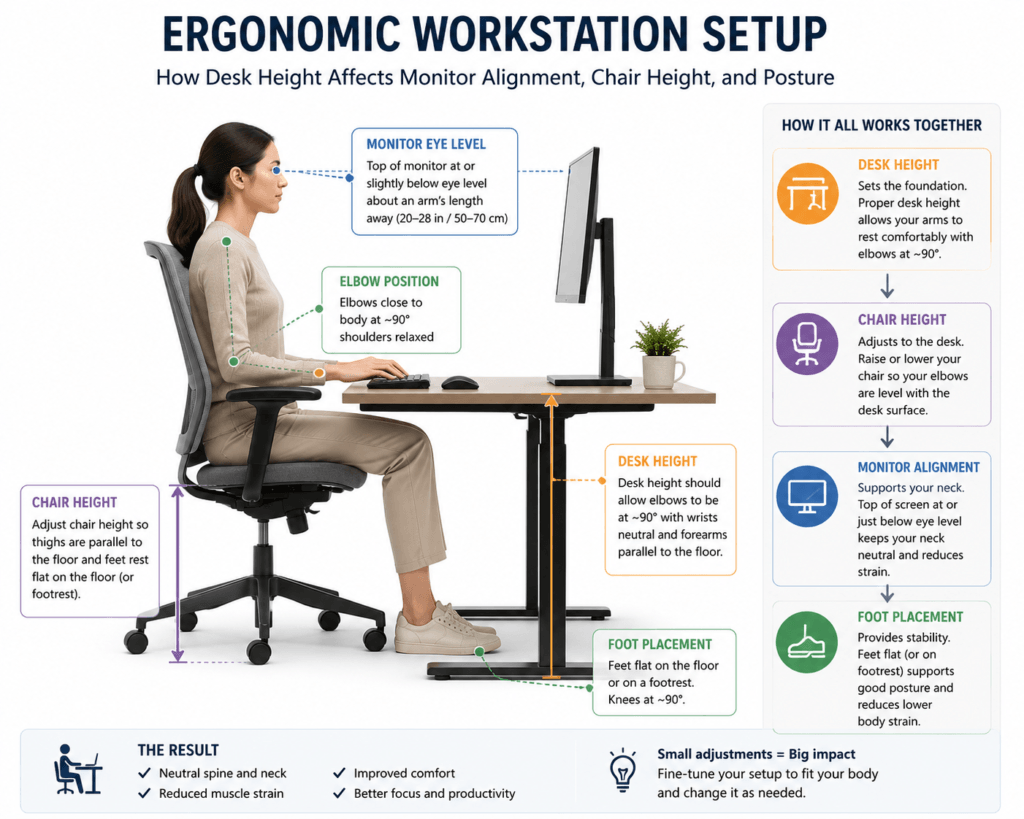
Desk height affects your monitor setup. Changing your chair height also changes your eye level.
Many people raise their chairs to match the height of a high desk. This often causes the monitor to end up too low for their eyes.
This causes you to look down for extended periods, leading to neck fatigue and forward head posture.
Add Relationship Logic
Your workstation should work as a connected system.
When desk height changes:
- chair height changes
- elbow alignment changes
- monitor height changes
- neck posture changes
- keyboard angle changes
Incorrect desk height often becomes worse when monitor positioning is also misaligned.
That’s why making only one ergonomic change often does not solve the problem.
How Incorrect Desk Height Causes Shoulder Pain
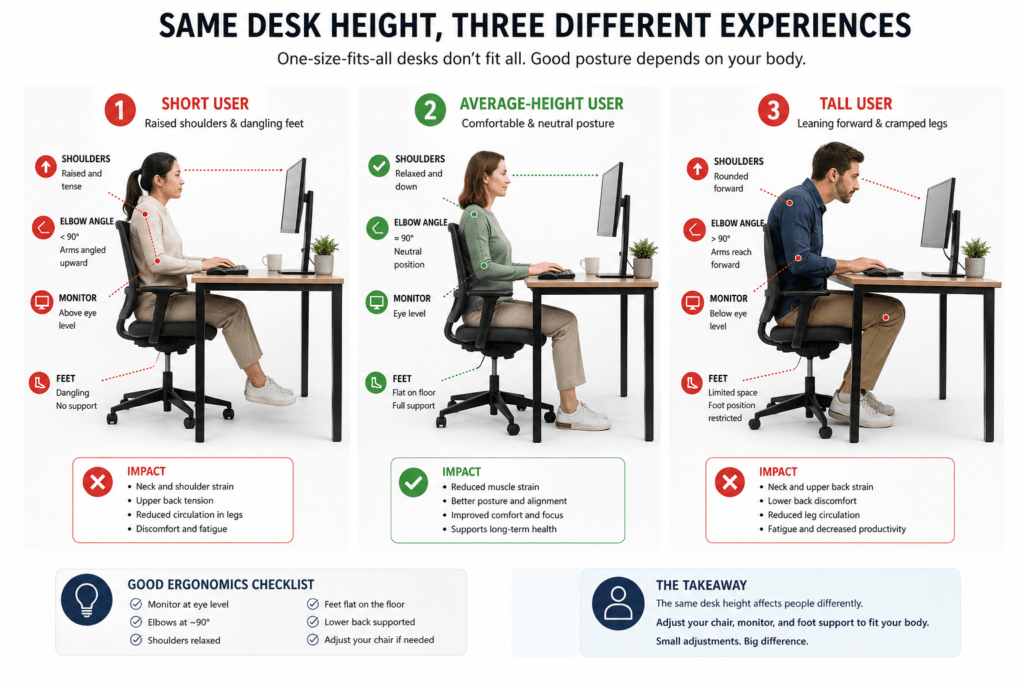
Shoulder pain is one of the most common signs of a poor desk setup.
In many setups, the problem is not just the chair or keyboard. It’s how desk height, arm position, and typing posture all work together.
Desk Too High
When a desk is too high, people often raise their shoulders unconsciously while typing.
Common symptoms:
- upper trap tightness
- shoulder fatigue
- tension near the neck
- wrist extension
- mouse-arm discomfort
Why does it happen:
The shoulders remain raised for long periods rather than relaxing.
Recommended adjustments:
- Lower the desk if possible.
- Raise the chair carefully.
- Add foot support if feet no longer rest flat.
- Reduce keyboard height
- Keep elbows close to the torso.
Desk Too Low
Low desks often cause people to hunch forward while typing.ms:
- rounded shoulders
- leaning posture
- neck stiffness
- lower back fatigue
- pressure on forearms
Why does it happen:
People compensate by bending their upper body toward the desk.
Recommended adjustments:
- Increase desk height
- improve monitor height alignment
- reduce forward reach distance
- Support a lower back posture properly.
Desk Height for Typing Ergonomics
Typing comfort depends heavily on desk height, as the position of your keyboard affects your wrists, elbows, and shoulders.
A desk that looks normal can still cause poor typing posture. This occurs if the keyboard is too high relative to your elbows.
Your desk may be too high when:
- Your shoulders rise while typing.
- wrists bend upward
- elbows flare outward
- forearms feel unsupported
Your desk may be too low when:
- wrists collapse downward
- You lean forward heavily.
- neck posture worsens while typing
- elbows drop below comfortable alignment
Goal
The goal is to keep:
- shoulders relaxed
- wrists neutral
- elbows near 90 degrees
- forearms supported without excessive pressure
Keyboard thickness, wrist rests, and desk edge height all affect your posture.
How to Adjust Your Desk Height Throughout the Workday
A desk that feels comfortable at first can quickly become uncomfortable as your workday progresses.
As you get tired, you might lean forward, shift your shoulders, move your wrists, or sit closer to the screen without realizing it.
You should adjust your ergonomic setup throughout the day instead of setting it once and leaving it.
Look out for these signs that your setup might need a few tweaks as the day goes on:
- shoulders gradually rise while typing
- leaning toward the screen increases
- wrists feel more tense later in the day
- neck posture worsens after long sessions
- The monitor distance feels less comfortable over time
Here are some easy changes you can try to stay comfortable:
- alternate between sitting and standing
- slightly recline periodically
- Reposition the monitor distance during long sessions.
- relax shoulder tension intentionally
- Take short movement breaks.
- avoid staying frozen in one posture for hours
One important ergonomic tip to remember
It’s hard to keep a perfect posture all day long.
It’s usually better to move and change your posture from time to time rather than stay in one position all day.
Let your desk setup change throughout the day.
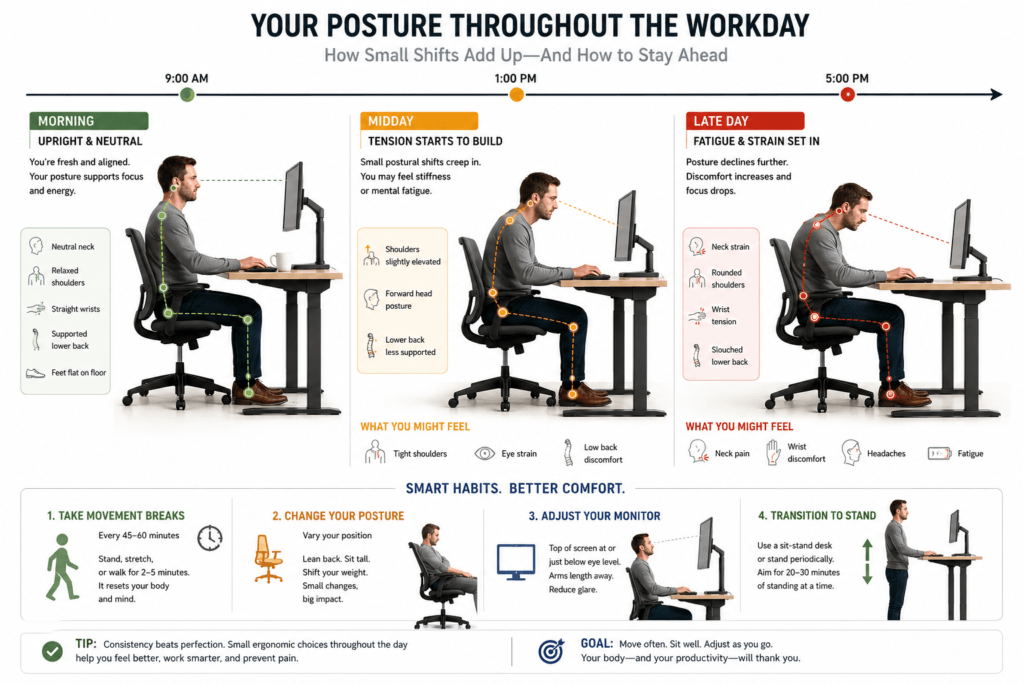
Workstation ergonomics can change. What feels comfortable in the morning might not feel the same after hours of typing, meetings, or screen time.
It’s normal for your posture to change a bit during your day.
For example:
- slight reclining changes elbow positioning
- Fatigue may increase forward-head posture.
- Monitor distance may feel different after prolonged focus.
- Standing and sitting transitions alter shoulder and wrist alignment
Rather than forcing yourself to stay in one position all day, try to maintain good alignment while letting yourself move and adjust naturally.
Here’s another helpful tip to remember
Even if your posture is correct, sitting or standing in one position for too long can make you feel tired. It still helps to:
- movement,
- posture variation,
- and periodic reset adjustments.
If your setup feels uncomfortable, don’t change everything at once. You might find it hard to know what actually helps.
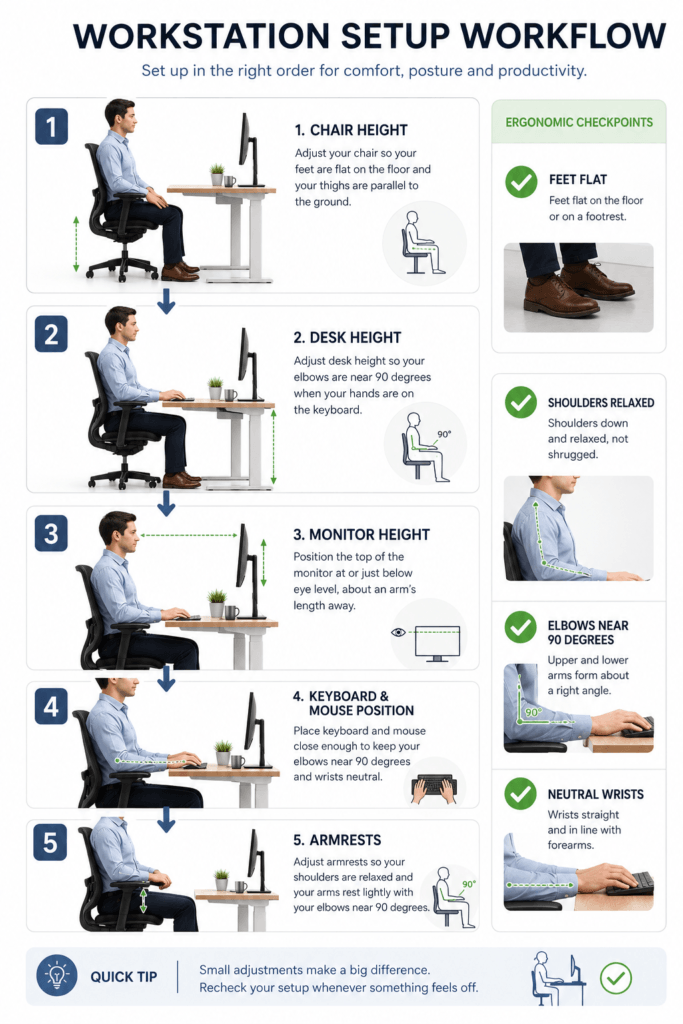
It’s better to adjust one main thing at a time and see how your posture and comfort improve. Try making changes in this order for clarity:
1. Check your chair height.
Start by making sure your feet are flat on the floor, and your shoulders feel relaxed.
2. Desk height
Check that your elbows are comfortable as you type and your shoulders stay relaxed.
3. Monitor height
Adjust your monitor so you don’t have to strain your neck or look down much.
4. Keyboard and mouse position
Make sure your wrists are straight, and your forearms are supported.
5. Armrests
Armrests should gently support your arms without forcing your shoulders to lift.
One key idea to remember
Ergonomic changes work best when each part of your workstation supports the others, rather than working against them.
Standard Desk Height vs Ergonomic Desk Height
By standard desk height, we mean a firm number—say, 29 to 30 inches—that’s built for the average adult. It’s relatively simple to produce, and so accessible and adequate that it serves most purposes. But it does not include individual differences in body size or work behavior.
Ergonomic desk height, however, is about the user. Instead of being locked on just one number, it moves with you to accommodate your natural posture. When working, your elbows should be close to desk level, your shoulders relaxed, and your wrists neutral.
The difference is in the flexibility. The average desk height requires your staff to adjust themselves to the desk. Invest in an ergonomic desk height that is adaptable to your preferences. That tiny change in thought can make an enormous difference to one’s comfort and long-term health.
Why it matters: Adjustability is important because a little misalignment can lead to problems over time. A desk that is only an inch too high can cause shoulder tension. A low desk can also lead to slouching and back pain. These problems tend to develop gradually, with no outward hint of pain.
By tending to ergonomic desk height, you’ll establish a workstation that accommodates, not impedes, your body. This relieves fatigue and supports better posture, allowing you to persevere in long periods at a desk without breaks, such as work, study, or daily computer use.
Desk Height and Chair Height Relationship
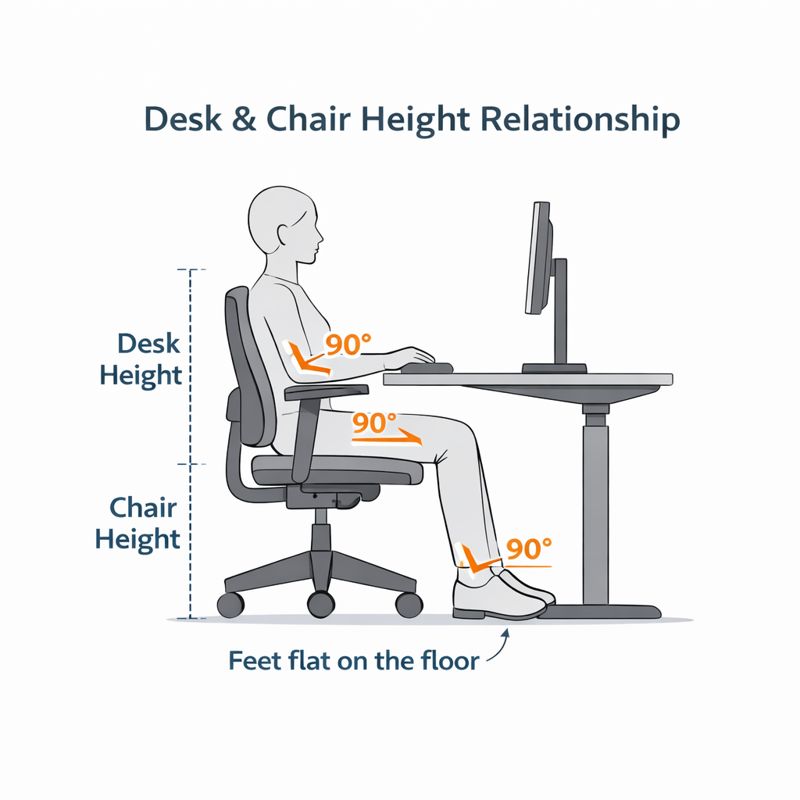
Desk height and chair height are BFFs. The best desk will be uncomfortable if the chair height is off. Good alignment here will help you keep your body less tense and better supported throughout long days of sitting.
When the chair height is adjusted to its proper position, your elbows straighten at a point close to desk level. This way, your forearms can relax without raising your shoulders or bending your wrists. At the same time, your knees should form a soft angle, with your feet flat on the floor and your hips slightly raised. This position helps maintain a neutral spine and reduces lower-back strain.
When the chair is too low for the desk, people end up hunching their shoulders or extending their wrists and fingers to reach the work surface. Feet may dangle from a chair if the seat is too high, which can promote hip tension and reduced blood flow. In neither case is the result as tight as needed.
What Happens When Desk and Chair Heights Don’t Match?
Posture & Comfort Impact
Wrong Desk Height Symptoms: neck strain, shoulder tension, wrist pain.
- Too-high desk: causes shoulder elevation and tension.
- Too low a desk: causes wrist strain and poor hand position.
- Shoulder strain: When your arms are raised to get to the desk
- Discomfort in the wrist due to an incorrect desk height and wrist flexing.
- Bad Support: Causes you to hunch, lean forward, or round your back.
Repairing this desk–chair relationship is one of the easiest ways to improve our desk ergonomics. It’s often the small height adjustments that can make a world of difference in comfort, posture, and long-term health.
Why Chair Height Alone Cannot Fix a Bad Desk Height
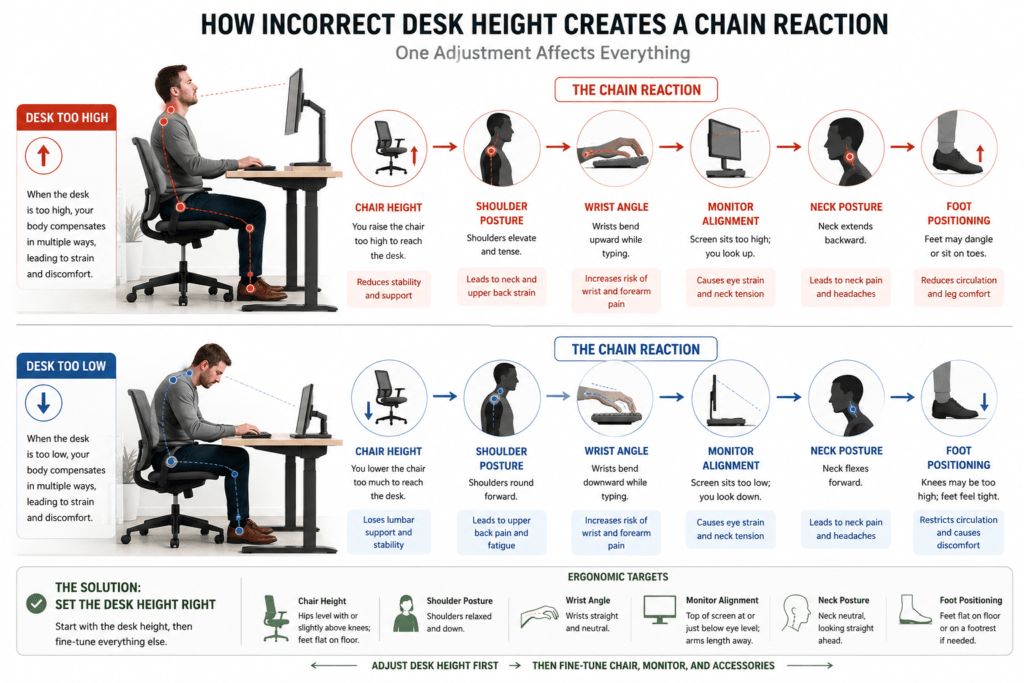
Many users try to compensate for an uncomfortable desk height by adjusting only their chair. While this may temporarily improve elbow positioning, it often creates new ergonomic problems elsewhere in the workstation.
For example:
- Raising the chair may improve typing posture, but leave the feet unsupported.
- Lowering the chair may improve foot contact, but worsen shoulder posture.
- Changing chair height can also alter the monitor’s eye-level alignment.
Since workstation adjustments are connected, fixing one issue without considering others can shift strain elsewhere.
Common compensation problems
| Compensation | New Problem Created |
|---|---|
| Raising chair | dangling feet and monitor misalignment |
| Lowering chair | shoulder elevation while typing |
| Leaning forward | neck and upper-back fatigue |
| Moving monitor closer | increased eye and neck strain |
Better ergonomic approach
Instead of adjusting only one variable, evaluate:
- desk height
- monitor height
- keyboard position
- chair height
- foot support
- viewing distance
Think of your entire workstation as a single connected system.
How to Measure Desk Height Correctly
Measuring the desk’s height is easy, but very minor mistakes can lead to inaccurate measurements. Knowing your desk’s height lets you position your chair correctly and improve your posture.
First, measure the distance from your floor to the top of your desk. Lay the end of a tape measure on the floor and stretch it straight up to your working surface (the spot where you use your keyboard or where you have space to write). Make certain the tape is vertical, not canted, and compensate for circular construction so your readings are accurate.
Suppose you can, be sure to measure on a hard, flat surface. Carpets or other slightly uneven surfaces can alter the height, which is important for ergonomic precision. If your desk has adjustable feet, measure once the table is completely in place.
Common Measuring Mistakes to Avoid
- Directing tape to underneath the desk as opposed to up top
- Using the desk on an uneven or soft surface.
- Tilting the tape measure instead of having it straight
Tools You’ll Need
- Measuring tape (inch , preferably)
- A flat floor surface
- Another person (optional) to keep the tape in place
Taking the time to measure your desk properly will provide you with a solid foundation for setting up a more comfortable, ergonomic office.
Standard Desk Height for Different Desk Types
Desks are not all made the same. Some tables have a height range of 22–46 inches (56–117 cm). Some modern tables are adjustable, allowing the user to transform them from a computer table to a standing computer desk. Knowing these differences ensures an ideal, comfortable, and ergonomic aspect ratio for any job!
Writing Desks: Used for writing, typing, and other manual work, writing desks generally measure 29–30 inches, aside from minor variations. They’re designed for resting your hands and arms on, not for typing on a computer.
Computer Desk: Computer desks usually have a keyboard tray and space for a monitor. Although the typical main desktop height is still 29-30 inches, keyboard platforms are often lowered by a few inches to promote a neutral wrist posture and reduce strain during extended typing.
Study Desks: For children or students, study desks can be a bit lower, typically 28-29 inches tall. These desks can be combined with adjustable chairs to help maintain good posture and elbow alignment.
Office Desks: Most standard office desks are 29–30 high, but some are taller or adjustable. This allows for longer work hours without discomfort, promotes a neutral posture, and alleviates stress on the back, shoulders, and wrists.
These measurements are only a starting point and are best paired with an appropriately adjusted chair. Even a slight discrepancy between the heights of your desk and chair can lead to poor posture, discomfort, or reduced productivity. All you need to do is consider the desk type and user requirements, and almost any workspace can be optimized for better ergonomics.
Standing Desk Height Recommendations
Standing desks give you more flexibility. Good standing ergonomics still depend on your workstation setup. A desk that is too high may elevate the shoulders. One that is too low can increase neck and upper-back strain.
Practical Guidance
While standing:
- Elbows should remain near 90 degrees.
- Shoulders should stay relaxed,
- wrists should remain neutral
- The monitor height should align naturally with eye level.
Add Advanced Nuance
Standing changes how you need to set up your monitor.
Many people stand too close to their screens. Others tilt their necks down while working. Bigger monitors may need to be set a bit lower and farther away to reduce eye and neck strain.
Add Tradeoff Section
Standing for long periods can help with sitting fatigue. However, standing too much without moving can cause lower back and foot pain.
It’s better to move and change positions than to stay in one spot all day. Common mistakes with desk height include:
Even costly ergonomic setups can feel uncomfortable if you do not adjust everything so that it all works together. Raising the Chair Too High. Many users raise their chair to match a tall desk, but this often creates:
- dangling feet
- leg pressure
- monitor misalignment
- lower-back instability
Ignoring Keyboard Thickness
Mechanical keyboards and thick wrist rests can raise your hands significantly, altering your wrist and elbow position.
Using Monitor Risers Without Adjusting Chair Height
If you only raise your monitor without adjusting your chair or desk, you might strain your neck by looking up too much.
Sitting Too Far From the Desk
Large reach distances increase shoulder tension and encourage forward-head posture.
Keeping Elbows Too Wide While Typing
Keeping your elbows too far apart while typing can tire your shoulders and cause upper back tension during long sessions.
Adjustable Desks vs Fixed Height Desks
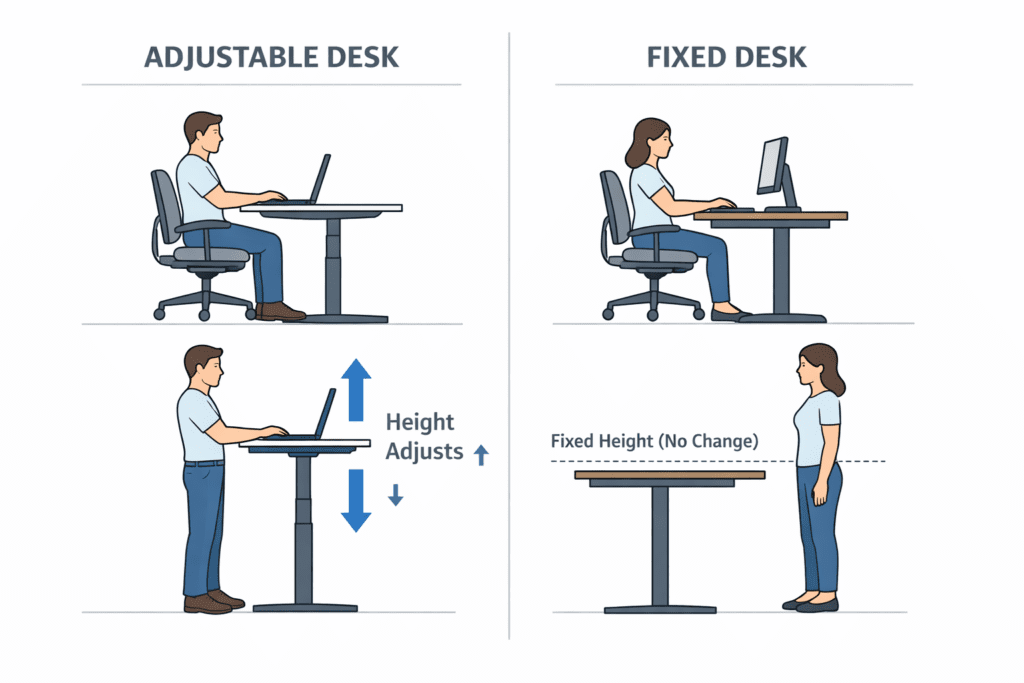
There are two main types of desks: adjustable and fixed height. Know the differences to select a configuration that promotes comfort and good posture.
Some desks are height-adjustable: the work surface can be easily raised or lowered to heights ranging from 2 or 3 feet to 5 feet or more. This leniency for adjustments helps users of all statures achieve a neutral position and maintain proper elbow-to-wrist alignment when going from sitting to standing. It lessens fatigue, increases shoulder tension, and there is seldom back strain. Adjustable desks can be particularly helpful for people who have shared workspaces or who move back and forth between tasks throughout the day.
Even with the correct desk height, poor monitor placement can still create neck and shoulder strain. Maintaining proper ideal monitor height helps keep the head and neck in a more neutral position throughout the day.
Fixed-height desks have a fixed desktop height of 29-30 inches. They’re a good option for the average-height user who works in one spot and doesn’t require frequent adjustments. When coupled with a properly adjusted chair, fixed desks can provide more than adequate ergonomic support for most operations.
Key Takeaways
Sit-to-stand desks offer flexibility for multiple users and a variety of sitting and standing options.
Fixed desks are suitable for permanent single users.
They both need proper chair alignment to maintain a neutral posture and avoid straining the system.
The decision between an adjustable and a fixed-height desk depends on how often you need to move your work location up and down (i.e., frequency), whether you’re taller or shorter, and how often you’d like to shift your work. The better question is about posture correction, which MAY come from the desk rather than the keyboard type.
Common Mistakes to Avoid in Desk Height Setup
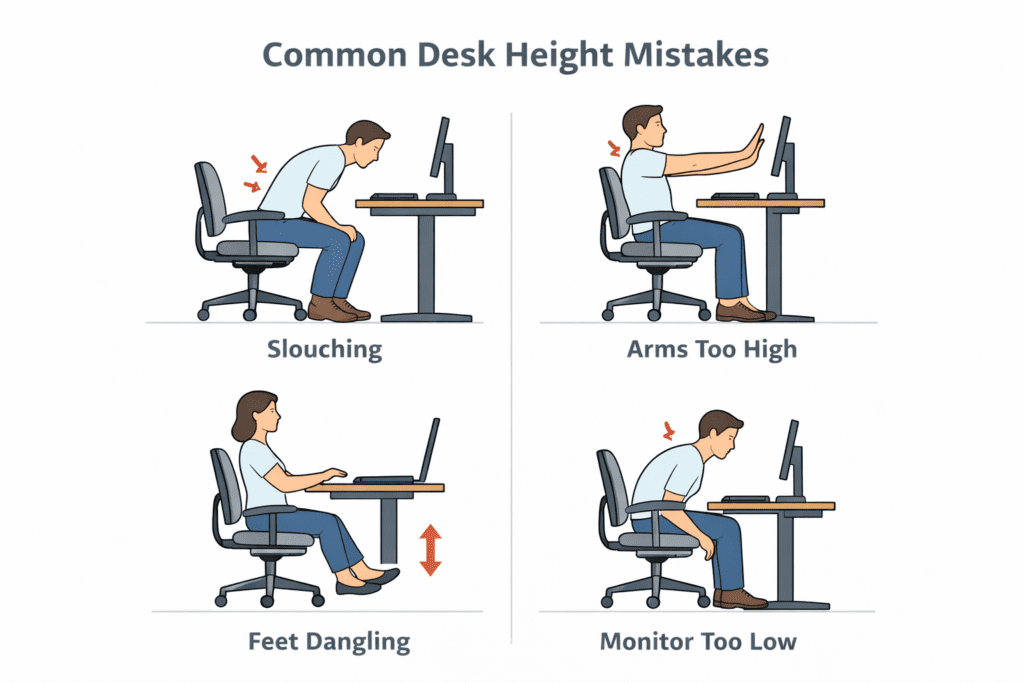
Even a few centimeters of miscalculation in desk height can lead to discomfort, poor posture, and long-term strain. Plenty of body postures you need to avoid for a relatively more ergonomic workspace.
Desk too high or too low: If it doesn’t fit your height, your shoulders, elbows, and wrists will be in awkward positions. Too high creates rising shoulders and bent wrists; too low results in slouching and rounded shoulders.
Not paying attention to chair height: Desk ergonomics is not only about the desk. Absolutely correct: the desk can be the right size for working, but if the chair is too high or too low, it’s uncomfortable. Always consider the desk–chair relationship.
Most people buy a desk based on its looks or color without considering ergonomics. A handsome desk that is the wrong height or doesn’t work with your particular style can result in discomfort, strain, Dry Eyes, headaches, & Fatigue.
By ensuring none of these errors are present and paying close attention to alignment, you can set up a workspace that promotes good posture, minimizes strain, and boosts well-being and productivity every day.
FAQs About Standard Desk Height
1: How tall is a standard desk in inches?
Americans, for instance, are, on average, 29-30 tall from floor to desktop. This height is suitable for most people for writing, typing, and so on.
2: Is 30 too high for a desk?
At 30 inches, it might feel a bit tall for shorter users. If you find your shoulders hiking up or your wrists curling under as you type, adjust your chair height or use a footrest to support an orthopedically neutral posture.
3: Best Sitting Desk Height. What Is The Best Height For A Desk?
The right desk height lets your elbows sit comfortably at 90°–100 ° relative to your desk, your shoulders relax, and your wrists stay straight. Chairs or desks with some adjustable components help hone this alignment.
4: Does desk height affect posture?
Yes. A desk that is too high or too low can result in slouching, leaning forward to type, and shoulder tension, which not only leads to bad posture but, over time, can cause discomfort in the back, neck, and wrists.
5: Should your desk height equal chair height?
Good desk and chair ergonomics dictate that your desk should be at the same height as a seated armchair. Adjust your chair so that your feet are flat on the floor, your knees are slightly bent (if possible), and your elbows rest comfortably on the desk while you work in a neutral posture.
Final Thoughts on Standard Desk Height
The perfect desk – The difference between sitting at a correctly set up table and standing easily and comfortably, with proper posture in mind. The most common desk height, 29–30 inches, works for many people, but your leg length and your chair’s adjustability matter a lot.
Adhering to desk–chair positioning, elbow-to-wrist angles, and overall posture also helps reduce strain on the back, shoulders, and wrists. Being familiar with these basics helps you create a workspace conducive to long hours of working or studying.
A smart arrangement — adjusting the desk to fit your body and work habits — can make you more comfortable and efficient, and stave off long-term musculoskeletal damage.