

Table of Contents
What Are Dry Eyes, headaches, & Fatigue?
People who spend long hours on screens often suffer from dry eyes, headaches, and fatigue. Dry eyes occur when your eyes do not have enough moisture, which can make them feel itchy, burning, or tired. The headaches are usually pressure-like around the eyes or forehead. Fatigue is a feeling of weariness that doesn’t go away when you rest.
They frequently occur together because they arise from the same kinds of habits, like staring at screens for long periods without a break. Short-term screen time can result in minor discomfort that will disappear after rest. But long hours in front of computers, mobiles, or on laptops every day can transform these irregularities into a frequent problem. Unchecked, they slowly erode our ability to focus, be comfortable, and just feel good. Knowing them is useful so you can get the root cause instead of only addressing the symptoms.
Why Screen Time Triggers These Symptoms
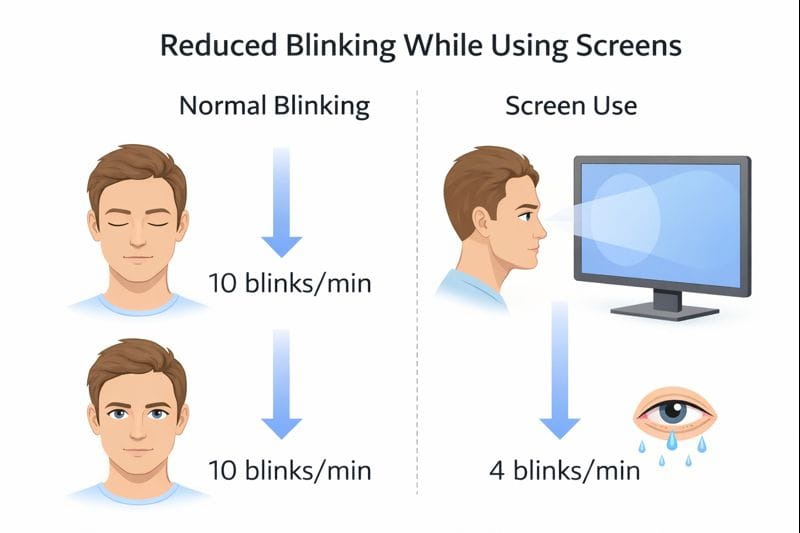
Your body is affected in several intertwining ways by screen time. A major reason is diminished blinking. Your eye blinks less than usual when you gaze at a screen. Blinking spreads tears over the surface of your eyes, keeping them moist. If you blink less, your eyes will become drier; you will feel irritation and burning.
Another cause is prolonged focus. Your eye muscles have to work harder when you stare at text, images, or videos for long periods. As with any muscle, exercise can tire the muscles of the eye. This strain can cause headaches and fatigue in your eyes, which become heavy and sore.
Blue light is also a factor. Screentime emits blue light that has been shown to increase eye strain and disrupt natural sleep. You sleep poorly, so you’re more tired the next day, and it becomes a cycle of fatigue.
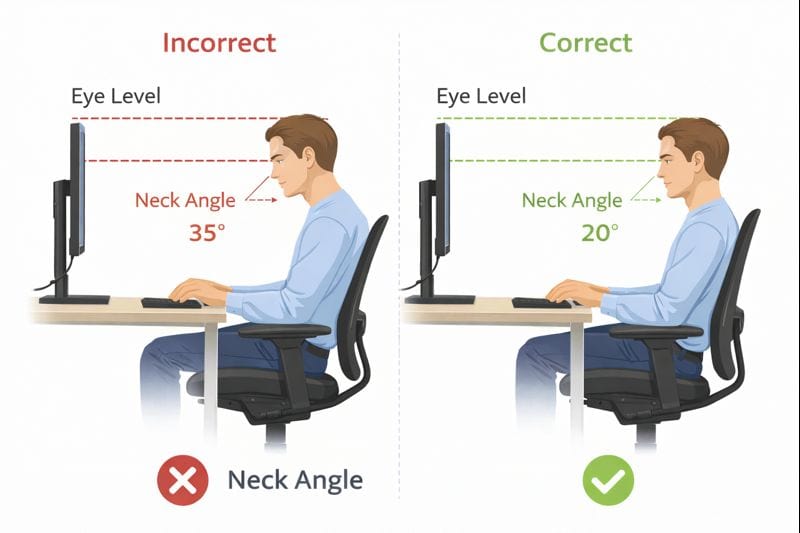
Lastly, everything is joined up by bad workstation ergonomics. If your screen is too high, too low, or too close, your eyes and neck do work that doesn’t need to work that hard. This results in eye strain, neck tension and overall fatigue. Positioning your screen at the right height and distance—like ideal computer monitor height practices, for example—can help reduce a lot of these problems and make life a little more comfortable.
How Poor Desk & Monitor Ergonomics Make It Worse
Bad desk and monitor ergonomics can quietly convert mild screen discomfort into chronic “dry eye,” headaches, and fatigue. One of the common issues is the wrong monitor height. You tilt your head up when your screen is too high, and you bend it down when the screen is too low. Both positions put a strain on the neck and eye muscles, which increases the potential for headaches.
Another “lost in the weeds” issue is dual-monitor misalignment. If you have your two monitors at different heights or too widely spaced, then your neck is rotating all day long. With time, it is the repetitive motion that further tightens your neck and puts strain on your eyes. This is exactly why a well-designed dual-monitor setup desk is an absolute must for extended and various forms of screen use.
Improper viewing distance also matters. A screen too close makes your eyes focus harder, and a screen too far forces you to squint. Both are going to dry the eyes out more quickly and lead to fatigue. In addition, when desks are too high or too — in relation to the user, they force the body into uncomfortable positions. Here’s how following a rule of thumb like Standard Desk Height in Inches can help keep your screen, arms, and eyes at a natural position.
Finally, the forward head posture — that is to say, leaning toward the screen — creates an excessive burden on neck and shoulders. This position inhibits blood flow, activates muscle tension, and will have you in excruciating eye/head pain by the end of the day.
Common Screen-Related Causes Most People Ignore
The real culprits. Many people simply hold screens responsible, and they kind of are, but neglect to pay attention to some small things that can make a huge difference. Screen glare, caused by windows or lights, causes your eyes to have to work harder, even if you don’t perceive it immediately. Over time, they cause eye burning and headaches.
Yet one other neglected cause is small font sizes. When text is too small, you squint or lean in, often without even realizing it. These efforts play havoc with your eyes and neck. With only the size of the text increased, fatigue is relieved rather rapidly.
The dry air indoors, especially fresh from air conditioners or heaters, also plays a part. Dry air also causes tears to dry out faster, exacerbating dry eyes during long stretches of desk work.
Finally, the chronic tendency of your brain to maintain attention without a break is a significant contributor. Eye muscles become fatigued when they have to stare at a screen for long periods without resting. Letting your eyes take a short break by looking at something can make your eyes feel less strained. These are easy causes to overlook, but powerful when combined. Let’s check out our guide on blue light glasses for screen problems.

Signs Your Screen Setup Is Causing These Symptoms
Your body often sends clear signs when your screen arrangement is the issue. One of the signs is that your eyes are burning or dry by evening, even though they feel O.K. in the morning. This is typically a sign of screen strain accumulating as the day goes on.
Headaches following desk work — particularly around the forehead or behind the eyes — are another red flag. These headaches tend to arise after long stints in front of a screen and abate when you take a break.
Having no urge to exercise is also an indication. If your eyes are strained and your back is sore after sitting at the computer (or a TV, or anything with a screen), they may be doing more work than necessary.
A good sign is when symptoms get better on screens. If your eyes seem fine on weekends or vacation days, then it’s probably the setup of your desk and monitor. Identifying these symptoms early on can help you correct setup issues before discomfort becomes a daily habit.
How to Reduce Dry Eyes, Headache & Fatigue at Your Desk (Actionable)
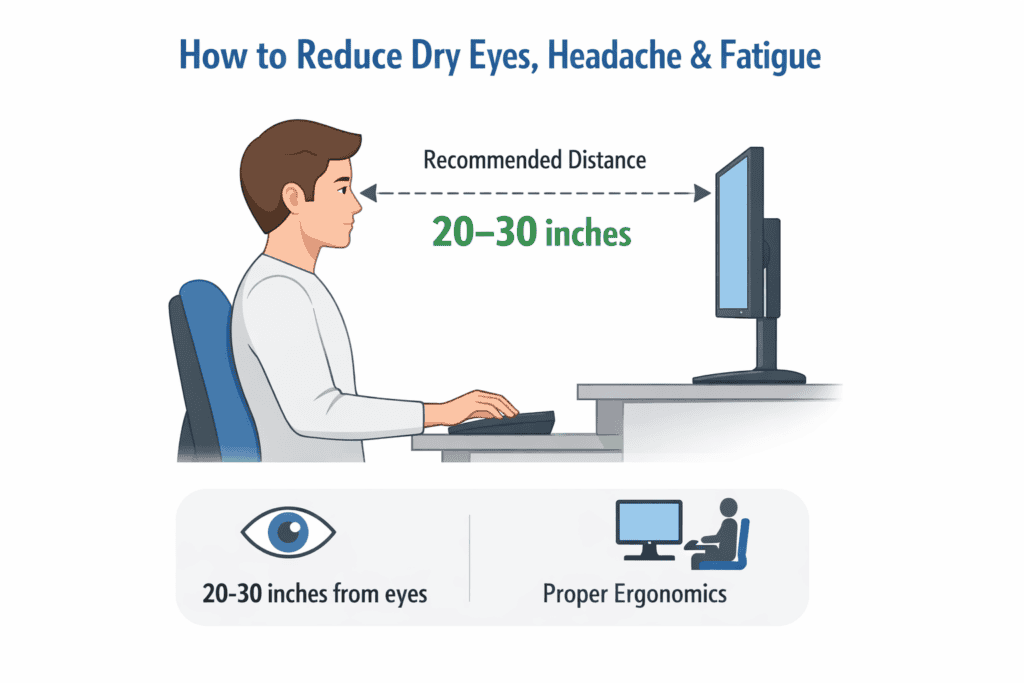
The key to minimizing dry eyes, headaches, and fatigue at your desk? You need to make small — but mighty — adjustments to your setup. First, position your monitor at the right height and distance. The top of your screen should be just at or slightly below eye level, and the screen itself should sit approximately an arm’s length away. This relaxes your neck and prevents eye fatigue.
Then match your screen’s brightness and contrast. An overly bright screen is tiring to the eyes; an overly dim one has you squinting. The brighter your screen, the more aggressive you’re being to those parts of your eyes.
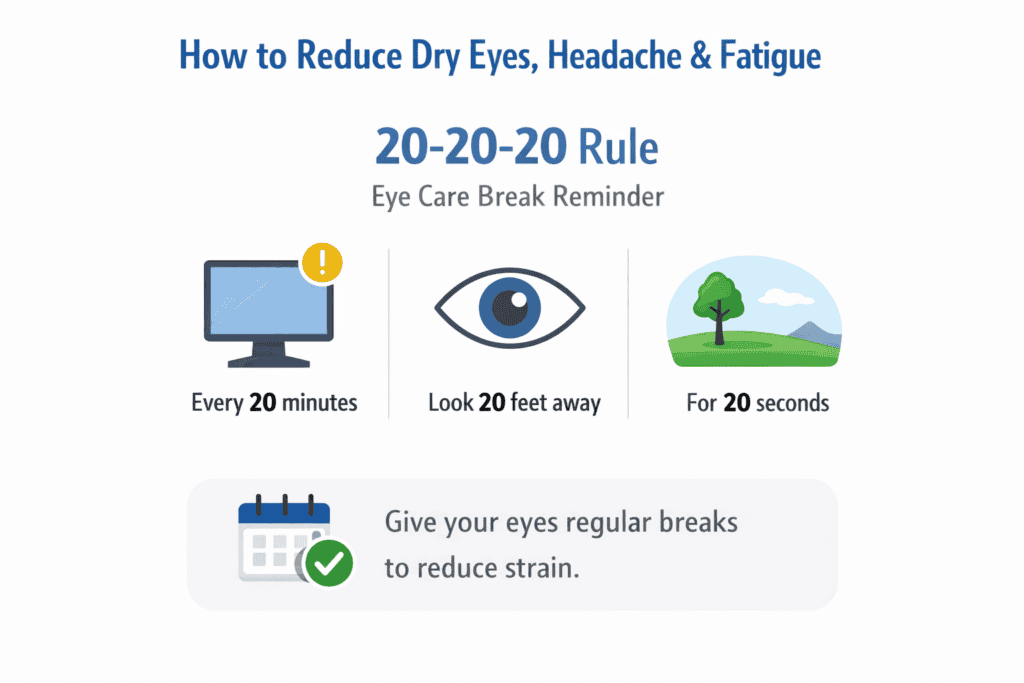
Employing the 20-20-20 rule, which is to simply look at something 20 feet away for 20 seconds every 20 minutes. This brief pause allows the eye muscles to relax, preventing dryness and focusing fatigue.
Workspace lighting also matters. Don’t position strong light sources either directly behind or in front of your screen. Enjoy soft, even illumination that makes glare a thing of the past and helps to keep your eyes relaxed and resistant to fatigue during those marathon gaming sessions.
Finally, when you are ready to sit up and start working, verify that your chair and posture are aligned. Sitting up with proper back support keeps your head balanced over your shoulders, preventing neck tension and subsequent headaches. A well-supported lower back can contribute to a relaxed upper body and ease the eyes as well. For additional lumbar support, instruction flows smoothly to the Ergonomic Chair Back Support in a total desk setup.
Can Monitor Height & Distance Really Help? (Evidence-Based)
Yes — the height and distance of your monitor really does have a significant impact on reducing eye and body strain. If the screen were at eye level, your head would be in a neutral position. That eases neck tension that can lead to headaches and shoulder tightness during long desk work.
Distance makes just as big a difference. When the screen is too near, your eyes have to work harder to focus on it, which makes them tire more easily and become dry. This allows your eyes to relax and blink more naturally when the screen is at a distance — not too close or too far.
Another important factor in eye comfort is posture, and the way you position yourself probably affects your eyes more than you think. When you hunch over or slouch, your head comes closer to the screen. This reduces viewing distance and raises the effort your eyes must exert without you realizing it. An ideally neutral sitting posture helps ensure the correct screen distance throughout the day.
All these help to reduce the chronic muscle tension in your eyes/neck/shoulders. This is the reason we included ergonomic screen position as part of our desk comfort guide. For a more comprehensive explanation, naturally mentioning Ergo Monitor Height to reinforce the best practices.
Screen Time vs Work Type (Office, Gaming, Remote Work)
Different types of screen use affect your body differently. Office work frequently means long hours of reading, typing, and working between tabs. This constant concentration can minimize blinking, resulting in dry eyes and mental weariness if the arrangement is not an ideal one.
Gaming sessions are often filled with high concentration, swift graphics, and visuals. Gamers tend to lean forward and forget to blink, causing their eyes to become dry and their necks to be strained. Here, especially, appropriate monitor height and frequent breaks are crucial.
Laptop-only operations are popular, yet dangerous business-only setups aren’t. Laptops sitting flat on a desk force users to look downward, which can strain the neck and tire the eyes. Even just small changes, such as lifting the screen a bit and using an external keyboard, can make a difference.
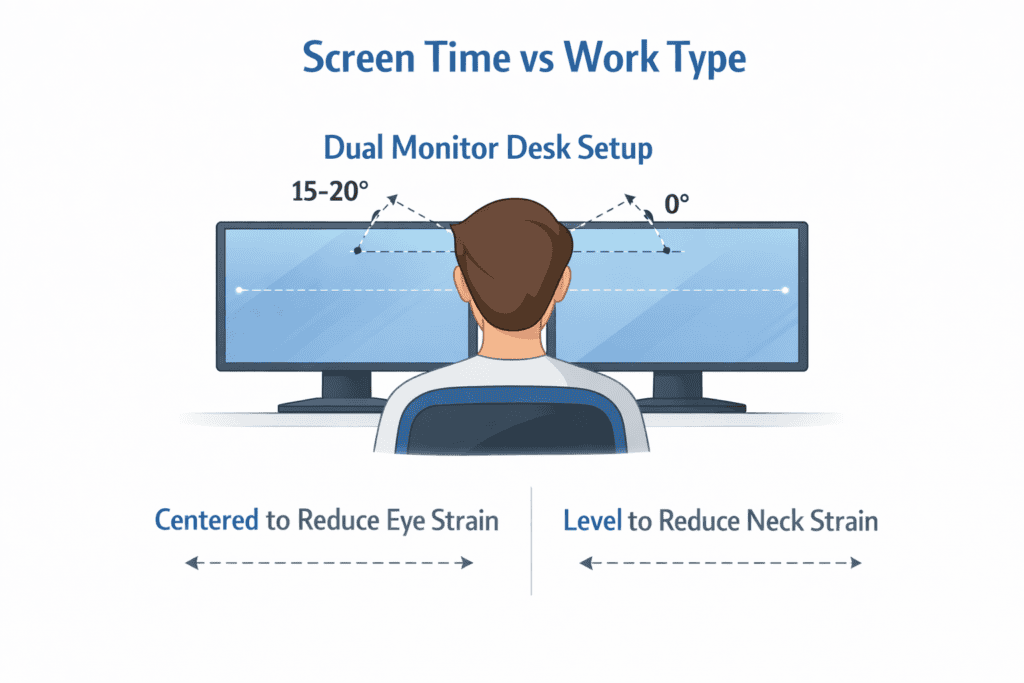
Having a dual monitor configuration enhances your productivity, but it can be a source of trouble when screens are not properly aligned. Differing heights or excessive widths cause the neck to rotate excessively which increases the strain. There’s no rushing or searching while using a balanced layout, and head movement is reduced, so eyes are calm.
By learning how your work style impacts your body, you can customize your setup wisely and protect against daily discomfort.
FAQs About Dry Eyes, Headache & Fatigue From Screens
Do screens really give you dry eyes and a headache?
Yes, prolonged screen use can result in dry eyes and headaches. People blink less often and hold their eyes in the same position too long when they look at screens. It can dry out the eyes and cause tension in the head and neck, which results in discomfort.
How many hours of screen time can you get before eye fatigue sets in?
There’s no one-size-fits-all answer to this question, but a lot of people will experience eye strain after around 2-3 hours of continuous screen use without taking a break. Add poor lighting, tiny text, and bad posture, and fatigue can set in a lot sooner.
Does monitor position cause eye strain?
Yes. When a monitor is too high or too low, your neck and eyes have to strain harder. A screen that’s at or just below eye level can help keep your head relaxed and eyes from becoming strained over the course of time.
Why do I get tired after sitting at my desk?
Desk jobs may sound cushy, but your eyes and brain are on high alert for long stretches. Constant expenditure of attention, bad posture, and a lack of movement throughout the day make your body ache as if you have worked without any physical labour.
Do breaks really help combat screen fatigue?
Yes. Frequent brief breaks allow your eyes and body a speedy relaxation and reset. Even punctuation can make a person more comfortable.
Final Thoughts: Small Ergonomic Changes, Big Relief
Dry eyes, headaches, and fatigue are centered in today’s screen-focused world, and are usually not worrisome. Often, it comes from how your desk, chair, and monitor are configured. Simple adjustments — better screen height, the right viewing distance, and taking regular breaks, among them — can make a big difference in day-to-day comfort. Instead of just concentrating on one’s symptoms, you focus on bettering your workspace ergonomics. A better setup will afford your body the sort of support it naturally craves, and leave you feeling more at ease and focused throughout the day.