
Table of Contents
What Does “Ergo Monitor Height” Mean?
The phrase “ergonomically monitor height” is one inspired by the idea of ergonomics — just as you set up your workspace to fit your body, and not try to make your body fit a desk. Put simply: ergo monitor height is the screen height that helps keep your neck, eyes, and shoulders happy as you work.
A lot of beginners believe ergonomics is just about spending a fortune on chairs or desks. That’s not true. One of the most critical ergonomics is where your monitor is positioned. If your screen is too low, you pull your neck down. If it’s too high, you likely lift your chin and tense your shoulders. Either can gradually lead to pain, stiffness, and poor posture.
Ergo monitor height helps you to:
- Neck straight, not cocked to the side
- Reduce eye strain and headaches
- Just relax, whether sitting or standing.
- Comfortable to use in long work or study sessions
That’s why monitor height is an integral part of desk ergonomics, not simply a bonus. Once you get a grip of this idea, everything else falls into place as far as setting up your workspace goes. For specific measurements and step-by-step guidelines, see the Ideal Monitor Height guide in this pillar series.
Why Ergonomic Monitor Height Is Important
Finding the right ergonomic monitor height is crucial, as it greatly influences how your neck, shoulders, and eyes feel at the end of your day. Once you position your screen at the correct height for viewing, your body is in a natural and comfortable posture. And when it’s wrong, minor issues can become the equivalent of daily pain.
Neck Posture
If it’s too low, you bend your neck forward to read the screen! If it’s too high, you tilt your chin upward. Both positions are bad for the neck muscles. In the long run, this can result in stiffness, headaches, and unnatural posture. The correct monitor height maintains neutrality and balance. Well, a correct monitor height keeps your neck straight and neutral.
Shoulder Tension
Incorrect screen height frequently causes your shoulders to hunch or scrunch forward, and you may not even realize it’s happening. This leads to shoulder and upper back tension. When the monitor is at a good height, your shoulders relax and fall back without having to hold tension all day.
Eye Fatigue
Your eyes work harder when a screen is too high or too close. This can lead to dry, burning , and tired eyes. A well-placed monitor allows your eyes to rest comfortably, rather than tire from an unnatural angle.
Long Work Sessions
Billions of people are working or studying for prolonged stretches without taking breaks. Mispositioned monitor height can lead to fatigue and strain over long sessions. At the ergonomic height, the muscles are less stressed, and the eyes are not easily fatigued; your concentration remains high for a long time, thereby making you more comfortable while working.
Ergo Monitor Height Guidelines (Simple Rules)
Adjusting the correct ergo monitor height does not require special tools or complex measurements. There are a few easy rules to follow to ensure your screen is not causing stress and strain on your neck, eyes, and shoulders. These are things that work in home offices, on study desks, and if you have regular sorts of work.
The Eye-Level Rule
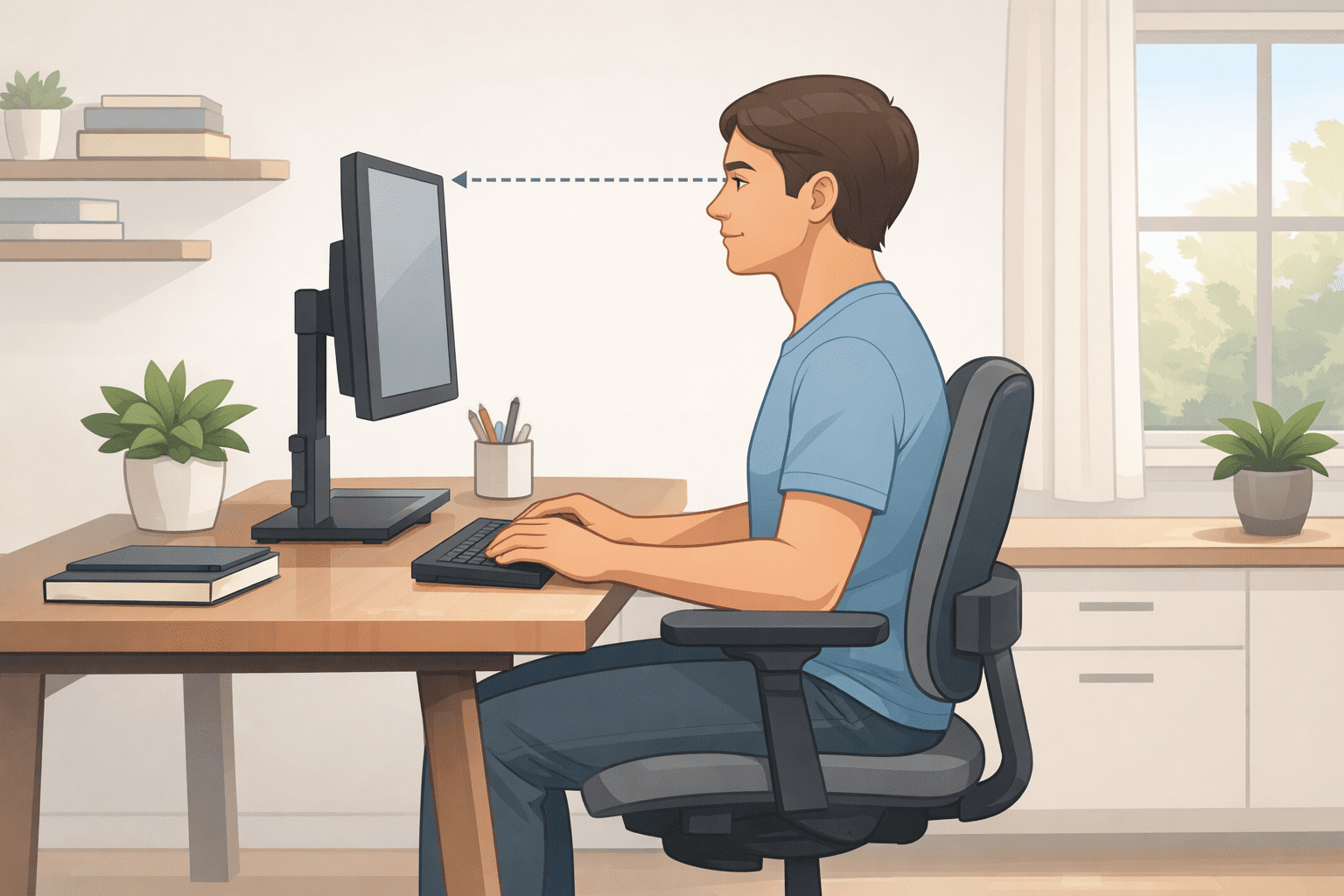
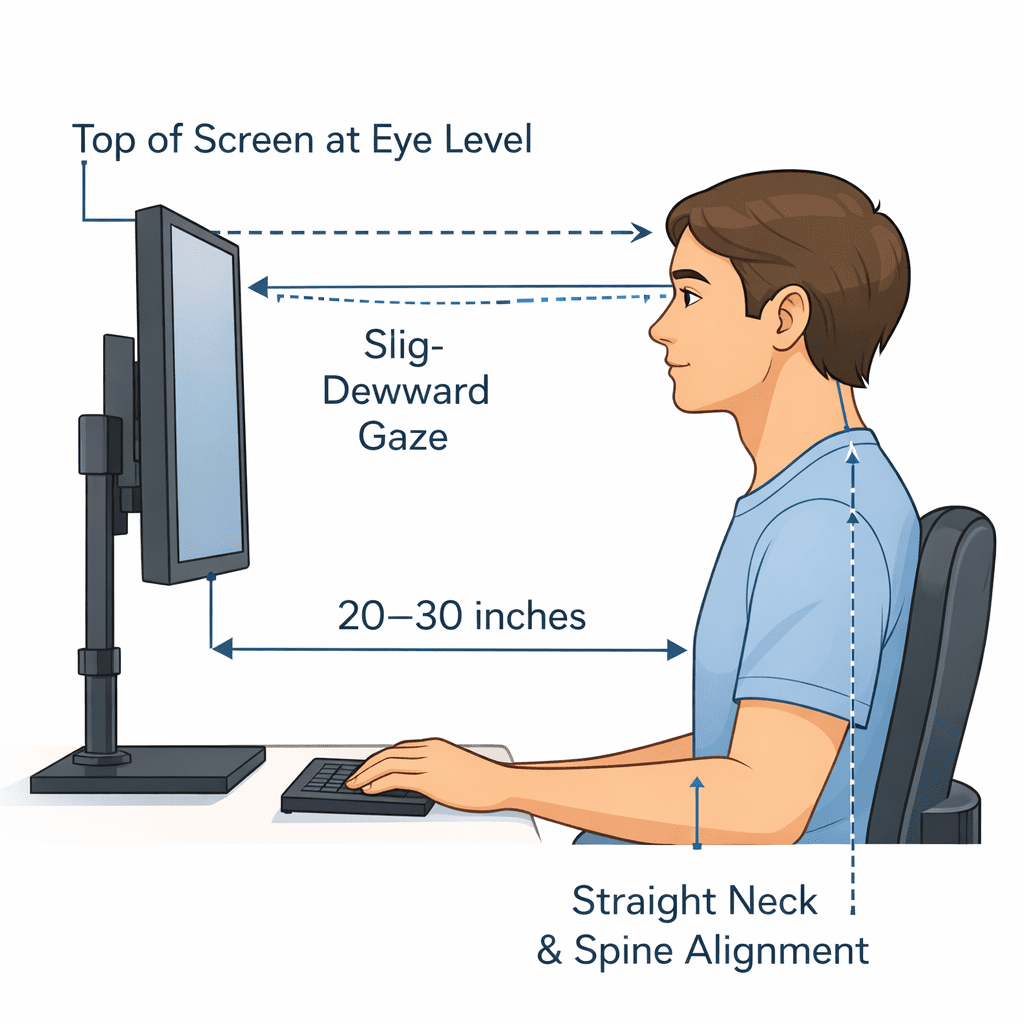
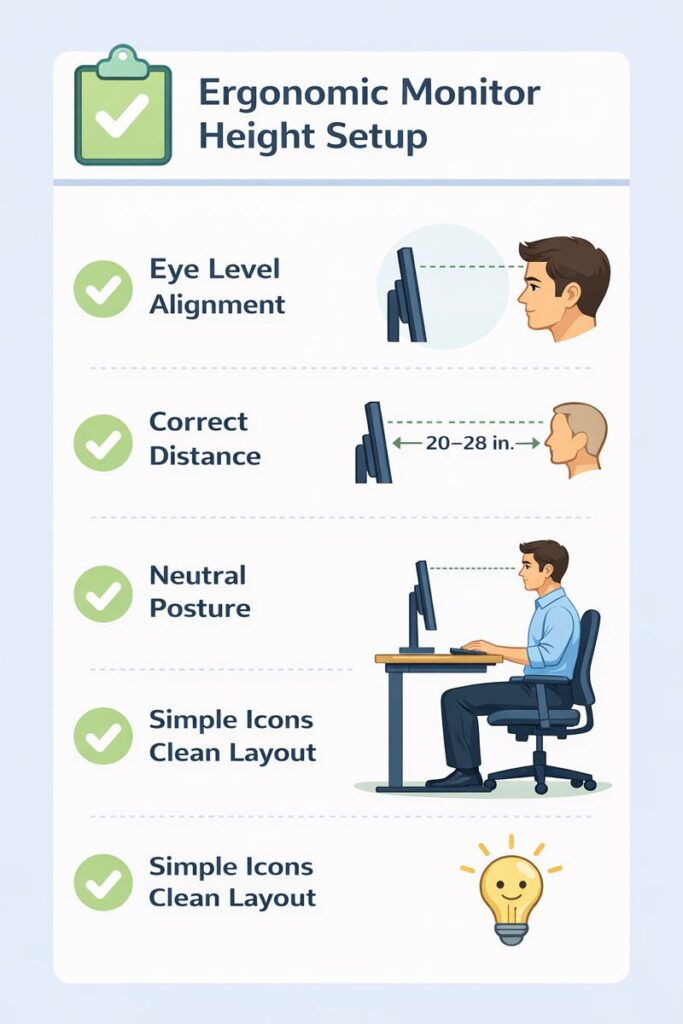
Your eyes should fall naturally somewhere at or just above the top edge of your screen if you are sitting or standing up straight. That means you’re only looking slightly down at the screen, without bending your neck up or down.
- Relax and sit back in a relaxed position
- Keep eyes forward without bending the neck
- Position your monitor so that the top of the screen is at or slightly below eye level.
- This saves you from straining your neck and is essential for a long working session.
Correct Viewing Distance
The monitor should be approximately an arm’s length from you, typically 20 to 30 inches away from your eyes. Your eyes work harder if the screen is too close. That can cause you to slouch forward without even realizing it.
- You will read the text looking straight with your back straight.
- Your eyes should be rested, not strained.d
- The right distance can reduce eye strain and ensure a good sitting posture.
Slight Downward Gaze Angle
Your eyes instinctively close while looking downward around 10 – 20 degrees. This little angle will help you reduce drying in the eyes, and allow return to blinking normally.
Don’t set the screen too high.
Avoid looking sharply downward.
Quick Reminder
- Neck straight
- Eyes slightly down
- Screen at a comfortable distance
By following these easy rules, you can build a safe and ergonomic setup that keeps your body feeling comfortable all day long.
Ergo Monitor Height for Different Desk Types
All desks aren’t created equal , and neither is ergo monitor height, depending on how your desk works. What feels right at one desk can cause neck or eye strain at another. Here is a handy guide for the seven most popular types of desks, written with beginners in mind.
Standard Sitting Desk
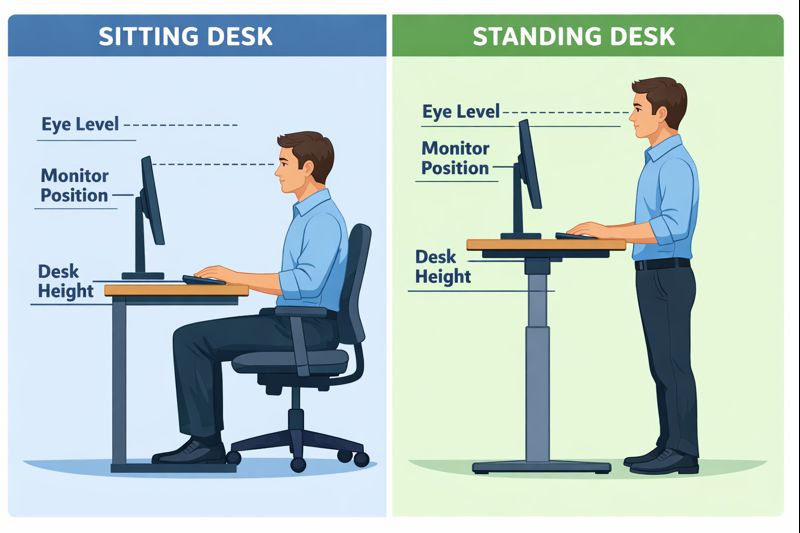
Most standard sitting desks are set at a single height. So that your chair height and monitor height are working against each other. First, sit so your feet are flat on the floor and your elbows just about at desk level. Then, position the monitor where its screen is at or slightly below eye level.
If the monitor is too low, resist butting it up against a stack of books because they’re likely to slide and make achieving alignment difficult. You can also use a sturdy stand for the monitor instead. The height of a desk is relevant here, so knowing the standard desk height in inches will make it easier to set your screen without having to crane.
Standing Desk
Your eyes will naturally be at a higher level with the standing desk instead of a traditional countertop, so you’ll need to elevate the position of the stand as well. When you stand tall in front of the screen, your eyes should be at the same level as the top edge of the screen. One of the most common errors people make is to elevate the desk but not their monitor, leaving them with a sore neck.
The screen should be about an arm’s length away, and you shouldn’t hunch forward while standing.
Adjustable Height Desk
The one that provides the greatest flexibility is an adjustable height desk. You can move the desk and monitor higher for a standing position, then lower it back down into a seated position. This is particularly helpful with an adjustable height rolling desk, which requires moving and adjusting heights regularly.
The main rule is easy: Whenever the height of your desk changes, check and adjust the height of your monitor. This ensures you remain in a balanced posture and allows your screen to be at edge height all day.
The role of an ergonomic chair
Proper ergonomic chair back support plays a key role in maintaining a healthy sitting posture, especially during long desk hours. When your chair supports the natural curve of your spine, it reduces back strain and improves overall comfort. Learn how correct back support fits into a complete ergonomic setup in our detailed ergonomic chair back support guide.
Ergo Monitor Height for Laptop vs Desktop Users
Therefore, monitor height is not the same for laptop and desktop users. The type of screen you have shifts the way your neck, eyes, and shoulders move throughout the day. Knowing the difference can prevent you from developing common posture issues before they become painful.
Laptop Users and Poor Postures – Why They Are Common
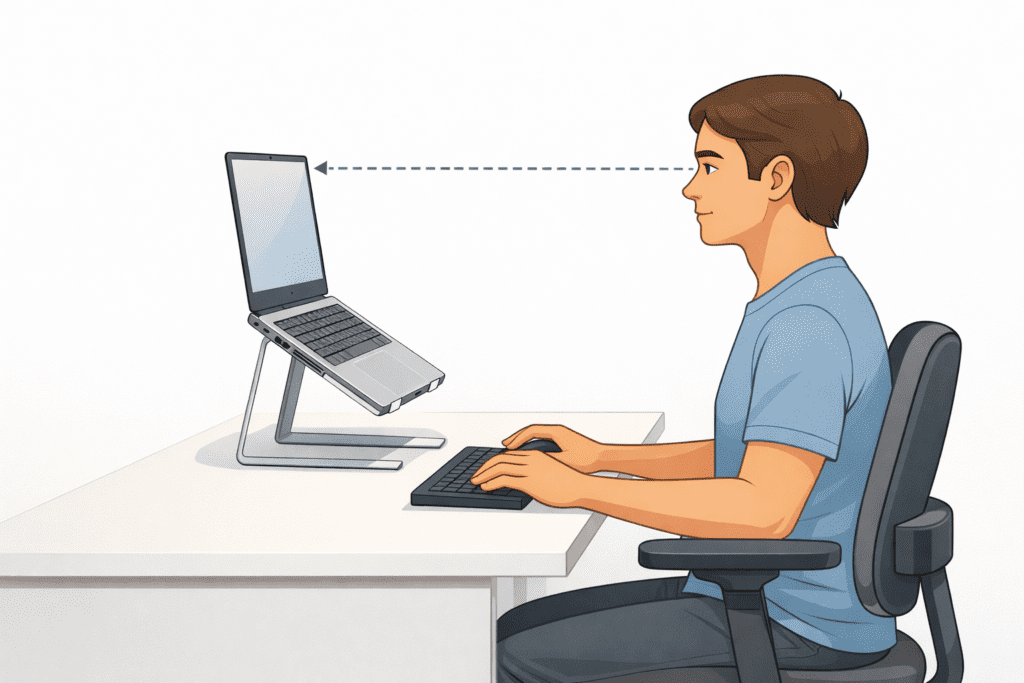
Ergonomically for laptops? Laptops aren’t ergonomic, they are portable… The screen and the keyboard are connected, which presents an issue. With the laptop close to sitting level on the desk, I find myself hunching over to see what’s on screen. When you bring the laptop up to eye level, your arms rise high enough that it’s awkward to type. That’s why so many laptop users get neck and shoulder pain.
The best answer is a method of resolving that separation between the screen and the typing plane. Place the screen at eye level with a laptop riser or stand. Then also consider an external keyboard and mouse, so your hands can relax, and you can keep your elbows closer to desk height. This easy modification is also better for the ergo monitor height and posture. You can then link up to a more in-depth laptop setup section from the pillar guide if you want to film other types of style items.
Desktop Users: Easier to Position Right the First Time
Desktop arrangements are generally easier to tune because your monitor is already not attached to your keyboard. The top of the screen should be at, or slightly below, eye level. You can achieve this by using a monitor stand or arm to raise or lower the screen. Now, the keyboard and mouse stay on the desk, ergo, your shoulders can relax naturally.
Desktop users still need to look out for viewing distance and screen angle. Sitting too close or tilting the screen up can undo the advantages of getting the height right. If properly set up, desktop monitors provide better posture and reduced eye and neck strain during long stints of work.
In other words, laptops require additional tools to achieve the proper ergo monitor height, whereas desktops have more natural adjustability when configured correctly.
Common Ergo Monitor Height Mistakes
Even when good intentions are in play, many people position their screens in a way that quietly harms posture and comfort. These widespread ergo monitor height goofs eventually cause neck pain, eye strain, and shoulder tension. Thankfully, they’re pretty easy to fix once you get why they occur.
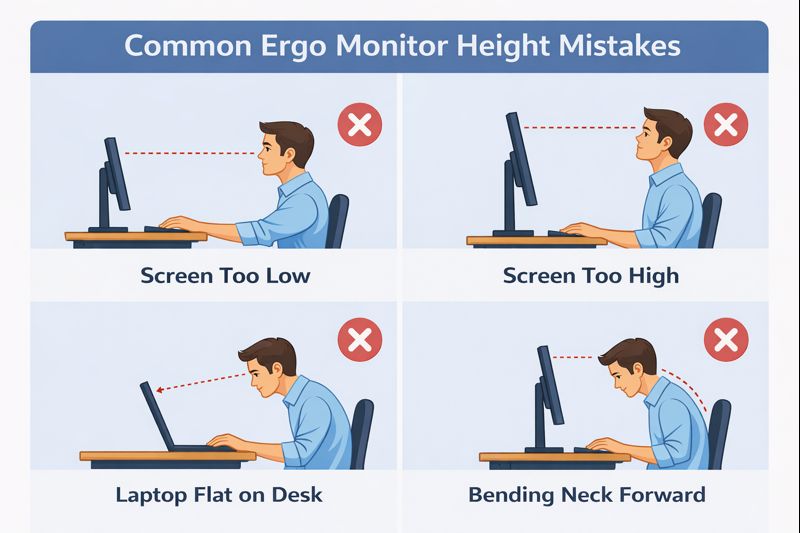
Screen Too Low
If the screen is too low, your head will naturally be inclined forward. And while this might seem benign enough, keeping your head held forward while working for extended periods of time adds strain to your neck and upper back. A lot of people don’t even think about this: The monitor goes right on the desk, but the desk is below eye level, instantly making the screen a dropped-waist staring affair. This position can lead to stiffness and fatigue after hours of work.
Screen Too High
A screen that’s too high is just as bad. Looking up at a monitor keeps your neck elongated all day. This causes tension in the neck and shoulders, but can also reduce the amount you blink (because you’re looking closer to the ceiling instead of straight ahead), which may lead to dry eyes. This is triggered by many of the monitors set on high shelves or crates.
Laptop Flat on the Desk
Never using the laptop flat on the desk is two problems at once. Its keyboard fixes you with a too-low screen position that immediately hunches your posture downward. This causes your neck to bend shoulders to round forward. Doing so can gradually cause bad posture or discomfort even after short work sessions.
Staying “tuned into” your monitor this way helps it work with your body rather than forcing you against it. Even a little change in height can have an enormous ergonomic impact.
Quick Checklist: Set Ergo Monitor Height Correctly
Follow these easy tips to find the right height for your ergo monitor. You don’t need any special tools or technical know-how. Simply follow these 6 simple steps to ensure your desk is comfortable and kind to the body.
1-2 Sit or stand in your usual position at work.
- Relax your back, drop your shoulders, and keep your head straight AVERT before positioning the screen.
Position the top line of the screen closer to eye level.
- When you look straight ahead, your eyes should gaze @ the top of the monitor (not above or far below to these comfortable positions.
Keep a slight downward gaze.
- ATAXIA EXERCISE» Look just very slightly down from the previous exercise ( eyes down towards your shoulder). This keeps your neck in a neutral, relaxed position.
Set the correct viewing distance.
- Position the monitor approximately an arm’s length away from your eye line (20–30 inches).
Adjust the chair, and THEN the monitor.
- Never adjust screen height with the chair out of position.
Center the display in front of you
- Don’t look and twist your neck.
Test and fine-tune
- Then work for 10–15 minutes and observe how your neck, eyes, and shoulders feel.
This fast setup check will help prevent strain and maintain a healthy posture through long days of work.
FAQs About Ergo Monitor Height
Is Ergonomic Monitor Height the Same for All?
No, ergonomic monitor height is not one size fits all. People are different heights, have different desk setups, and sit or stand all day differently. The ideal monitor height is based on your eye level, chair, and desk. The aim is to maintain the straight and relaxed position of your neck while looking at the screen.
Do I look just below my screen?
Yes, with a downward glance, if there can be said to be such a thing. Your eyes should tend to focus a bit down from straight ahead. This slight downward angle can ease the strain on your neck and feel better for hours of work.
Does a monitor sit too high and cause neck pain?
Yes, a screen that’s too high or too low can cause neck pain. If the monitor is not at the right height, you end up tilting your neck up or down for hours, straining neck muscles and joints.
How frequently should I change monitor height?
Your monitor height should always match your position (whether sitting or standing), desk, and chair. Even small changes can add up to great comfort, especially if you shift between sitting and standing.
Final Thoughts
Hence, monitor height is one of those small things, but it can make a big difference for your comfort and posture. When your screen is at the right height, your neck remains loose, your eyes tire less, and your shoulders won’t hunch. The point is not perfection; it’s balance. Adjust your chair before even moving the monitor so that it is at eye level and you have a subtle downward gaze. Little corrections now can save you pain and discomfort later, leaving your daily work easier and healthier.