

Many of us spend hours typing each day. Students work on assignments, office workers reply to emails, and designers and programmers often sit at their keyboards for long stretches.
Typing might feel fine at first, but over time, small issues can arise.
Your wrists may start to ache.
Your shoulders may feel tight.
Your neck might feel stiff.
Sometimes the keyboard seems too high. Other times, the desk feels uncomfortable, and it’s a matter of figuring out why.
Often, the real issue is the height of your desk.
If your desk is too high or too low, your body tries to adjust in ways that aren’t healthy. Your shoulders might rise, your wrists bend, and your back leans forward.
Over time, these small posture issues can lead to real discomfort.
The good news is that once you know the right typing position, it’s easy to fix this problem.
In this guide, you will learn:
- Why desk height matters for typing
- the proper desk height for comfortable typing
- How chair height affects desk ergonomics
- How to fix a desk that feels too high or too low
- Simple ways to improve typing posture
By the end of this guide, you’ll know how to set up your workspace so your body stays relaxed while you work.
Why Desk Height Matters for Typing
Typing might seem simple. Your hands rest on the keyboard, and your fingers press the keys.
But actually, your whole body is involved in the process.
Your shoulders support your arms.
Your elbows control your forearms.
Your wrists guide your fingers.
If your desk isn’t the right height, these parts of your body can’t work together comfortably.
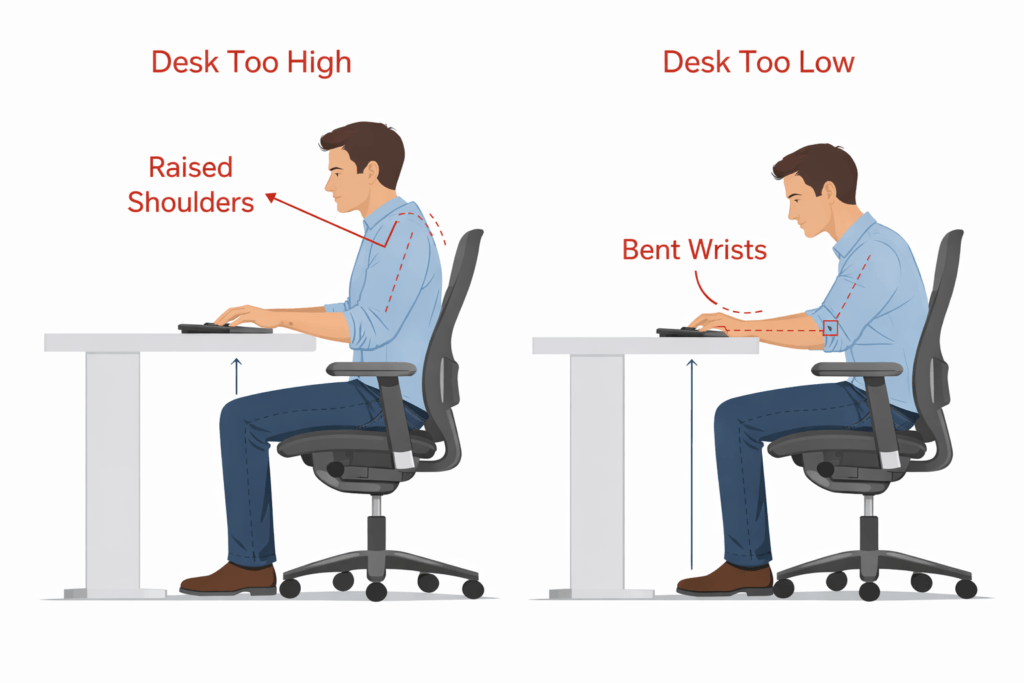
For example, imagine that your desk is too high.
If the desk is higher than your elbows, your shoulders have to be lifted to reach the keyboard. After a while, your shoulder muscles get tired.d.
Now imagine the opposite situation. Your desk is too low.
In this situation, you might lean forward or bend your back to reach the keyboard, which puts pressure on your lower back.
Both situations can cause pain over long periods of work.
The right desk height helps keep your arms and shoulders relaxed while you type. When your body feels balanced, typing is easier and more comfortable.
What Is the Proper Desk Height for Typing?

The right desk height for typing lets your arms move naturally.
A simple ergonomic rule can help you find the correct position.
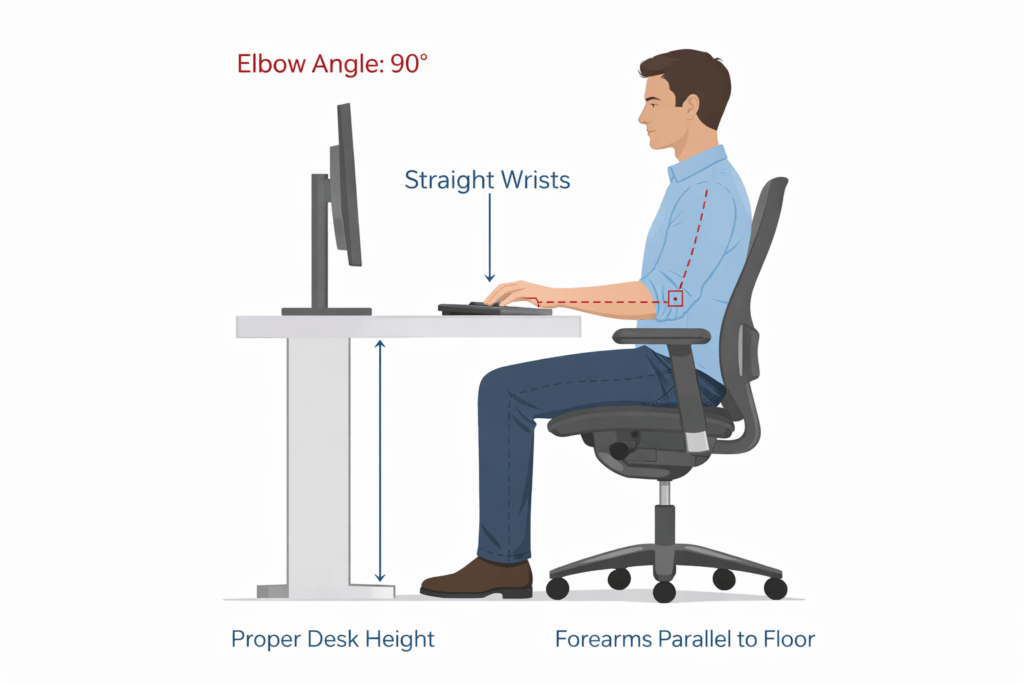
When you type, your elbows should be at about 90-100 degrees.
Your forearms should be nearly parallel to the floor.
Your wrists should stay straight and relaxed.
If your desk matches this position, your arms can rest comfortably as you type.
Your shoulders stay relaxed rather than lifted, and your wrists stay neutral rather than bent sharply.
This alignment helps reduce strain on the muscles and joints that support your hands.
If your workspace follows this rule, you’ll be able to type for longer without discomfort.
Standard Desk Height Explained
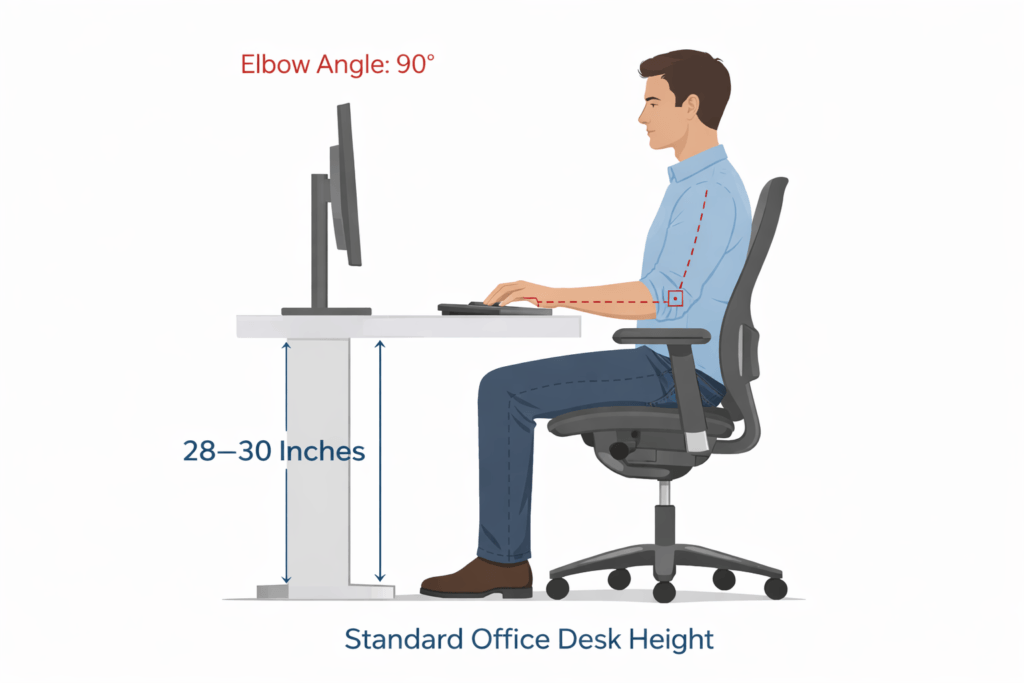
Most office desks are built at a standard height.
In many homes and offices, desks measure between 28 and 30 inches tall.
This height works well for people of average height, but not everyone fits the same design.
A shorter person may find a 30-inch desk feels too high. Their shoulders might lift while typing.
If you’re at the desk, it might feel too low.
Since most desks are built to a fixed size, many people end up working in uncomfortable positions without realising it.
This is why adjustable chairs and desks are becoming more common. These tools help people adapt the workspace to their body instead of forcing their body to adapt to the desk. You do not always need to buy new furniture to create a comfortable setup. There are many low-cost alternatives. For example, you can place sturdy books or cardboard under desk legs to raise a desk, use a firm cushion to increase your chair height, or add a footrest with a box or stack of thick magazines. Simple changes like these can make your workspace more ergonomic without major expense. Knowing the standard desk height can help you spot when your desk might need to be adjusted. nt.
Desk Height Based on Your Body Height
Everyone is built differently, so the ideal desk height can vary from person to person.
If you’re taller, you’ll need a slightly lower desk so your elbows stay level with the keyboard.
If you’re you’re, you might feel more comfortable with a slightly higher desk.
Rather than just focusing on measurements, pay attention to how your body is aligned.
When you sit at your desk, check these things:
- Your elbows stay near a 90-degree angle.
- Your forearms stay level with the keyboard.
- Your shoulders remain relaxed.
If these conditions are met, your desk height is probably right for you.
Many modern workspaces use adjustable desks because they allow users to fine-tune the height until the posture feels comfortable.
Ideal Keyboard Height for Typing
The height of your keyboard is a big factor in how comfortable typing feels.
Ideally, your keyboard should be at the same height as your elbows.
This way, your forearms can rest comfortably while your fingers move across the keys.
Your wrists should stay straight, not bent.
If the keyboard is too high, your wrists might bend upward while typing, which can put pressure on your wrist joints.
If the keyboard is too low, your wrists might bend downward.
Both can cause discomfort after long typing sessions.
Some people use keyboard trays to fix this. A keyboard tray sits just below the desk surface, which helps align the keyboard with your elbows.
Even small changes to your keyboard height can make typing much more comfortable.
Chair Height and Desk Height Relationship
You can’t set the desk height without also considering your chair.
Your chair height plays an important role in typing posture. If your chair is too low, your elbows will be below the desk, which forces you to lift your shoulders while typing.g.
On the other hand, if your chair is too high,
Your elbows might be raised, causing your wrists to bend downward.
The best typing position occurs when your chair and desk heights work together.
When sitting correctly:
- Your feet rest flat on the floor.
- Your knees form a comfortable angle.
- Your elbows align with the keyboard.
If your chair is adjustable, you can change its height until your arms reach the keyboard naturally.
Many ergonomic experts suggest adjusting your chair first, then seeing if the desk height feels comfortable.
Typing Posture Mistakes to Avoid
Even if your desk height is right, some habits can still make you uncomfortable.
Many people pick up typing habits that slowly lead to posture problems.
A common mistake is lifting your shoulders while typing, which usually happens if the desk or keyboard is too high.
Another mistake is pressing your wrists down hard on the desk. Light support is okay, but too much pressure can strain your joints.
Some people also put the keyboard too far away, which makes you stretch your arms forward and strains your shoulders.
Leaning forward toward the screen is another common problem. If your monitor is too far away or too low, you’ll have to lean in.
Watching out for these small habits can make typing much more comfortable. Try setting aside time each week to check your posture and workspace. Regular reminders can help you build healthy habits and keep discomfort away.
Standing Desk Height for Typing
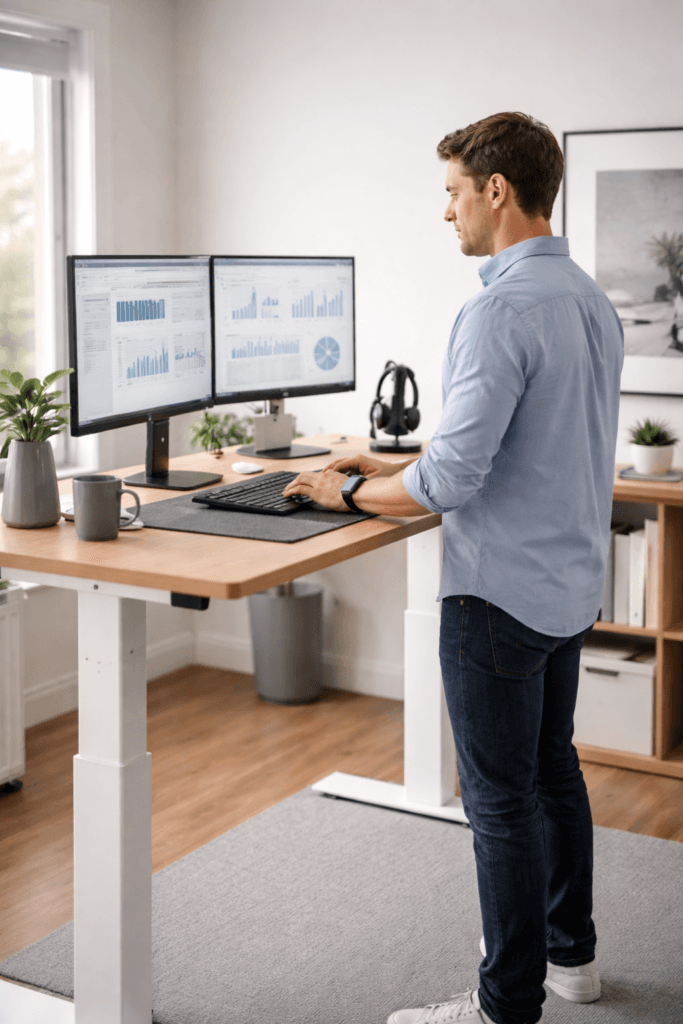
Standing desks are getting more popular because they let you change your posture throughout the day.
When you use a standing desk, the same typing height rule applies.
Your keyboard should be close to elbow height when you’re reading.
Your elbows should be at a comfortable angle, with your forearms level with the keyboard.
If the desk is too high, your shoulders might lift while you type. If it’s slow, you might end up bending forward.
The goal is always to keep your arms relaxed and your wrists neutral.
Standing desks work best when you can adjust the height quickly. This flexibility helps you maintain good posture whether you’re sitting or standing.
How to Fix a Desk That Is Too High
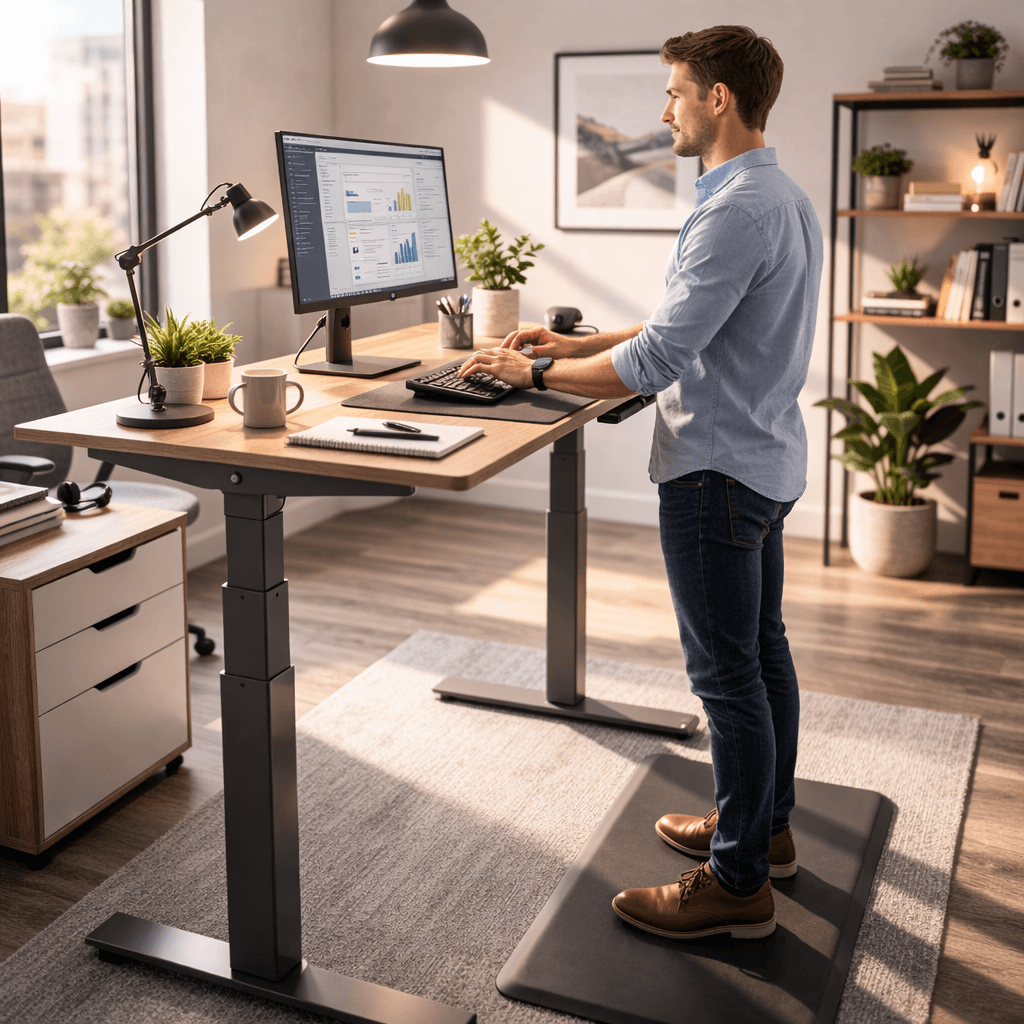
Many people find their desks are too high.
There are several ways to fix this.
One option is to raise your chair. When you do this, your elbows move closer to the keyboard level.
However, raising your chair might mean your feet don’t touch the floor. In that case, a footrest can help support your feet comfortably.
Another solution is to use a keyboard tray. This puts the keyboard just below the desk surface and helps your arms line up better.
These small changes can make a desk feel much more comfortable without replacing the entire workspace.
How to Fix a Desk That Is Too Low
A desk that’s too low can also cause posture problems.
When the desk is too low, you might lean forward or bend your back while typing.
One simple fix is to add desk risers or small supports under the desk legs to raise it slightly.
Another option is an adjustable desk frame that lets you adjust the height.
Some people switch to adjustable standing desks, which let you change the height whenever you need to.
The goal is to bring the keyboard closer to elbow height so the arms remain relaxed while typing.
Creating a Comfortable Typing Workspace
Proper desk height is only one part of a comfortable workspace.
Other things also affect how comfortable typing feels.
Your monitor should sit at eye level so your neck remains straight. Your chair should support your lower back.
Keep your keyboard and mouse close enough so your arms can stay relaxed.
Lighting also matters. A well-lit workspace reduces eye strain and helps you maintain a natural posture. For example, position your monitor to avoid glare from windows or overhead lights. Try to use indirect or diffused light to minimise harsh shadows, and avoid working in dim conditions that cause you to lean forward or squint.
When all these elements work together, typing becomes easier and less tiring.
A comfortable workspace lets you focus on your tasks rather than worry about discomfort.
Frequently Asked Questions
What is the proper desk height for typing?
The proper desk height keeps your elbows at 90 degrees and your forearms parallel to the floor.
What is the standard desk height?
Most office desks are between 28 and 30 inches tall, though the ideal height can vary by user.
Should the keyboard be higher or lower than the desk?
The keyboard should sit at or slightly below elbow height so the wrists stay straight.
How do I know if my desk is too high?
If your shoulders lift while typing or your wrists bend upward, the desk may be too high.
How high should a desk be for a tall person?
A taller person may feel comfortable with a desk height close to 29 or 30 inches, depending on chair height and posture.
Is an adjustable desk better for typing?
Yes. Adjustable desks allow users to adjust the desk height to their body posture.
Should wrists rest on the desk while typing?
Wrists should stay relaxed and neutral. Light support is fine, but heavy pressure should be avoided.
What is the best typing posture?
The best posture keeps the elbows near 90 degrees, the forearms parallel to the floor, and the wrists straight.
Final Thoughts
Typing is something many people do every day, yet few people think about the height of their desk.
When your desk is at the wrong height, your body has to adjust. Your shoulders lift, your wrists bend, and your back might lean forward.
These small adjustments can slowly lead to discomfort.
The proper desk height keeps your arms relaxed and your wrists neutral while typing.
By adjusting your chair, desk, and keyboard, you can set up a workspace that supports your body rather than strains it. All ergonomic improvements may seem simple, but they can greatly improve comfort during long work sessions.