
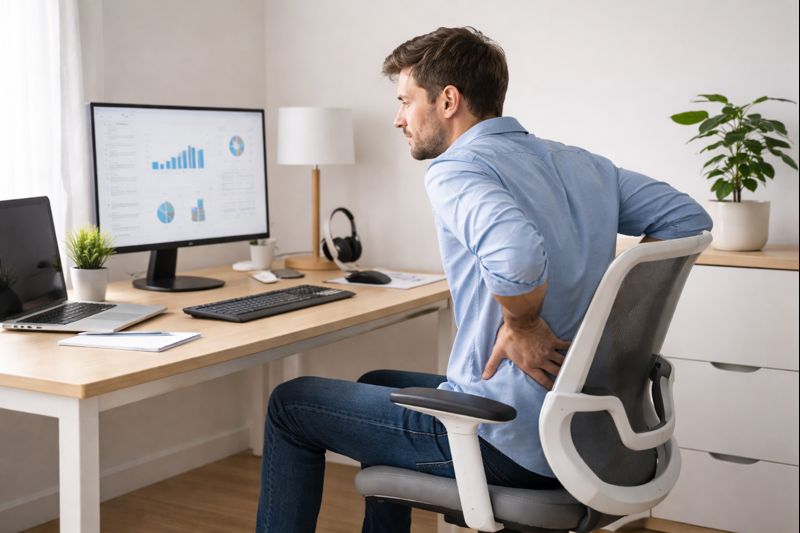
Many people pick ergonomic chairs to support their backs.
However, if you notice back pain after switching, it can be both confusing and frustrating.
You may begin to ask yourself:
• When you sit in an ergonomic chair, do you feel any new pressure or discomfort in your lower back?
• When you lean back, does the lumbar support match the curve of your spine?
• Are your feet flat on the floor, and do you feel balanced?
• If you sit for a long time, do you notice more tension in your back?
The good news is:
Ergonomic chairs are not bad for your back, but the wrong setup, a poor fit, or bad sitting habits can still cause pain.
This guide will show you why ergonomic chairs can sometimes cause back pain, what usually goes wrong, and how to fix it step by step. The main solutions are adjusting your chair, moving often, and building better sitting habits. Try a quick 30-second movement break every hour to remind yourself to move. You could do ankle pumps or thoracic twists. You can also try shoulder shrugs, neck stretches, or stand up and do a set of seated marches by lifting your knees one at a time. By using these tips, you’ll be better able to prevent and manage discomfort.
Back pain often happens because of a poor setup or sitting for too long. An ergonomic chair is not a quick fix. It needs to be set up correctly, and you should use good posture and adjust it regularly for the best results.
Table of Contents
Do Ergonomic Chairs Really Cause Back Pain?
Short answer: No, not by themselves.
Ergonomic chairs are designed to support your body, not harm it.
But they are tools, not magic solutions.
Back pain usually happens when:
• The Chair does not match your body
• The adjustments are wrong
• You sit in one position for too long
• You force “perfect posture.”
An ergonomic chair that is too high, too low, or not correctly adjusted to your spine can strain your lower back. Even in the most comfortable Chair, sitting for many hours without breaks can also stress muscles. Everybody is different, so a setup that feels great for one person might be under- or overstimulating for someone else.
Another common issue is posture. But slowly, that poor posture of slumping or leaning forward, or not adhering to some back support, can result in discomfort. The muscles naturally become tired and stiff over the course of your day, which most people blame on their chairs.
The secret is to realize that ergonomic chairs are tools, not remedies. When they are correctly adjusted and used with good sitting habits, they tend to relieve rather than cause pain. Before diving deeper into selecting and setting up the perfect Chair, here are some quick tips: ensure your feet are flat on the floor, adjust the lumbar support to align with your lower back’s natural curve, and take regular breaks to stand and stretch. For more detailed guidance, explore our guide to ergonomic office chairs for back pain, which explains how proper support, posture, and movement all play a role in protecting your spine.
Are Chairs Bad for Your Back — or Is Sitting the Real Problem?
You’ve likely seen people Googling “are chairs bad for your back,” and although it’s easy to blame the Chair, that’s not exactly the right question. The larger issue, of course, is how long and how still we sit. For all the ergonomics in the world, not even the acme of office chairs can save you from what an immobile body becomes.
This is a widespread misunderstanding.
Chairs are not the main problem.
Long, unmoving sitting is.
Even the best ergonomic Chair cannot protect your back if:
• You sit still for hours
• You lock yourself into one posture
• Your muscles never get a break
Apparently, when you sit still like that, your muscles gradually fatigue. Blood flow decreases, muscles become rigid, and your spine loses its natural range of motion. It’s called static sitting, and it can stress your lower back, shoulders, and neck. The muscles get tired, and one experiences pain or tightness.
Your spine is designed to move, not stay frozen.
So when back pain appears, it’s usually a mix of:
• Static sitting
• Muscle fatigue
• Poor adjustment
The Chair becomes uncomfortable not because it is “bad”, but because your body is asking for movement or better support.
Common Reasons Ergonomic Chairs Cause Back Pain
This is the most critical section.
Most back pain comes from small setup mistakes, not big problems.
The goal of an ergonomic chair is to support your body, but if you don’t sit in it correctly or have the proper setup, even ergonomic chairs can become quite uncomfortable. The following are some reasons why back pain is still associated with an ergonomic chair.
Lumbar Support Is in the Wrong Position
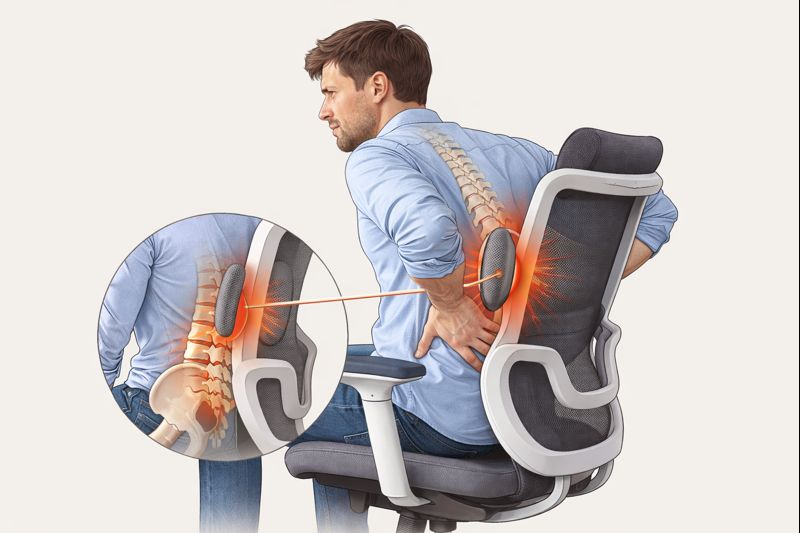
Lumbar support is designed to support the natural curve of your lower back. But when it doesn’t match your body, it can create more discomfort than relief.
If lumbar support is too high, too firm, or pushed too far forward, it can force your spine into an unnatural position. This increases pressure on the lower back muscles and can cause soreness or pain after prolonged sitting.
Many people assume more lumbar support is always better. In reality, lumbar support should feel gentle and supportive, not hard or aggressive.
Back pain happens when:
• The lumbar support is too high
• It pushes too hard
• It does not line up with your spine
When this happens, your muscles fight the Chair rather than relax.
Simple fix:
• Lower the lumbar support slightly
• Reduce pressure if adjustable
• It should feel supportive, not forceful
Seat Depth and Height Are Incorrect
Seat depth and height affect your pelvis and lower back more than people realize.
Problems happen when:
• The seat is too deep → you slouch
• The seat is too shallow → no thigh support
• The Chair is too high → pressure under thighs
• The Chair is too low → rounded lower back
Simple check:
• Sit all the way back
• You should have about 2–3 fingers of space behind your knees
• Feet should rest flat on the floor
Seat height and seat depth play a significant role in how your back feels while sitting. If the seat is too high, your feet may not rest flat on the floor. This shifts pressure to your lower back and thighs.
If the seat is too deep, the backrest cannot adequately support your spine. This often causes people to slide forward or slouch, increasing strain on the lower back.
A properly adjusted seat allows your feet to stay flat, your knees to bend naturally, and your back to remain supported without effort.
Sitting Too Upright for Too Long
Many people think:
“If I sit perfectly straight, my back will be safe.”
This is a myth.
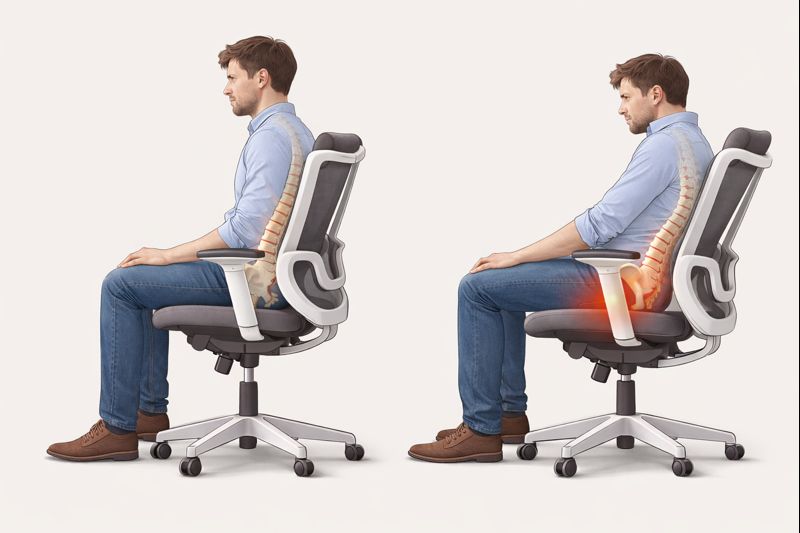
Maintaining an upright posture for hours can tire your muscles, especially in the lower back.
Pain builds slowly, not because posture is bad, but because it’s too rigid.
Better approach:
• Sit upright sometimes
• Recline slightly sometimes
• Change positions often
Your back prefers movement, not perfection.
Sitting perfectly upright all day may look healthy, but it can actually cause back pain. Holding one posture for too long, even a “correct” one, tires your muscles.
Your spine is designed to move. When you stay stiff and upright for hours, your muscles work nonstop to hold that position. Over time, this leads to fatigue and discomfort.
A better approach is relaxed, neutral sitting with small movements. Slight reclining, shifting positions, and short breaks help reduce back strain.
Desk and Chair Don’t Match
Even a great chair fails if the desk setup is wrong.
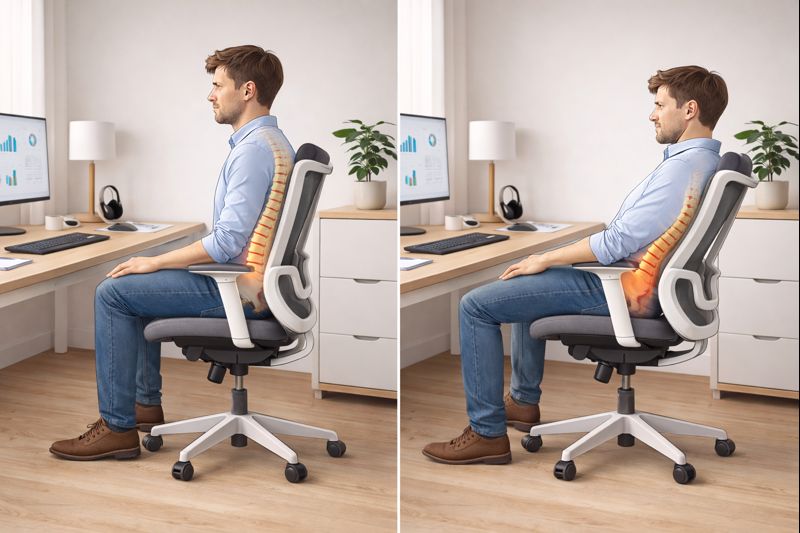
Back pain appears when:
• The desk is too high
• The Chair is raised too much to compensate
• Shoulders lift, spine tightens
Your Chair and desk must work together, not separately.
Simple fix:
• Adjust chair height first
• Then adjust the desk or keyboard height
• Avoid raising the Chair too high to reach the desk
You can’t make up for a bad desk setup, even with the best Chair. If the desk is too high, people also tend to raise their shoulders or lean forward. The Chair then attempts to compensate, often resulting in poor posture and back strain.
If the desk is too low, people slump into it and put pressure on the lower spine. This is out of alignment, so your body develops bad posture habits over long stretches.
A chair and a desk should complement one another. Getting both right will do wonders for your back, neck, and shoulders. An adjustable-height rolling desk setup enables better alignment and helps your Chair support your body rather than fighting against the desk.
By learning about these, you’ll be able to correct back pain at the root, instead of pointing fingers at ergonomic chairs. Incremental nudges and improved habits have an outsized impact.
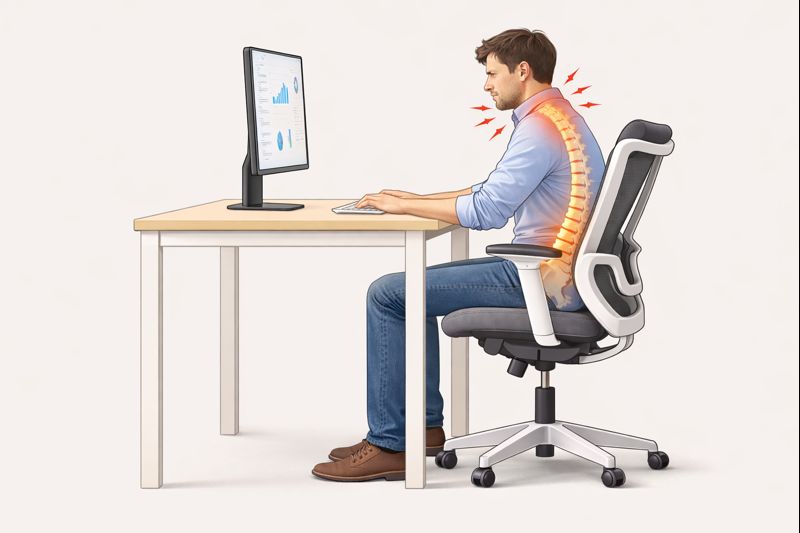
Does Your Office Chair Cause Back Pain at Work?
Office setups make back pain more likely because:
• Work hours are long
• Breaks are skipped
• Adjustments are limited
A lot of people experience back pain in the middle of their work and often wonder: Does my office chair cause me back pain? The fact is, the Chair is frequently just one aspect. Workplaces are designed for long stints, no movement, and a fixed desk. When you’re planted in one place all day, even a good chair can become a pain in the rear end.
The human body is designed to sit (which is itself an evolutionary anomaly) for six to nine hours per day. During this time, muscles gradually grow weary, blood flow decreases, and the spine becomes compressed. Fixed-height desks make this worse. If your desk is too high or too low, your Chair will never fully fix the problem. Your body then twists, tilts, or sags in response, and aches follow.
Even ergonomic office chairs can cause pain if:
• They are shared with others
• Adjustments are locked
• Sitting time is excessive
At work, back pain is often caused by time, not just posture.
Helpful habits:
• Stand up every 30–45 minutes
• Change recline angle during the day
• Avoid staying in one fixed position
Small changes matter more than expensive chairs.

New Ergonomic Chair Pain: What’s Normal and What’s Not?
If your Chair is new, mild discomfort is often normal.
Your body may need:
• 7–14 days to adjust
• Time to relax muscles that were used to poor posture
That 7–14 day ‘honeymoon’ period is something most people experience when adjusting to a new chair. During this time, muscles not previously engaged start to function more, which can lead to slight soreness, tightness, or pressure. This minor discomfort is normal and should gradually improve each day as your body adjusts. Over time, this indicates that the Chair is supporting a healthier alignment.
The pain ought to lessen each day. You might even find yourself sitting up straighter and slouching less, or being more cognizant of how you sit. These are positive signs. Some mild discomfort is to be expected, particularly in the lower back and hips.
This is normal discomfort:
• Mild soreness
• Feeling “different.”
• Temporary stiffness
But some pain is a signal. Sharp pain, tingling, numbness, or worsening pain every day are not typical. If two weeks later the pain has not gone, it is possible that the Chair is wrongly adjusted for you or doesn’t fit your body. Failure to address this can result in ongoing pain. In such cases, it is advisable to consult a doctor or a workplace health specialist. Persistent or severe pain should not be ignored, as professional assessment can help identify underlying issues that might require specific attention.
How to Fix Back Pain Caused by an Ergonomic Chair
Back pain from an ergonomic chair typically means something is not adjusted correctly or used properly. The great news is that you can fix most problems with a few easy strategies.
Adjust the Chair in the Right Order
Many people adjust things randomly.
That creates an imbalance.
Use this order:
- Seat height – feet flat on floor
- Seat depth – space behind knees
- Lumbar support – gentle lower back support
- Armrests – shoulders relaxed
This order protects your spine naturally.
Lots of people arbitrarily fiddle with it and get crummy results.
Always follow this order:
Seat height
(Your feet should be flat on the ground, and your knees should be at or slightly below hip level. This will help you keep your pelvis neutral and protect your lower back from strain.
Seat depth
The end of the seat should be slightly padded and not impinge on the backs of your knees. This reduces pressure and improves circulation.
Lumbar support
Lumbar support into the curve of your back. It should feel supportive, not like a push. Try not to protrude your spine so much.
Armrests
Armrests should lightly support elbows. If they’re too high or too low, they can tighten up and strain your back.
Setup: Many users have a hard time due to ubiquitous ergonomic chair adjustment mistakes that can hurt you, and you wouldn’t even notice. Some of the most common mistakes include setting the seat too high, which can cause pressure on your thighs, or too low, which can lead to a rounded lower back. Having the lumbar support too firm often forces your back into an unnatural position. These errors may seem minor, but checking and correcting them can significantly enhance your comfort and reduce back pain.
Stop Forcing Perfect Posture
Your spine is not a statue.
Forcing yourself to sit straight all day causes:
• Muscle fatigue
• Tension
• Back pain
Instead:
• Sit naturally
• Let the chair support you
• Relax your back muscles
Comfort is a better guide than stiffness.
Sitting stiff and straight all day is not the key to perfect posture. Neutral is not too, but relaxed. When you attempt to hold your body upright without moving, your muscles fatigue rapidly.
Your Chair should have some leeway for shifting around a bit. Lean back a bit, relax your shoulders, and let the Chair support you. It is balance that brings comfort, not stiffness.
Change Posture, Don’t Lock It
The best posture is the next one.
Helpful habits:
• Recline slightly when reading
• Sit upright when typing
• Lean back occasionally
• Stand up regularly
The best sitting position is the next one. Lean back when you read, sit up straight when you type, and fidget with your weight. These small movements help engage muscles without stressing them.
Get regular low-impact exercise. Stand, stretch, and walk for a minute for every hour you spend sitting. Chairs are meant to facilitate movement, not replace it. Consider setting up simple reminders to help you move regularly: use phone alarms, calendar notifications, apps, or place sticky notes in visible locations. These cues can help you develop healthy habits and ensure you keep moving throughout your workday.
Solving back pain isn’t about repurchasing a new chair. It’s just about knowing your body, making it work for you, and still being able to move at the end of the day.
When the Chair does NOT cause Back Pain
Sometimes, the Chair is not the leading cause.
Back pain may come from:
• Previous injuries
• Weak core muscles
• Stress and tension
• Poor sleep or inactivity
A chair can reduce strain, but it cannot fix everything.
If pain persists despite a good setup and good habits, the issue may be outside the Chair.
Why Posture and Chair Setup Matter More Than People Think
Over time, a clear pattern appears in everyday office use: most back pain does not come from a “bad” chair, but from sitting the same way for too long. Many people spend hours at a desk each day, and small setup issues slowly turn into discomfort without being noticed.
One common mistake is adjusting a chair once and assuming it will work forever. People also try to force what looks like perfect posture instead of paying attention to how their body feels. Sitting too stiffly, pushing the lumbar support too firmly, or ignoring seat height often leads to tension in the lower back.
Another detail that is easy to miss is how the body changes during the day. Muscles get tired, posture shifts, and pressure builds in different areas. When the chair setup does not change with the body, even a well-designed ergonomic chair can start to feel uncomfortable.
Simple adjustments, relaxed posture changes, and short movement breaks usually help more than replacing the chair. Understanding how posture and setup work together makes sitting feel more natural and reduces long-term strain.
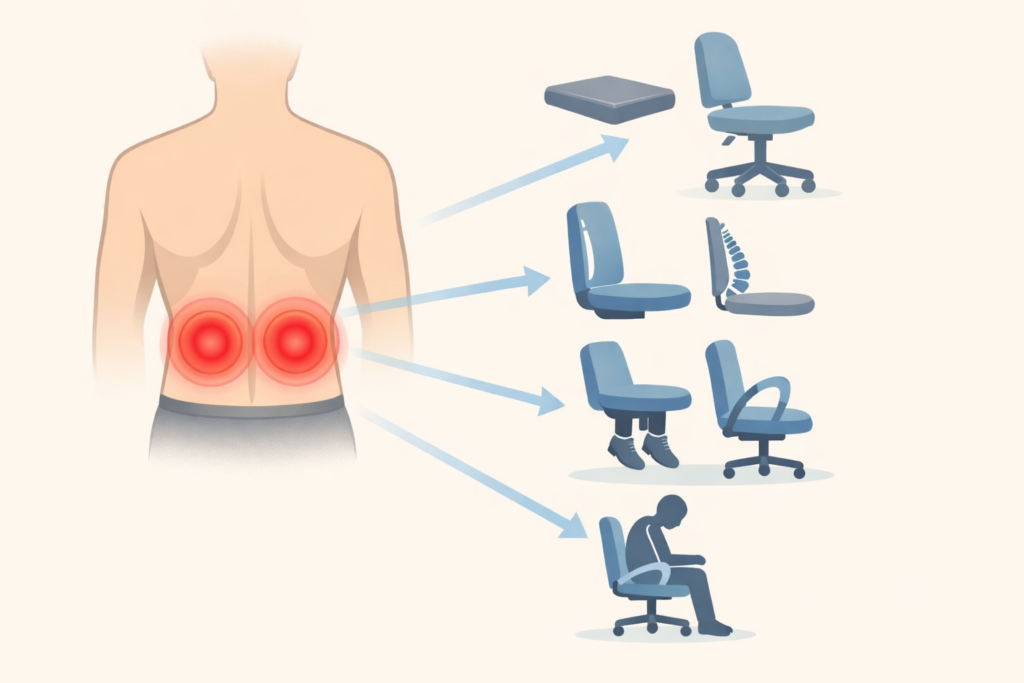
When discomfort appears, identifying the cause early makes it easier to fix—this quick troubleshooting guide helps connect common pain points to simple adjustments.
Ergonomic Chair Troubleshooting: Quick Decision Guide
Use this simple guide:
• Lower back pain after 30–60 minutes
→ Likely muscle fatigue or rigid posture
• Immediate pain when sitting
→ Lumbar support or seat depth issue
• Pain only at work
→ Desk mismatch or long sitting hours
• Discomfort but no pain
→ Adaptation phase or over-adjustment
Most problems have simple solutions once you identify the cause.
Frequently Asked Questions
Do ergonomic chairs make back pain worse?
No. But poor adjustment, prolonged sitting, or body mismatch can cause discomfort.
How long should you sit in an ergonomic chair?
Ideally, change position every 30–45 minutes and stand regularly.
Should lumbar support touch your back?
Yes, gently. It should support, not push.
Can the wrong Chair cause lower back pain?
Yes, especially if the seat height, depth, or lumbar position is incorrect.
Final Takeaway: Ergonomic Chairs Aren’t the Enemy
Ergonomic chairs do not, on their own, cause back pain.
Pain usually comes from:
• Wrong setup
• Static sitting
• Forced posture
• Poor desk pairing
When used correctly, an ergonomic chair should:
• Reduce strain
• Support movement
• Make sitting easier, not painful
If your back hurts, don’t panic.
Most problems can be fixed with small, smart changes.
Explore the related guides on this site to fine-tune your setup and sit more comfortably.