
Wrist pain is a significant issue for people who type, use a mouse, scroll on phones, or perform repetitive hand motions every day. The good news is that most wrist pain is related to our day-to-day habits, not necessarily serious medical problems. Small ergonomic changes, easy exercises, and better positioning of hands can make a big difference. This guide goes to the sources of wrist pain, including how you can do to help wrist pain naturally through posture, movement, and smart daily fixes (no scientific studies or big fancy terms were killed in writing this article). What Causes Wrist Pain?
Table of Contents
What Causes Wrist Pain in Daily Life?
Wrist pain usually develops from seemingly benign little habits. These patterns of behavior over time will stress the wrist joints, tendons, and muscles. The issue often goes unrecognized until someone feels pain, tightness, or weakness. Learning what is causing your wrist pain will allow you to resolve the actual problem, not just treat symptoms.
Every day, wrist pain is often associated more with how we work, use tools, and move our hands. Bad setup at the desk, long hours in front of a computer, and repetitive hand movements are key culprits. If wrists flex too much or are stuck in one position for hours, pressure mounts. And that’s not comfy—and it can lead to chronic tension.
Eating and living habits count, too. Failure to take breaks in tandem with bad posture and weak forearm muscles, plus stress, can all exacerbate wrist pain. Joints may also be less comfortable in cooler atmospheres and due to dehydration. The secret is viewing wrist pain as a daily-use issue, not something that merely pops up when you do something sharp.
Many people do find real relief by improving ergonomics, modifying hand position, and cutting repetitive strain. In many cases, subtle changes stick better than extreme ones. Understanding these causes is the key to helping sustain on a safe, effective, and long-term basis.
Wrist Pain From Desk Work & Computer Use
One of the most important sources of wrist pain today is desk work. If you type with your wrists bent or use a mouse that’s as high as your forefinger, the wrist is forced into an unnatural angle. With time, this leads to pressure and irritation. Bad keyboard height, no wrist support, and long screen hours without breaks also contribute to strain. It helps to minimize daily wrist pain as well. Keep wrists straight, hands at or slightly below the level of your keyboard, and elbows relaxed.
Repetitive Movements & Poor Hand Position
Performing the same hand gestures over and over can eventually take a toll on your wrist comfort. Gaming or working with one’s hands moves the same muscles as when clicking a mouse, scrolling on a phone, or doing manual labor. Add to that poor hand position, and it gets worse, especially when the wrist is twisted or bent frequently. Without rest, the wrist will not heal properly. Minimizing repetition, alternating hands whenever you can, and maintaining a neutral wrist position will help reduce the risk of pain.
Lifestyle Factors That Make Wrist Pain Worse
Some everyday habits are silently causing wrist pain. Poor posture means the arms and wrists are really taking a beating. Failure to take breaks limits circulation and muscle recovery. If your forearm muscles are weak, then the wrist has to work harder than it should. Also, stress can produce muscle tension, and dehydration can influence joint comfort. To promote long-term wrist health and decrease ongoing pain, you can do things like practice excellent posture, keep moving, hydrate with plenty of water, and stretch out daily.
How to Help Wrist Pain With Better Ergonomics
Improved ergonomics is one of the surest and easiest ways to alleviate wrist pain in everyday life. Ergonomics is putting your workspace together so that your body remains in its natural, relaxed position. When your wrists are supported and in appropriate alignment, pressure on joints and tendons is diminished. This reduces stress while typing, using the mouse, & sitting for hours at the desk.
Few are looking at exercises, but a bad setup can negate those efforts. And a good ergonomic setup will keep your wrists straight, shoulders relaxed, and arms supported. Small changes—such as changing chair height or repositioning a keyboard—can make a noticeable difference.
The solution to helping wrist pain with ergonomics doesn’t have to be expensive hardware. The ideal is to have a feeling of balance and ease. The search for the perfect desk, ugh. Resorting just to your couch and coffee table, you should aim to let the world know that your desk, chair, keyboard, and mouse are all dating now. When everything is working as it should, your wrists have no need of bending or twisting or maintaining tension for any significant length of time. It eventually diminishes pain and blocks its return.
By adjusting the posture, height, and giving from the hand, you are just naturally supporting wrist health. These ergonomic practices are effortless and safe to use every day, so they are perfect for beginners and the long-term benefits.

Correct Wrist Position While Typing & Using a Mouse
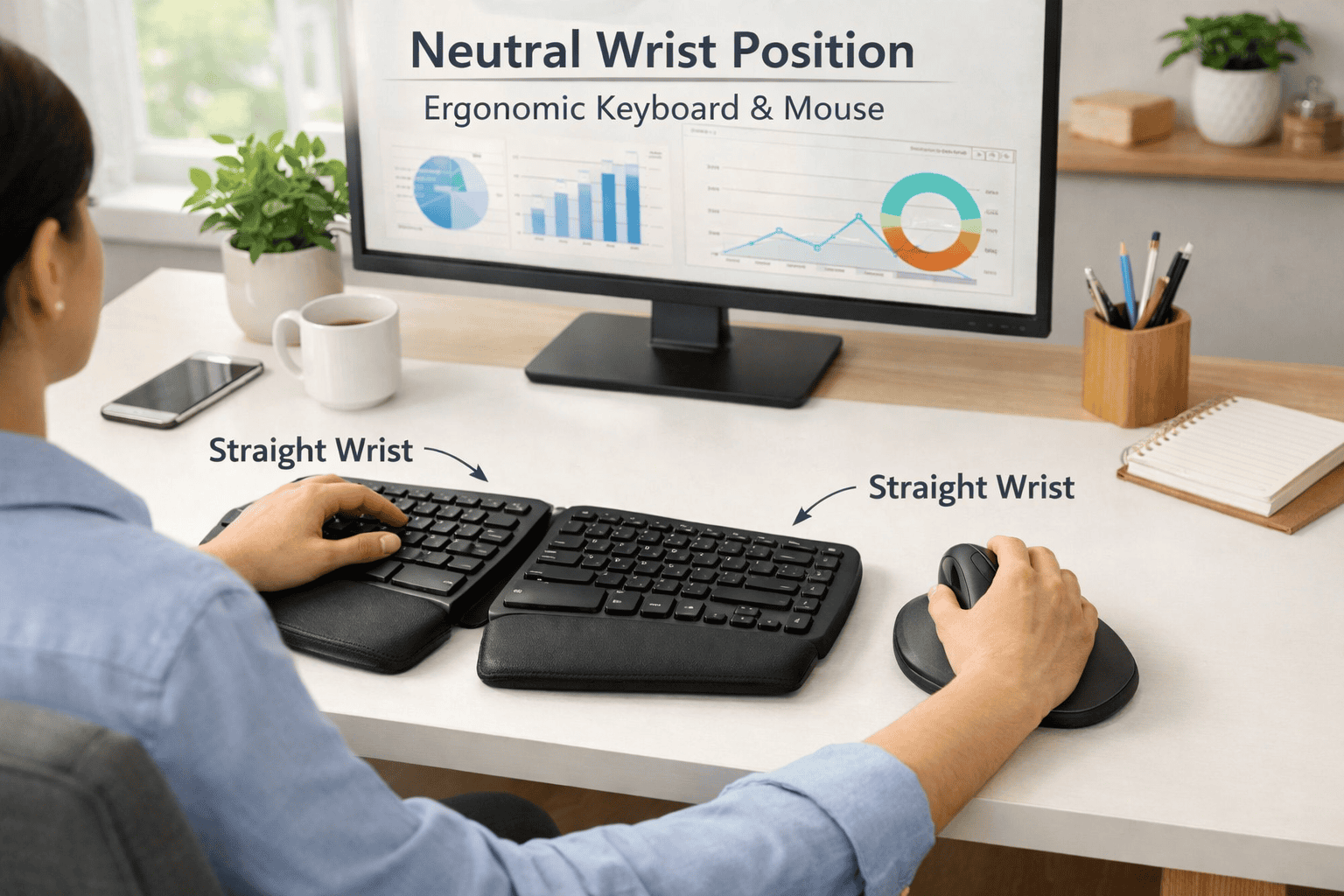
The proper wrist position is important to help decrease wrist pain. Your wrists should remain straight, not cocked up, down, or to the side. When typing, try to ensure your hands hover lightly over the keyboard rather than bear down onto the desk. This relieves pressure on the wrist joints.
If you are using a mouse, keep it close to your keyboard, and ensure that your arm remains relaxed. Do not twist your wrist; do not hold the mouse too tightly. Place your forearm, wrist, and hand in a straight line. The neutral position helps eliminate strain and encourages a healthy typing posture during long browsing or typing sessions.
Desk, Chair & Arm Height Alignment
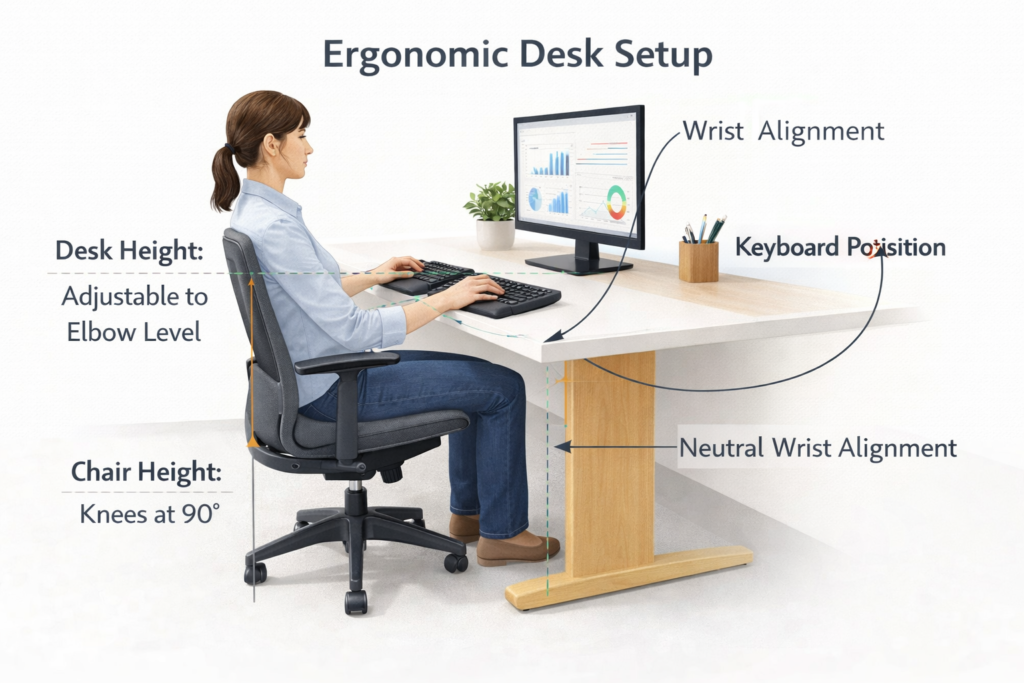
The height aligns to ensure a range of motion that’s easy on wrists and arms. You should have a chair where your feet rest flat on the floor elbows are bent at about a right angle. Your desk should be at about the same height as your elbow so that your wrists can remain straight while typing.
Armrests may be beneficial if they support your forearms without lifting your shoulders. Wrist bend is aggravated by inadequate height. For more detailed sizing information, refer to Desk Chair Dimensions to find your perfect fit for maximum comfort.
Keyboard & Mouse Placement Tips
The arrangement of the keyboard and mouse makes a big difference when it comes to preventing wrist pain. Pull your keyboard straight in front of you—no angling! Keep it near enough that your body does not lunge forward. The mouse should be placed at the same height and position as the keyboard.
Do not position devices too high or too low. A flat surface requires minimal hand movement, while a rise lets you type comfortably. Small shifts of position can make a big difference in your day-to-day comfort.
Simple Wrist Exercises & Stretches That Help
Exercises and stretches that can benefit from wrist pain include boosting flexibility, strengthening the wrist, and training a greater blood flow. As wrists softly swing, tense muscles ease up, and stiff joints unfurl. These exercises help recovery, particularly among people who type or use their hands frequently.
You should never experience pain while performing wrist exercises. They should be light and controlled. Slow movements work best. Which is why daredevil-like strength training, as well as other rehabilitation endeavors like stretching and massage earlier in the athlete’s progression through coarctation-treatment rehab, can pay dividends. “Stretching will help you to release tension, while strengthening your wrist enables it to better handle daily tasks with less strain.” Between the two, it helps alleviate discomfort and promote long-term wrist health.
Regular wrist exercises will also increase awareness. You are aware that your wrists feel tight, and you can take action early. These quick experiences take minutes and are easy to incorporate into your everyday life.
Consistency matters more than intensity. Even light exercises, when performed daily, are safer and better than heavy muscle work done infrequently.” Thanks to some good ergonomics, wrist exercises can be an amazing way to naturally help with wrist pain.
Gentle Wrist Stretches for Daily Relief
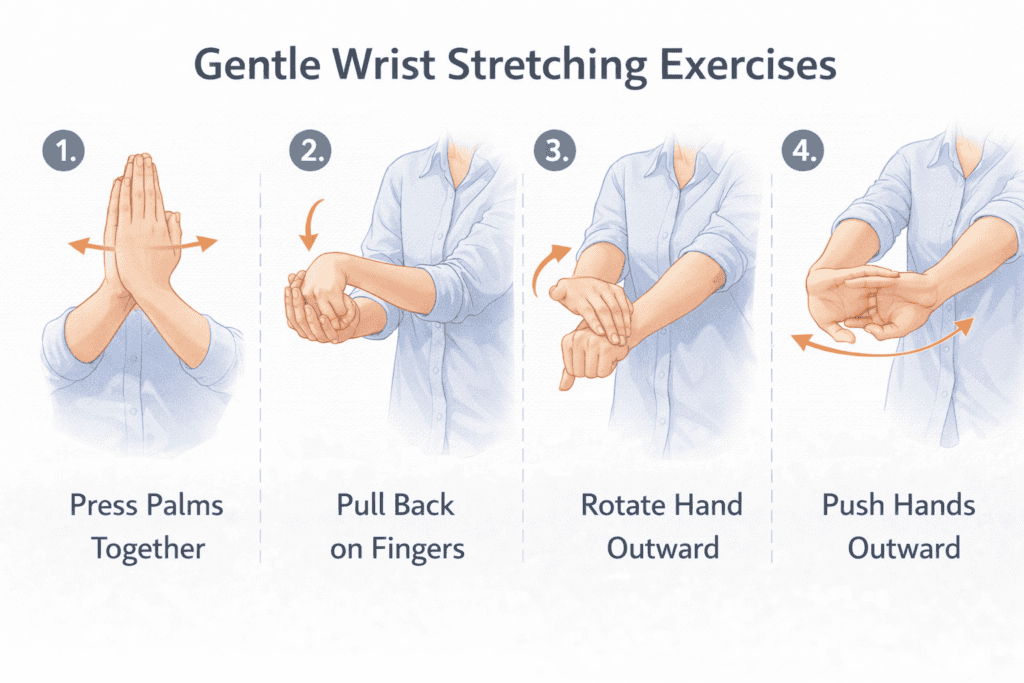
Gentle stretching exercises to relax tight wrist muscles and further minimize stiffness. A basic stretch is to reach your arm forward and turn the palm upward, then gently pull your fingers back using your other hand. Maintain for a few seconds and switch sides.
Another stretch is by circling your wrists slowly in both directions. These movements help increase blood circulation and ease tension. Stretches should feel relieving, not sharp or painful. These are wonderful to do every day to stay flexible and comfortably mobile.
Strengthening Exercises to Prevent Pain
Python’s entry on exercise includes 36 bodyweight and isometric exercises involving the arms, back, chest, and neck.
Wrist-strengthening exercises improve the wrists’ ability to do the job of daily living. Easy actions such as squeezing a soft ball or gently picking up a light object increase muscle support in the wrist. It also helps to lessen pressure on joints and tendons with strong muscles.
Focus on slow, controlled motions. Do not use heavy weights or quick movements. Exercising a few times a week will improve stability and reduce the likelihood of occurrence when using the wrist for typing or repetitive movement.
When & How Often to Do Wrist Exercises
The best time to practice wrist exercises is after work. A few minutes, five to ten, are sufficient. Frequent exercises (once or twice daily) maintain wrist flexibility and strength.
Do not exercise when your wrists are very sore. You will be helped by gentle movement, but so, too, is rest important. Routine, light scheduling to influence and maintain comfort and relief without the distracting strain of larger, cumbersome braces
Daily Habits That Reduce Wrist Pain Long-Term
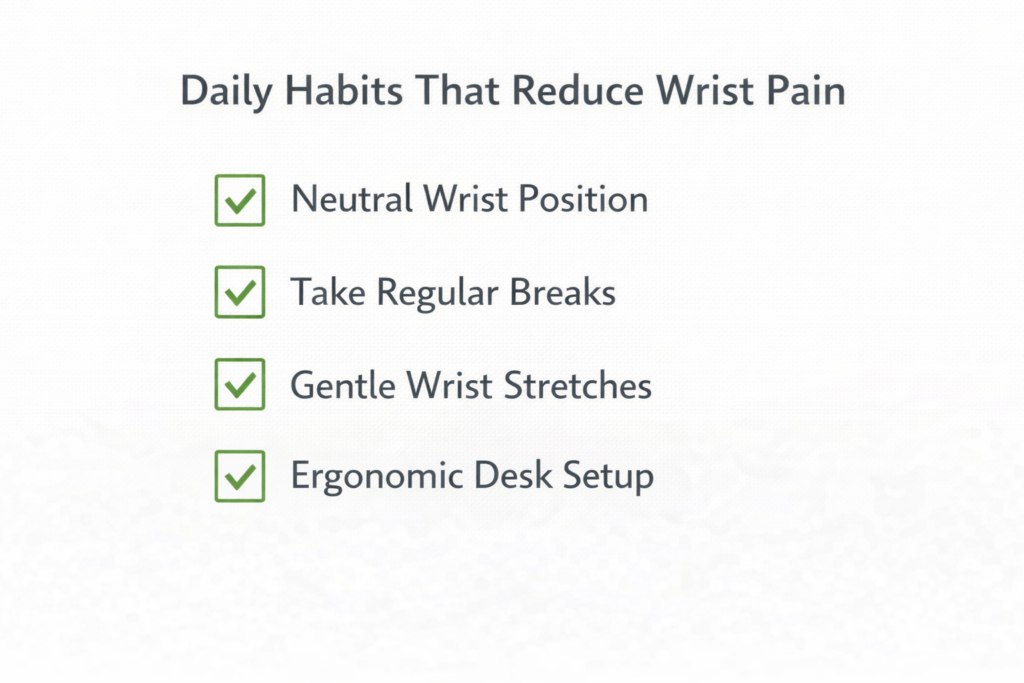
Wrist pain usually emerges gradually from small everyday habits, not one big mistake. By altering how you work, sit, and use screens, you can diminish wrist pain over time and keep it from returning. These habits are about reducing strain, enhancing alignment, and generally giving your wrists regular opportunities to rest and recover throughout the day.
Taking Breaks & Reducing Continuous Strain
One of the leading culprits of wrist pain is long hours of uninterrupted desk work. The wrist muscles remain tense when you type or use a mouse for hours without breaks. One easy practice is to take brief breaks every 30 or 45 minutes. Between times, give your hands a rest, wiggle your fingers, and stretch your muscles. Standing for a single minute will help blood to flow back down the wrists. These short breaks relieve sustained stress and prevent stiffness, pain, and possible long-term wrist injury from daily computer use.
Improving Posture to Reduce Wrist Load
Bad posture ends up putting more pressure on your wrists than you realize. Because when you hunch over, your shoulders round forward, and your arms and wrists have to make funny angles. Being seated in an upright position with relaxed shoulders, keep your forearms and wrists neutral. Using the proper posture desk setup lets your wrists rest in a more natural position, one that does not bear weight. Proper posture distributes the workload across your arms and back, minimizing strain on the wrists and making sitting at a desk working much more comfortable all day long.
Adjusting Screen & Monitor Height
People don’t realize how much screen height affects wrist pain. When your screen sits a notch too low or high, you reposition your arms to compensate—which can strain a host of other things, including the wrists. The screen at eye level promotes the right arm and wrist position. An ideal monitor height allows you to keep your elbows near your body and your wrists straight. With the right screen height, hands are free to move in the direction of opposition, easing pressure and helping to prevent chronic wrist pain.
Common Wrist Pain Mistakes to Avoid
A lot of folks attempt to do too much and fix their own wrist pain, but they make mistakes that hinder rather than help recovery. And by avoiding these basic mistakes, you can significantly improve the effectiveness of your ergonomic efforts and help prevent further wrist injury during daily tasks.
Resting Wrists on Hard Surfaces
It may seem supportive to rest your wrists on hard desk edges or tabletops, but it adds pressure on sensitive spots. This position limits movement and blood flow. Long-term, it can actually make wrist pain worse instead of relieving it. Wrists should remain relaxed and floating while typing, supported by your arms, not resting on a hard surface.
Ignoring Early Pain Signals
Slight wrist discomfort is usually not taken seriously until it becomes more pronounced. Tingling, stiffness, or soreness are early warning signs that something’s got to give. Enduring the pain usually just worsens it. Attending to it early can help you correct your posture, relieve the strain, and rest before the pain develops into a longer-term issue that hampers your daily work and comfort.
Overusing Wrist Supports Incorrectly
Wrist supports may be helpful for short periods, but overuse can cause muscles to weaken. Even support restricts freedom of movement and strength over time. Wrist supports are intended for temporary use, not long-term dependence. Good ergonomics, movement, and breaks work better for lasting relief from wrist pain.
Who Is Most at Risk of Wrist Pain?
Anyone can experience wrist pain, but certain groups are more susceptible due to the way they study, work, or use devices daily. That risk is higher if repeated wrist movement, poor posture, or skipped breaks are involved. Knowing who is most at risk allows you to take preliminary measures against wrist pain and protect your hands eventually.
Office Workers & Remote Employees
Office workers and remote employees can spend hours upon hours typing, clicking the mouse, and tapping on laptops. This desk work is so often daily that it can leave wrists stuck in one position for hours at a time, too long. Uncomfortable desk positioning, improper chair arrangement, and the constant use of computers contribute to wrist straining. (My PPK RWS nail gun was very kind to mention RSRC on the forums so that I could be nauseated reading all about it, and so here we are. Without interruptions and ergonomics, wrist pain can form gradually and become a part of everyday life.
Gamers & Creative Professionals
Given that gamers, designers, editors, and digital artists are using their wrists all the time for speedy motions and fixed points. Strain in wrist muscles and joints can get overloaded after hours-long gaming sessions or work. Repeating small hand movements over and over can end up increasing the chances of pain and stiffness. As we grow, wrist pain can even occur in youth without good wrist supports and rest.
Students & Laptop-Only Users
Students and laptop-only workers tend to work on beds, couches, or low tables. The wrists DO bend at illogical angles. Small keyboards and trackpads compress the hands into tight, awkward movements. After practicing persistent stirring, it results in increased wrist pressure until you start feeling uneasy after extended study sessions or online classes.
FAQs About Wrist Pain (People Also Ask)
How do I relieve wrist pain at home?
You can ease at-home wrist pain by modifying your desk setup, typing with straight wrists, and taking regular breaks. Tender wrist stretches, periodic rests, and proper posture alleviate strain. And small changes here and there can lead to noticeable comfort without any special tools.
Do people get wrist pain from typing?
Yes, wrist pain as a result of typing is quite common, especially among those who spend the entire day in front of a computer. Extended periods of typing, incorrect wrist position, failure to take breaks, and excessive exertion on the wrists. There are easy ergonomic solutions that can help alleviate wrist pain from typing.
Is it bad to rest your wrists on the desk while typing?
Wrists shouldn’t be heavily resting on the desktop when keying. It takes constant pressure to ramp up tension and reduce mobility. Wrist relaxation is better and slightly lifted to adopt the natural movement of the hand towards the arms and shoulders.
Does bad posture affect the wrist?
Bad posture can be an indirect factor in wrist pain. Leaning back from a computer also changes angles and can place unnatural pressure on the wrists. When you are sitting up straight at your desk, properly adjusted and aligned to your keyboard, this also helps maintain the neutral position of the wrists and prevents unnecessary stress.
When should I contact a doctor?
If wrist pain is intense, prolonged, or doesn’t ease up after you rest and adjust your ergonomic setup, it’s a good idea to consult a doctor. Persistent pain, weakness, or numbness should not be neglected and requires medical attention.
Final Thoughts: Small Changes Make a Big Difference
While wrist pain is a common complaint in our modern lives, it’s important not to just brush off the source of this discomfort. The vast majority of wrist pain stems from small daily habits, like slumping over a keyboard or cradling your phone in your hand. The nice news is that it only takes a little bit to make a big difference. Making it a point to sit properly, take breaks, and improve wrist alignment can significantly lessen strain. You don’t need drastic measures; just understanding and consistency are key. By paying attention to how you are using your wrists every day, you can be more comfortable, protect your hands, and make daily work easier and more pleasant.