

It’s 4 p.m. Your shoulders ache, and you keep adjusting your position as discomfort sets in. You bought an ergonomic chair to feel better, but now your neck hurts. Maybe you searched “ergonomic chair cause neck pain” and found you’re not alone. This is one of the most frustrating situations after upgrading your workspace. You spend money, follow advice, sit “properly,” and still feel pain in your neck by the end of the day. This article explains why that happens, what’s really going on in your setup, and what you can fix without buying another chair.
Table of Contents
Why People Feel Confused When an Ergonomic Chair Causes Neck Pain
Most people expect an ergonomic chair to remove pain instantly.
That expectation comes from marketing, not reality.
When neck pain appears after switching chairs, users feel:
- Confused
- Regretful
- Frustrated
- Doubtful about ergonomics itself
Some even think:
“If an ergonomic chair causes neck pain, maybe ergonomic chairs are fake.”
They aren’t. But they don’t work alone.
Does an Ergonomic Chair Cause Neck Pain or Reveal an Existing Problem?
This is the truth most articles miss: An ergonomic chair usually does not create neck pain. It reveals problems that were already there. When you shift from an old, slumped C-curve posture to a new, upright S-curve, old chairs allow slouching, which sometimes lets the neck rest lazily. Switching to an ergonomic chair transforms your posture, and your body must work again. That sudden change can make neck muscles sore, tired, and tense. To ease this adjustment, gradually increase your sitting time in the new posture, starting with shorter periods and working your way up. Add gentle neck stretches throughout your day to help your muscles adapt and relieve tension.
Ergonomic Chair Cause Neck Pain: The Real Reasons Explained
Let’s break this down clearly.
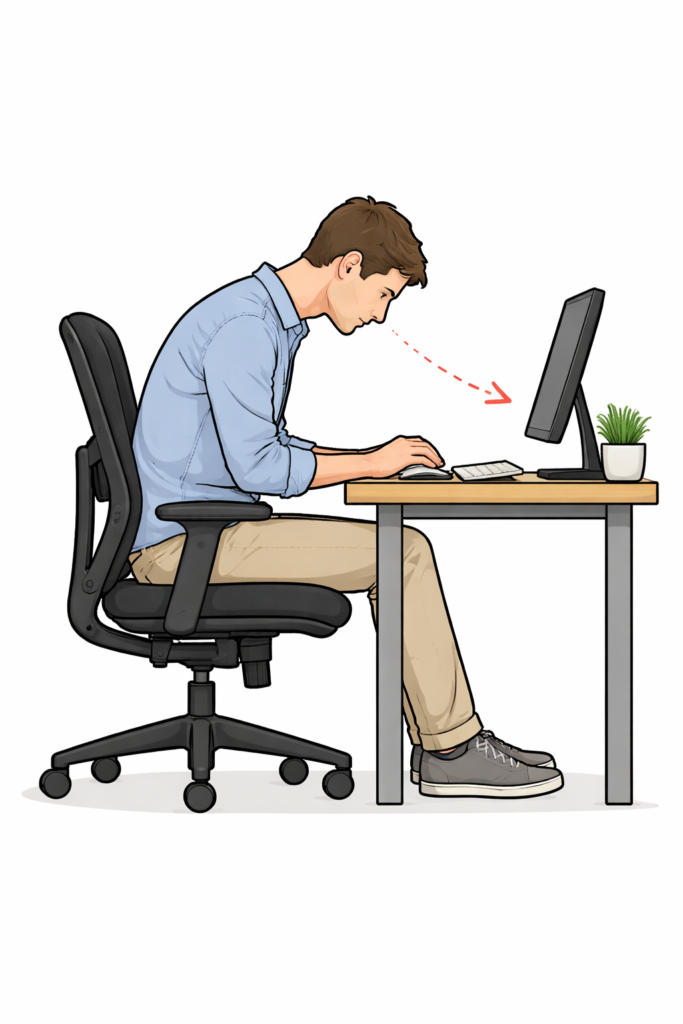
1. Your Monitor Height Is Wrong
This is the main reason people get neck pain after buying an ergonomic chair. The top of your screen should be at or slightly below eye level. This helps maintain a neutral neck posture and reduces strain.
When your chair improves posture:
- Your eyes change height.
- Your head position shifts.
- Your screen becomes too low or too high.
Your neck bends to compensate.
Result: Neck pain — not because of the chair, but because of the screen.
2. Armrests Create Shoulder Tension That Travels to the Neck
Armrests seem harmless, but the wrong armrest height can:
- Push your shoulders up.
- Pull shoulders down
- Lock arms into tension.
- Set your armrests so your elbows are at a 90-degree angle, and your shoulders are relaxed. This simple adjustment helps reduce tension that often travels from the shoulders to the neck.
Your neck muscles connect directly to your shoulders.
When shoulders stay tense, the neck suffers.
This pain often feels:
- Stiff
- Dull
- Worse at the end of the day
👉 Guide opportunity: Desk Chair Dimensions

3. Are You Sitting “Too Perfectly”?Many people try to sit like a robot: straight
- straight spine
- locked shoulders
- ero movement
That’s not natural.
Our necks are not designed to stay still for hours. When you force perfect posture:
- The neck muscles stay active nonstop.
- Fatigue builds
- in follows
Good posture is balanced, not stiff.

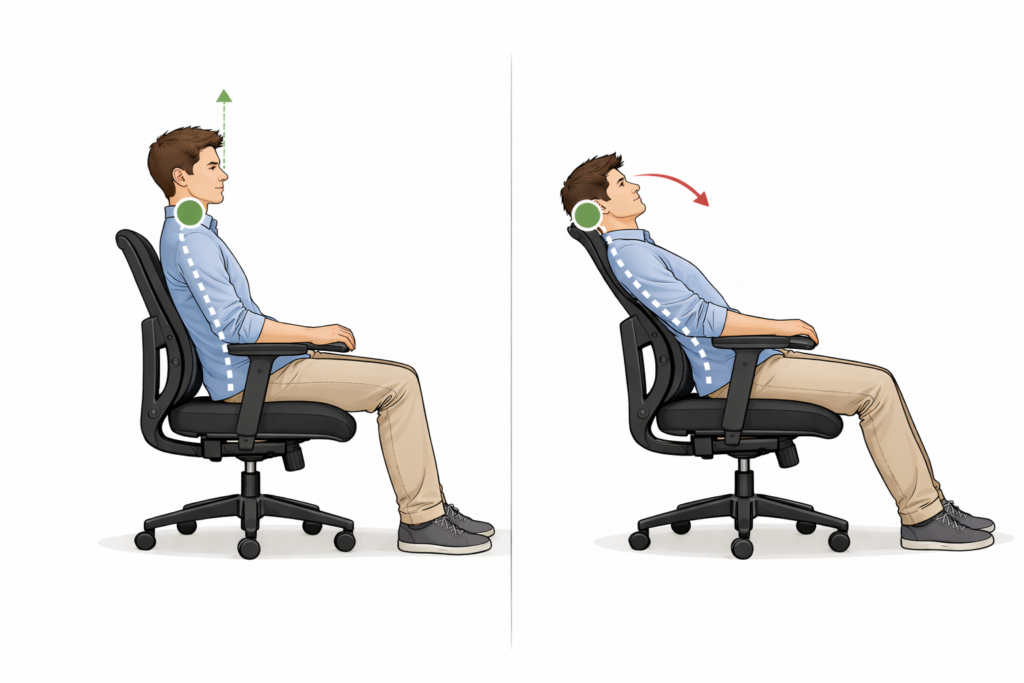
4. Backrest Angle Changes Head Balance
When you recline slightly:
- Your head shifts forward.
- Your neck works harder to hold it up.
When you sit too upright:
- Neck muscles over-engage
Small backrest angle changes can make a big difference to your neck.
5. Long Sitting Without Movement Is the Silent Trigger
Even the best chair cannot protect you from stillness. Muscles can lose up to 50% of their blood flow after just 60 minutes of inactivity. When you sit for long hours, blood flow slows, muscles stiffen, and neck tension builds. Pain does not come from sitting itself, but from not moving enough. To combat this, add simple movements to your day. Shoulder rolls help maintain flexibility, and neck tilts keep your neck muscles relaxed. These small, regular movements encourage circulation and prevent tension from building up.

Why Neck Pain Often Starts AFTER Switching to an Ergonomic Chair
This part is important for trust and authority.
When you change chairs:
- Your posture changes
- Your muscle usage changes
- Your body enters an adjustment phase.
Muscles that were asleep wake up.
That soreness feels new, but it’s often just muscle adaptation, not injury.
This is the same reason people feel sore after starting exercise.
👉 Guide opportunity: Why Ergonomic Chairs Cause Back Pain
Neck Pain vs Shoulder Pain vs Upper Back Pain (People Mix This Up)
Many users say “neck pain,” but feel pain in: Shoulder tops
- Upper back, between the shoulder blades
Why this matters: Fixing the wrong area doesn’t work.
- Users think ergonomics failed. Frustration grows
Neck pain is often shared tension, not just one spot. Pinch your shoulder blade. Does it hurt more than your neck? This quick self-test can help you find the real source of your discomfort.
What Ergonomic Chairs Do Well (And What They Don’t)
Let’s be honest.
Ergonomic chairs help with:
• Lower back support by encouraging a natural curve
• Sitting balance by providing adjustable features
• Fatigue reduction thanks to their design that promotes movement
Ergonomic chairs cannot:
• Automatically fix screen height, but they can encourage a neutral spine alignment
• Correct desk height issues, yet they support a posture that works with an ergonomic setup
• Adjust phone posture; however, they support a seating position that makes it easier to maintain a comfortable view
- Force movement, but they are designed to allow and accommodate int
Understanding limits builds trust.
Simple Fixes That Reduce Neck Pain (Without Buying Anything)
Fix #1: Adjust the screen first, Chair Second
Your eyes should meet the screen naturally.
If your neck bends:
- The screen is wrong
- Not your chair
👉Guide opportunity: Ideal Monitor Height
Fix #2: Lower Armrests Until Shoulders Relax
Rule of thumb:
- Shoulders down
- Elbows supported lightly
- Arms relaxed
If shoulders rise, neck tension follows.
Fix #3: Sit Balanced, Not Rigid
Think:
- Relaxed upright
- Small movements allowed
- Back supported, not forced
Your neck likes freedom, not discipline.
Fix #4: Move Every 30–45 Minutes
Stand.
Stretch.
Walk.
Movement resets neck tension better than any chair feature.

When an Ergonomic Chair Is NOT the Problem
Sometimes pain has nothing to do with the chair.
Common overlooked causes:
- Laptop-only setups
- Phone use during breaks
- The desk is too high or too low. If your desk cannot be adjusted, use a footrest to elevate your feet and maintain better posture when the desk is too high. If the desk is too low and cannot be changed, raise your chair to a comfortable height and make sure your feet are well-supported. Fixing these often removes neck pain completely.
When Neck Pain Might Not Be From Sitting
This article avoids medical advice, but it’s honest.
If pain:
- Is sharp
- Lasts weeks
- Gets worse daily
- Comes with numbness
Sitting may not be the main cause.
Listen to your body.
What Users Really Want (And What Actually Works)
Users don’t want:
- Another chair
- Another product
- Another promise
Users want:
- Comfort
- Relief
- Confidence they’re doing things right
That comes from understanding, not buying.

FAQs: Ergonomic Chair and Neck Pain
Can an ergonomic chair cause neck pain?
An ergonomic chair usually does not cause neck pain by itself. Neck pain often comes from screen height, armrest position, or sitting too still for long periods.
Why did my neck start hurting after switching to an ergonomic chair?
When you change chairs, your posture changes. This activates neck muscles that were not used before, which can cause temporary discomfort.
Is monitor height related to neck pain when using an ergonomic chair?
Yes. If your monitor is too high or too low, your neck bends to compensate, which often leads to pain even if your chair is well adjusted.
Final Thoughts: The Chair Is Not the Enemy
An ergonomic chair does not betray you. An ergonomic chair does not betray you. It changes posture, reveals habits, and exposes setup flaws. Once you fix the system—screen, arms, desk, movement—neck pain usually fades. Your body wants balance, not perfection. Adjust one thing today and notice how your neck responds. Jot down your observations and track your comfort over the next few days. This mindful approach builds confidence and helps you find adjustments that work best for you. Small changes can lead to big relief and greater comfort.