
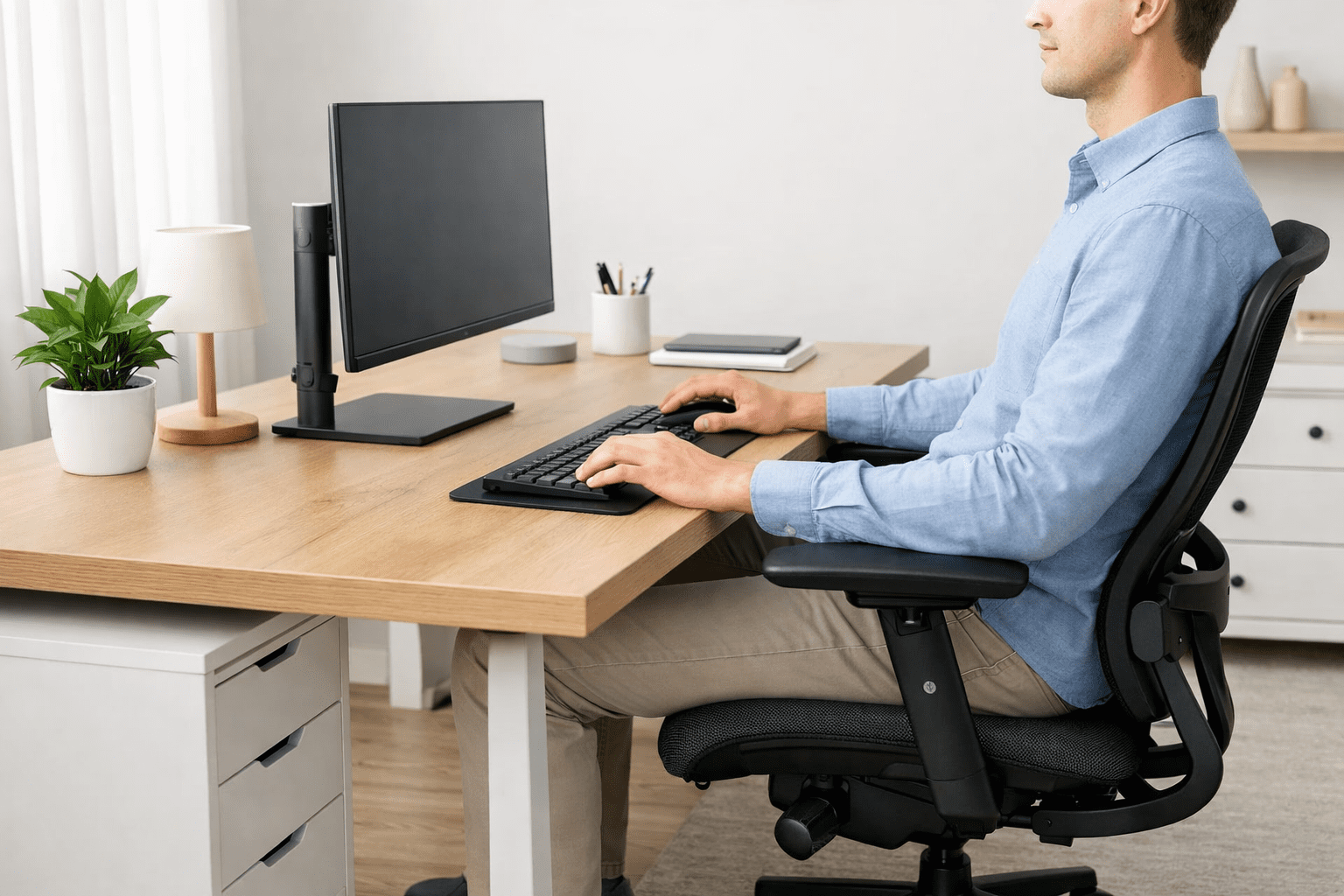
Desk ergonomics involves setting up your computer, monitor, and keyboard in a way that allows your body to work comfortably and naturally. Poor desk setup can quietly and subtly cause neck pain, lower back strain, wrist discomfort, and long-term posture problems — especially in an era of endlessly long hours of work, study, and screen time.
You can’t deny that, way work is done at a desk has much evolved. Full-time work at desks, online classes, and hours of video gaming mean many people never have to wonder or realize how their setup is impacting the way they sit. Minor problems, such as a desk that’s the wrong height or a screen in the wrong position, can place muscles and joints under daily stress.
Written for the novice who desires a comprehensive, yet practical knowledge of desk ergonomics. You will learn how great height and optimal posture, and layout combine to enable comfort in the short term, focus on work and activities, and health for a lifetime.
Table of Contents
What Is Desk Ergonomics?
Desk ergonomics means setting up your desk/workspace in a manner that accommodates your body, not making the body accommodate the desk. When performed properly, it can help you sit, work, and move more comfortably and reduce daily stress on your muscles and joints. Many of us are in pain not because we work too much, but because our desk setup has been quietly sabotaging us.
Simple Definition of Desk Ergonomics
In short, desk ergonomics is just a fancy way of saying desk design for people. Your chair, desk, screen, and keyboard should encourage the way your body naturally sits and moves.
There are three things you want to get right:
You can sit without feeling pressure or pain all the time
- Work / Study: No need to shake legs again when you can go up to that intensity without any kind of movement
- Health: Your back, neck, wrists, and shoulders are kept in a neutral position
- For instance, if your desk is at a height that allows your elbows to sit comfortably at an angle that supports relaxation in your posture, too, there’s no need to hoist your shoulders up or let them slump. Small changes like this can help the body endure long hours.
Why Desk Ergonomics Is Often Ignored
Good desk ergonomics are often ignored because issues develop over time. Pain develops slowly, over weeks to months: This gradual process may lead you to dismiss early warning signals.
Another factor is the furniture selected for appearance rather than fit. Too many desks and chairs are made to match room decor, not the size of our human bodies. This results in setups that look great but don’t encourage healthy posture.
There is also a prevalent notion of the one-size-fits-all desk. The fact is that none of us is built the same body-wise, or our arms are not all the same size, and we don’t sit the same way at times, etc. What’s comfortable for one person can hurt another.
Desk ergonomics simply means being aware of the ergonomic issues earlier and making small, reasonable changes that minimize their impacts on your body over time.
Why Proper Desk Ergonomics Is Important
Good desk ergonomics is crucial, since your body wasn’t designed to remain in one position for hours on end, particularly not in a bad home office setup. This can have a subtle but significant negative effect on us.” When your desk, chair, and screen are misaligned with your natural posture, small stresses compound every day. Over time, this discomfort can become painful and sap your focus — even if you’re in good health.
Turck. One of the most widespread complaints is backache. Sitting or bending over with a curved lower back or an unsupportive spine compresses discs and muscles constantly. It often begins with light stiffness and slowly progresses to daily pain that can even influence work or sleep.
A stiff neck: This is another common complaint. A screen that is too low or too far forward makes your head tilt down. Because the head is heavy, slight forward tilting places extra strain on the muscles of the neck and upper back.
Bad table ergonomics can also lead to wrist and shoulder pain, as well. Your shoulders raise, and your wrists bend in unnatural ways when your keyboard or mouse is too high or far away. This enhances the possibilities for long-term stress and repetitive stress-related issues.
Beyond physical discomfort, an ill-placed desk leads to fatigue and decreased levels of productivity. When your body is uncomfortable, your brain has to do extra work just to stay focused. The consequence of this is that there are so many distractions, work goes slower and lots of energy is wasted at the end of the day.
Who Needs Desk Ergonomics the Most?
And some people are more at risk than others, depending on how long and how often they sit:
- Remote workers putting in full days at a desk without office-grade setups
- Students who are studying/ attending classes online for hours at length
- Gamers who have long and serious sessions of sitting
- 6 or more hours FTJOB, PAID WORK 76.1%.
For these members of the community, good desk ergonomics is not a luxury—it’s a necessary component for living in comfort in the long term or over the course of any day.
Standard Desk Height
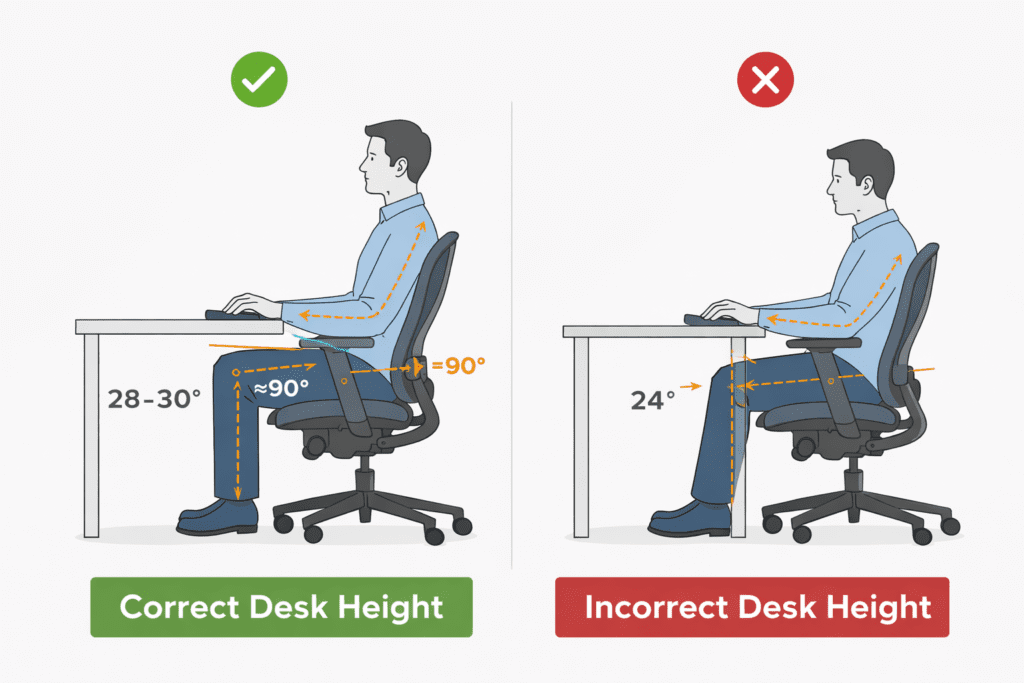
“How tall should a standard desk be?” is one of the most commonly asked questions related to ergonomics, because height can impact how comfortable you are when working and how productive you are throughout your day. The assumption a lot of people make is that desks are designed properly, but the truth is not all desk heights are created equal—and it’s possible the “standard” won’t fit everyone right.
The average desk height in a home or office is between 29 and 30 inches (74–76 cm) from the floor to the desktop. It is also most suitable for writing desks, office desks, and computer tables. It draws off the adult average height and has not changed for decades.
This is the typical height you will see in the ready-made desks at furniture stores. Manufacturers select based on this measure because it’s a pretty good average for the height of most people when sitting in an average chair. But “works reasonably well” doesn’t always translate to “comfortable for long hours.”
Also, normal desk heights vary with respect to the type and purpose of the desk:
- Desks: usually around 29 inches
- Computer desks: can be anywhere from 28 to 30 inches.
- Adjustable or sit-stand desks: typically fall between 24 and 49 inches
- Desks for kids: shorter than average adult desks
These differences exist because people work at and on desks differently and have varying physical requirements.
Does One Desk Height Work for Everyone?
The short answer is no. A single desk height does not work for all. Differences in height matter a lot. It is possible to have a desk that seems just right for someone who is 5-foot-10, that might seem too high to someone who is 5-foot-2, or even too low for someone much over 6 feet.
Body proportions also matter. Two people with the same height may have different leg, torso, or arm dimensions. This shapes the level at which their “elbows rest” and where their “hands naturally fall when typing or writing.”
That is why a lot of people wind up with tension in their shoulders or strain in their wrists at “standard” desks. Knowing your desk height is the first and most important step in setting up your chair or accessories to make sure you have a setup that fits your body, rather than one designed around an arbitrary average measurement.
Desk Chair Dimensions and Their Role in Ergonomics
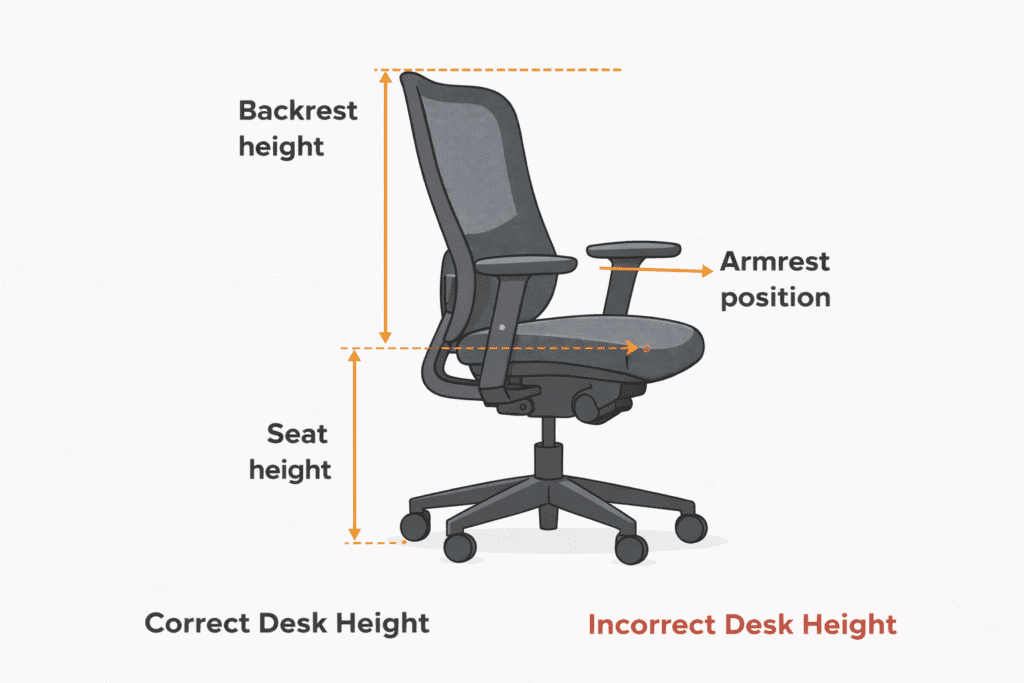
The desk is not only about the desk – the dimensions of the chair are just as relevant. A desk can still lead to discomfort if the chair doesn’t properly support you, even when it’s ideal in size. When the desk and chair work together, it’s less taxing and lets you sit with more comfort, for longer.
One of the longest butts belongs to the seat height. Your chair should help your feet remain flat on the floor, with knees bent at a right angle. With the seat too high, pressure accumulates under the thighs. If too low, the hips also tilt backward, which adds additional strain to your lower back.
Seat depth impacts the level of support it provides to your thighs. A great seat depth allows you to sit back into the chair, enough there is just a little air (about two to three fingers) behind your knees. Seats that are too deep hit the back of the legs, while shallow seats don’t evenly support body weight.
For those users looking to maintain a healthy posture, lumbar support is key. A nicely designed backrest takes up the natural shape of the lower spine, and therefore, it gives proper height for dressing the upper back over time. Without this assistance, slouching is more probable.
Armrests are one of those details that are too often disregarded but make a real difference. The correct armrests support the elbows slightly with relaxed shoulders. Tall armrests contribute to shoulder tension, and low or absent armrests can result in strain on the arms and neck.
Desk and Chair Height Relationship
The height of the desktop and chair can affect the posture. 3. A too-low chair. The vast majority of people talk and write with their hands at about the same level, but we’ve all seen the person hoisting up her shoulders because she can barely reach the desk from that giant armchair. If the chair is too high, wrists twist upward, placing extra pressure upon forearms.
Even and low-enough elbows to rest on the desk at or slightly under the desk level. In that position, the spine stays neutral, and shoulders relaxed as muscles are less fatigued—contributing to desk work that’s healthier and more comfortable over time.
Proper Desk Sitting Posture
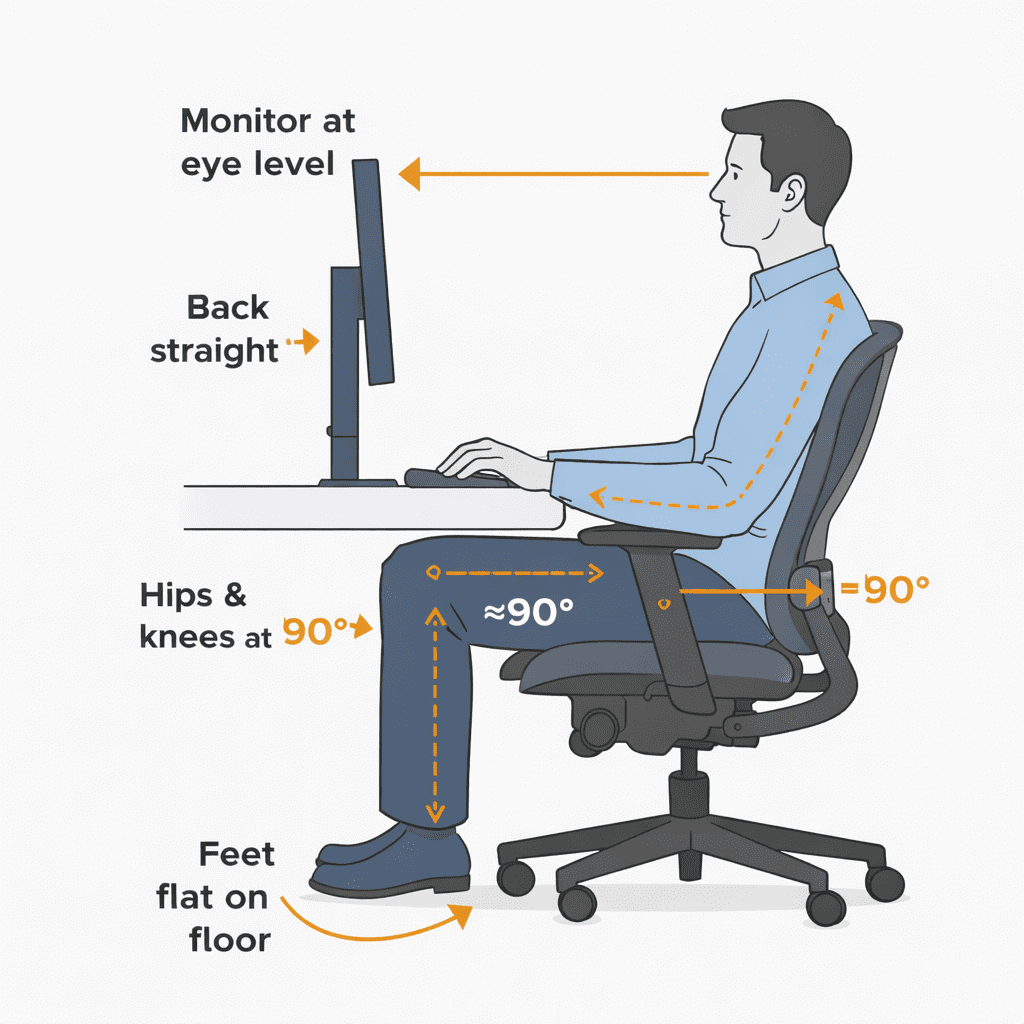
How you sit at a desk is one of the best and easiest ways to minimize daily discomfort as well as long-term strain. Good desk posture allows you to maintain body balance, joint alignment, and engagement without straining yourself. Caring small changes in posture make a difference even if you sit still for hours — and we all do.
Start with foot placement. You will place your feet flat on the floor, rather than tucking them under the chair or letting them dangle. Maximum stability with a flat foot contact and the even distribution of body weight. If your feet cannot comfortably reach the floor, use a footrest.
Next is the knee angle. Knees should be at or slightly below hip height and create an open angle, rather than a sharp bend. This position takes pressure off the lower back and increases leg circulation.
The position of your hips is more important than a lot of people think. Sit all the way back into the chair to ensure your hips are supported by the chair seat. Do not sit on the edge as it puts body weight forward and strains muscles.
To keep the back aligned, try not to flatten it. Your lower back should feel supported, not overly flat or arched. Instead of hunching over, stack your shoulders over your hips with a relaxed posture.
Comfort is a strong function of the positioning of your elbows and wrists. The elbows should be next to the body with an angle of about 90 degrees. Do not bend wrists up or down when typing or using a mouse. It decreases the pressure on the wrists and forearms.
Common Desk Posture Mistakes
One of the most common mistakes he sees is leaning over. The pressure gradually compresses the chest and fatigues the lower back by little every time you slouch, no matter how relaxed it may feel initially.
Another common issue is moving closer to the screen. That’s frequently due to the screen being either too far away or too low, which generates neck and shoulder strain.
Finally, the keyboard or mouse forces the shoulders forward, and stress on the arms can be increased. Input devices must stay very near, so that you can just have your arm hang naturally by the side.
It ISN’T about being rigid or stiff while sitting at your desk. It is all about crafting a balanced position that emulates healthy and natural sitting positions, so desk work will not take the same kind of toll it used to on your body.
Adjustable & Flexible Desk Solutions
Not all workplaces remain consistent throughout the day. Real people go from one task to another, device to device, and sitting position to sitting position (ever heard of hot desking?), so it’s little wonder that versatile, adaptable desks are growing in demand. These desks conform to the user instead of requiring the body to conform to rigid furniture. For instance, if you have a shared home office or live in an apartment with not much space, the flexibility that embracing this trend provides means much more freedom of movement and comfort.
Height, or position, on adjustable desks can be moved according to what the user wants. This can help prevent long spans of static sitting, which often leads to back stiffness and fatigue. Once a desk is adjustable, it can be easier to avoid bad posture, ensure that screens are placed at eye level, and support natural arm and wrist positions.
Flexible desk arrangements are also useful for those who work, study, or create content in the same spot. (Allowing for the desk height to be raised or lowered and for the desks to be brought closer or farther away helps promote small changes in posture throughout the day.) And while these micro-movements may look small, they work to release muscle tension and increase circulation in the long term.

Adjustable Height Rolling Desks
What is an adjustable height rolling desk? They typically have smooth top surfaces, locking wheels, and a simple height adjustment system.
These desks promote ergonomics while users stand or sit, as the height-adjustable desk ranges from 29 inches to 46.3 inches tall to suit your needs. Since the height is adjustable, they are suitable for both seated and standing positions. That avoids the bad habit of slouching over screens or raising shoulders while typing.
Rolling desks are great for small homes, shared spaces, or rooms that don’t have a specific office to begin with. They’re also handy for brief essay writing, video calls other light tasks that don’t require a full desk. They’re not for everyone as a sole workstation, but are a flexible way to use your desk if you’d like to be sitting less and standing more.
Standing & Perching Options for Desk Ergonomics
Standing desks have transformed the way many people work, but standing all day poses its own problems. This is when the standing or perching helps to balance out the desk ergonomics. They encourage less sitting all the time and don’t make you stand all the time, either.
Standing and perching activities are intended to promote movement and postural changes during the day. Rather than selecting between remaining seated for hours or standing until they get tired, users can move more naturally between positions. This balance will help reduce back pressure, increase circulation, and reduce stiffness in the hips and legs.
Perching options are a midpoint for those who use adjustable desks. They carry part of your body weight as they keep the hips more open than a regular chair. This can help you feel less tired after long hours at the desk and more animated, especially during meticulous work or short tasks.
Stand-Up Desk Stools Explained
Here are a handful of stand-up desk stools, which are less for sitting and more for perching. They’re not office chairs designed to be sat in for six hours a day, and unlike office chairs, they don’t encourage slouching or leaning back. Instead, they maintain your body slightly upright and activated.
Sitting vs perching:
- The seated position transfers the highest percentage of your body weight to the hips and lower back.
- This allows weight to be taken off the spine and transferred onto the legs.
Posture benefits:
Upright stools encourage a more neutral spine and open hip angle. This could cut down on lower back strain and help users remain more alert while working. The core muscles are lightly engaged, which naturally assists with posture.
Usage duration:
This stool is not recommended for long periods of use. The majority of us will find it best to use both standing, perching, and sitting, rather than staying in one position all day. Such rotation of the head will promote healthier movements and help prevent fatigue.
When used appropriately, standing and perching surfaces can be a useful component in an office ergonomics solution, particularly for people who want to reduce the amount of long sitting without going overboard.
How to Set Up an Ergonomic Desk at Home
When you work from home, you often sit on furniture that was never intended for prolonged use. This can cause neck pain, back strain, and weary eyes. An ergonomic desk setup mitigates both of these issues by accommodating the way your body naturally wants to sit and move.
What follows is a straightforward, step-by-step guide to establishing an ergonomic desk at home.
Step 1: Adjust the Desk to the right Height
The problem when your desk is too high (or low), it causes you to position your shoulders and wrists in a way that isn’t natural.
Solution: “Your desk height should be just high enough that your forearms can relax,” he says.
Sit upright with relaxed shoulders
Your elbows should be at a 90-degree angle
Forearms should be parallel to the ground.
You can even adjust your chair height if your desk is not adjustable.
Pros: Minimizes stress on your shoulders and wrists.
Step 2: Adjust Your Chair Properly
Issue: The back is in an unsupported slouch, resulting in lower back pain and tiredness.
Solution:
Get your chair right before anything else.
Feet flat on the floor
Knees even or slightly below the level of the hips
Lower back support by the curve of the chair
If necessary, sit with a small cushion or rolled towel to support your lower back.
Pros: Features a healthy spine posture throughout a long work day.
Step 3: Place Your Monitor Properly
The problem: Working with a screen that is either above or below eye level creates tension in the neck and eyes.
Solution:
Either the very top of the screen at eye level or just below it.
Stand about arm’s length from the screen
Position the monitor directly in front of you
Schematic suggestion: Seated side view with eye-level monitor alignment.
Advantage: Keep away from neck pain and eye fatigue.
Step 4: Place Keyboard and Mouse Mindfully
Issue: Extended reach or wrist flexing results in hand and wrist discomfort.
Solution:
The keyboard is right in front of you
The mouse is close to the keyboard
Neutral/straight wrist position
Do not put your wrists on a hard edge when typing.
Pros: Lessens the risk of RSIs (Repetitive Strain Injuries).
Step 5: Improve Lighting Basics
Issue: Bad lighting leads to eye strain and headaches.
Solution:
Use soft, indirect lighting
Avoid glare on the screen
4: Position lights to the side, not behind. Don’t position your lighting sources from behind the monitor.
Natural light is good, but don’t have the screen in direct sunlight.
Quick Ergonomic Desk Checklist
- ✔ Elbows at 90 degrees
- ✔ Feet flat on the floor
- ✔ Screen at eye level
- ✔ Neutral wrist position
- ✔ No screen glare
A good ergonomic workstation will increase comfort, enhance focus, and contribute to long-term health. Little tweaks and changes can bring improvements within days.
Desk Ergonomics for Different Users
We don’t all utilize our desks in the same way. A student, a telecommuter a gamer all have different physical and ergonomic demands of the body as well as their workspace. Knowing these distinctions can help you establish a desk space that promotes comfort, focus, and long-term health.
The following user manual was prepared with usage in mind.
Desk Ergonomics for Students
Problem:
Many students spend hours studying on beds or at the dining table, resulting in bad posture and a lot of back strain.
Solution:
A well-organized, uniform desk set-up creates a more comfortable study experience.
Use a chair with back support
Use a stand to keep books or laptops at eye level
Give yourself little breaks every 30-40 minutes
Pros: During cycling, the user may assume a correct posture, leading to better concentration and preventing tiredness related to studying.
Example: Elevating a laptop on a stack of books will automatically straighten your neck.
Desk Ergonomics for Remote Workers
Problem:
Working from home is a pain, and it is literal; long hours in front of screens result in neck, wrist, and lower back discomfort.
Solution:
Focus on full-body alignment.
Adjustable chair with lumbar support
Easy on the eyes for video calls
Elbow height to the keyboard and mouse
Advantage: Helps to relieve stress on the body during long days of work and increases efficiency.
Diagram proposal: The complete ergonomic workstation layout for a home office.
Desk Ergonomics for Gamers
Problem:
Gamers frequently lean forward and remain seated for extended periods, placing stress on necks, shoulders, and wrists.
Solution:
Chair with back and neck support
Screen BELOW eye level
Mouse positioned to avoid overreaching
Benefit: Comfort and quick response in long gaming sessions.
Quick Comparison Checklist
| User Type | Main Focus | Key Adjustment |
| Student | Comfort + focus | Eye-level books/laptop |
| Remote Worker | Long-hour support | Lumbar + monitor height |
| Gamer | Endurance + control | Arm and wrist positioning |
A desk arrangement should be in sync with how you use it. Too many little custom changes to the user experience can make a huge difference in overall comfort and performance later.
Common Desk Ergonomics Mistakes to Avoid

Even with the best of intentions, many people configure their desk in a manner that subtly sabotages performance and comfort. These miscalculations may seem minor, but over the long term, they can set you up for pain, stiffness, and trouble concentrating. Knowing what not to do is as important as knowing what to do.
The Desk Before the Chair
Problem:
So many people buy a desk and then attempt to find something that will work for their chair. This translates into bad upper arm and shoulder position.
Solution:
Always pick and set your chair before anything else. When your seat is at the right height and angle, position the desk so that your elbows are even with its surface.
Benefit: Allows shoulders to stay back and wrists to remain in a neutral position.
Example: A desk that appears fine could still be too high once you sit with proper form.
Ignoring body measurements
Problem:
Copying someone else’s setup ignores the fact that everyone has a different height, arm length, and body shape.
Solution:
Let your own body be the guide.
Elbows near 90 degrees
Feet flat on the floor
Screen at eye level
Pros: Individual adjustment helps to take the long-term load and discomfort off.
Diagram idea: Figure sitting, with body angles and alignment points noted to illustrate related muscle group activation.
Sitting too long without breaks
Problem:
But not even the perfect desk can save you if you sit for hours on end without moving.
Solution:
Take short movement breaks.
Get on your feet or do other physical activity every 30-60 minutes
Change sitting positions slightly
Relieve your eyes, look away from the screen
Benefit: Enhances blood circulation and helps to reduce muscle fatigue.
Quick Mistake-Avoidance Checklist
- ✔ Chair adjusted before desk
- ✔ Built around your body, not trends
- ✔ Regular movement breaks
Avoiding these errors allows your ergonomic setup to serve you, rather than work against you.
FAQs About Desk Ergonomics
Desk ergonomics can often lead us to ask simple yet significant questions. These responses prioritize clarity and actionable advice, especially for beginners who are figuring out how to set up a home workspace.
What Is the Best Desk Height?
Problem: The shoulders are tight, and the wrists are strained by a desk too high or too low.
Solution: For the perfect desk height, your elbows should rest at about a 90-degree angle as you type. For the average person, this is about 70–75 cm (27.5–29.5 inches) from floor level, depending on height.
Advantage: Relaxes arms and enhances typing comfort.
How long should You Sit at a Desk?
Problem: The sedentary nature of clocks compresses circulation and makes muscles still.
Solution: Don’t be in a sitting position for more than 30–60 minutes.
Stand up briefly
Stretch or walk
Change posture when sitting again
Benefit: Supports the health of your joints and helps fight fatigue.
Can A Poor Desk Setup Cause Back Pain?
Problem: Couch-potato sitting and bad support wreak havoc on the back over time.
Solution: Yes, bad desk ergonomics leads to lower and upper back pain. Correct chair support, screen height, and desk level, also maintain a neutral spine.
Advantage: Helps to minimize long-term pain and posture problems.
Is an Adjustable Desk Really Worth It?
Problem: Not all body types or work methods are conducive to a fixed desk.
Solution: An adjustable desk works better for sitting and standing. It’s useful but not essential if you’ve got your existing desk configured in the right way.
Advantage: Provides flexibility and allows freedom of movement.
Does Desk Ergonomics Really Help with Work Productivity?
Problem: Pain is attention-dragging, and it’s an ability-reducer.
Solution: Ergonomic design ensures the least amount of strain on your wrist.
Bonus: An Improved stance can help maintain energy and productivity.
Diagram idea: Basic position of ergonomics visualizing Neutral spine and Elbow placement.
The rule for good desk ergonomics is not perfection. It’s all about setting up a work environment that works for your body.
Final Thoughts on Desk Ergonomics
Desk ergonomics is an afterthought until discomfort kicks in. Bad posture, uncomfortable desk height, and long hours sitting take a toll on your body, pain level, and focus if you aren’t careful. These issues typically develop over the long term, not overnight.
The answer lies in tiny, fact-based shifts. All are part of a set that also includes braking at regular intervals. No one fix solves everything, but each little tweak lends comfort and equilibrium.
It’s all about sound ergonomics: Building products that support how your body is built to move. It does not need expensive equipment or a precise setup. This thoughtful desk setup means you work, study, or play with reduced strain and greater continuity over time.