
If you keep shifting in your chair and still can’t find a comfortable sitting position, you are not alone. Many people sit down with good intentions, but after 20 or 30 minutes, discomfort slowly creeps in. Your lower back feels tight. Your hips feel stiff. Your shoulders start to droop. You try sitting straight. Then you lean back. Then you cross your legs. Nothing feels right for long.
It’s frustrating. You bought a quality chair, adjusted your desk, and tried to sit correctly. Yet, comfort fades.
Comfort isn’t about finding one perfect posture. It’s about understanding your body and learning to change positions the right way.
In this guide, you will learn:
- Why does sitting become uncomfortable so fast
- What makes a sitting position truly comfortable
- The most comfortable sitting positions for long hours
- How to adjust your chair correctly
- Common mistakes that secretly cause discomfort
Let’s fix this, step by step.
Table of Contents
Why Sitting Feels Uncomfortable So Quickly
Sitting feels restful, but your body doesn’t fully relax.
Here is what really happens:
1. Your Muscles Work Even When You Sit
Your back muscles support the spine, your neck holds your head, and your hips balance your weight. Over time, these muscles tire.
2. Pressure Builds Under Your Body
When you sit, most of your weight presses down on:
- Your tailbone
- Your hips
- The back of your thighs
Too much pressure in one spot leads to discomfort.
3. Blood Flow Slows Down
If you sit too long, blood flow slows, which can cause numbness or stiffness.
4. Static Posture Is the Real Problem
The bigger mistake is staying in one position. Even a correct posture can become uncomfortable if you don’t move.
Comfort is not about freezing in one position. It is about smart movement.
What Makes a Sitting Position Truly Comfortable?
Before we talk about specific comfortable sitting positions, let’s understand what comfort really means.
A comfortable sitting position should:
- Keep your spine neutral.
- Support your lower back. Relax your shoulders.
- Keep your feet stable. Spread pressure evenly.
- Allow small movements
Now make these personal. Do a quick self-check. Score yourself from 1 (needs improvement) to 5 (very good) on each item. This fast audit turns the list into your personalized plan.
When these things happen together, your body feels balanced, not strained.
Comfort does not mean slouching.
Comfort does not mean sitting stiff like a soldier.
Comfort means balance.
Most Comfortable Sitting Positions for Long Hours
Now, let’s review the best sitting positions and when to use each. Don’t hold any position all day. Treat posture changes as mini-breaks to keep your body comfortable and relaxed. Switch positions when a new song plays or when you get an email. Let these reminders prompt you to adjust regularly.
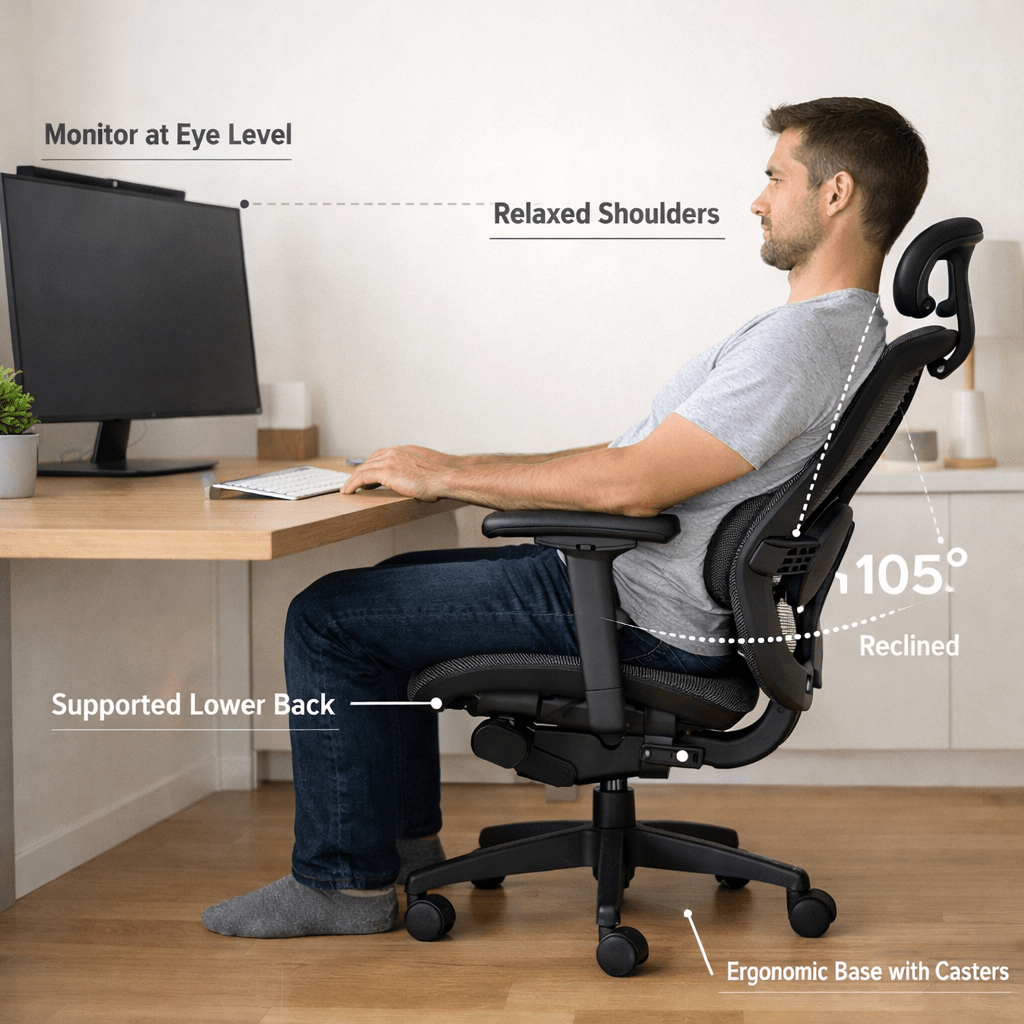
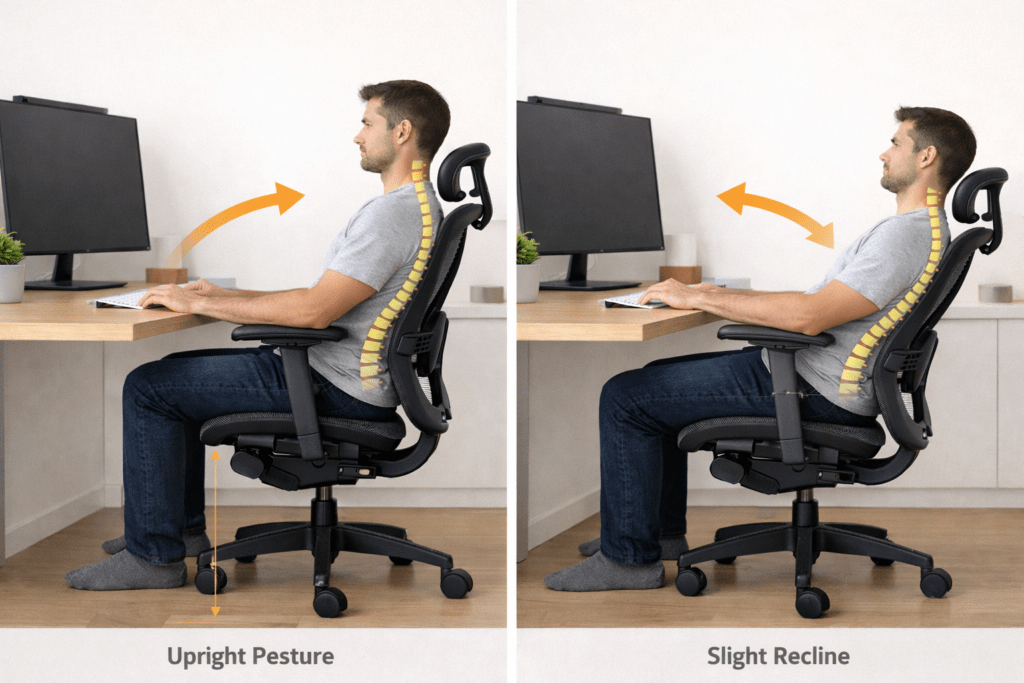
1. Supported Upright Position
This is the basic working posture.
How to do it:
- Sit back fully in your chair for complete support.
- Ensure lower back support.
- Keep shoulders relaxed. Place your feet flat on the floor
Keep your knees aligned at a right angle. This posture works well for typing and focused work.
Common mistake:
Don’t sit too straight or tense—overcorrecting creates stiffness.
2. Slight Recline Position (100-110 Degrees)
Leaning back isn’t lazy. A slight recline, about 10 degrees, reduces lumbar disc pressure and boosts comfort.
A slight recline reduces pressure on your spine.
How to do it:
- Lean your chair back slightly.
- Keep your lower back supported.
- Keep your head aligned with your spine.
- Avoid pushing your chin forward.
This position works well for reading or thinking.
It reduces spinal compression more than sitting upright.
3. Forward Lean Work Position
Sometimes you need to lean forward to focus.
How to do it safely:
- Keep your back straight.
- Hinge slightly from your hips.
- Avoid rounding your shoulders.
- Do not hold this position for long.
Use this position temporarily, then return to a supported posture.
Holding this too long causes neck and shoulder tension.
4. Dynamic Sitting (The Smartest Strategy)
This is the best long-term approach.
Dynamic sitting means:
- Shifting weight slightly
- Adjusting your recline
- Moving your feet
- Changing hip angles
Don’t chase one perfect posture. Rotate positions instead.
Your body loves movement.
5. Cross-Legged Sitting (Use With Caution)
Crossing your legs may feel comfortable for a short time.
But if you do it often:
- It can tilt your pelvis.
- It may cause hip imbalance.
- It can create uneven pressure.
Use it occasionally, not as your main position.
6. Perching Position
This position uses a slightly higher seat height.
Your hips open more, and your back stays active.
It feels more alert than relaxed,
This position works well for short tasks or active work sessions.
Comfortable Sitting Positions vs Slouching
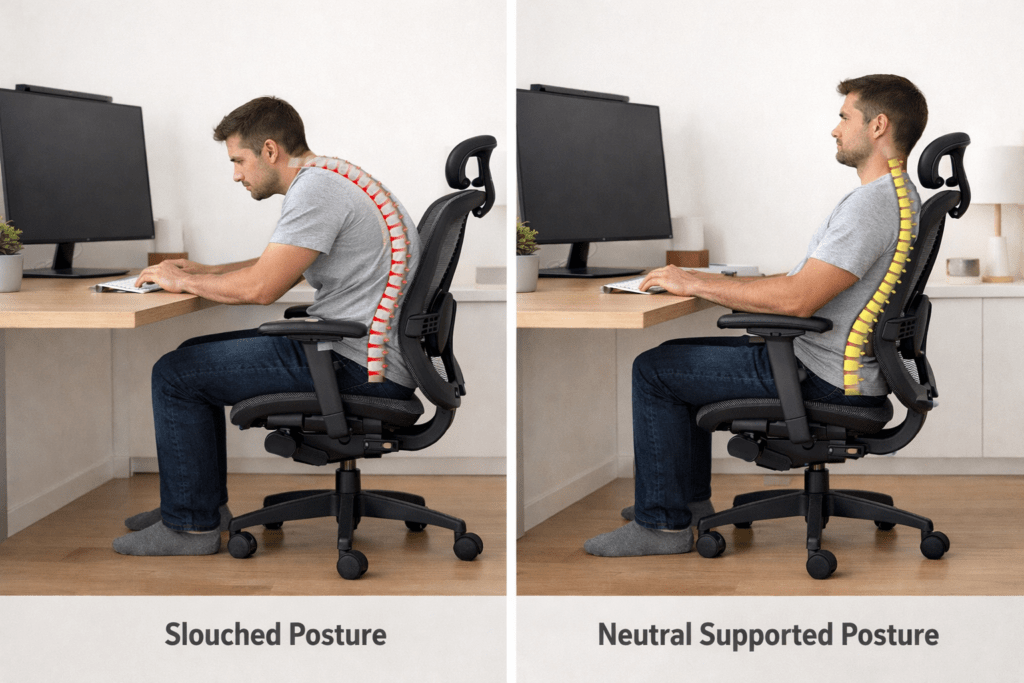
Slouching feels comfortable at first. Why?
Because your muscles stop working as hard.
But then:
- Your spine rounds
- Your head moves forward.
- Your shoulders tighten
- Pressure increases on discs.
Slouching gives short-term relief but leads to long-term discomfort.
Real comfortable sitting positions support your spine without collapsing it.
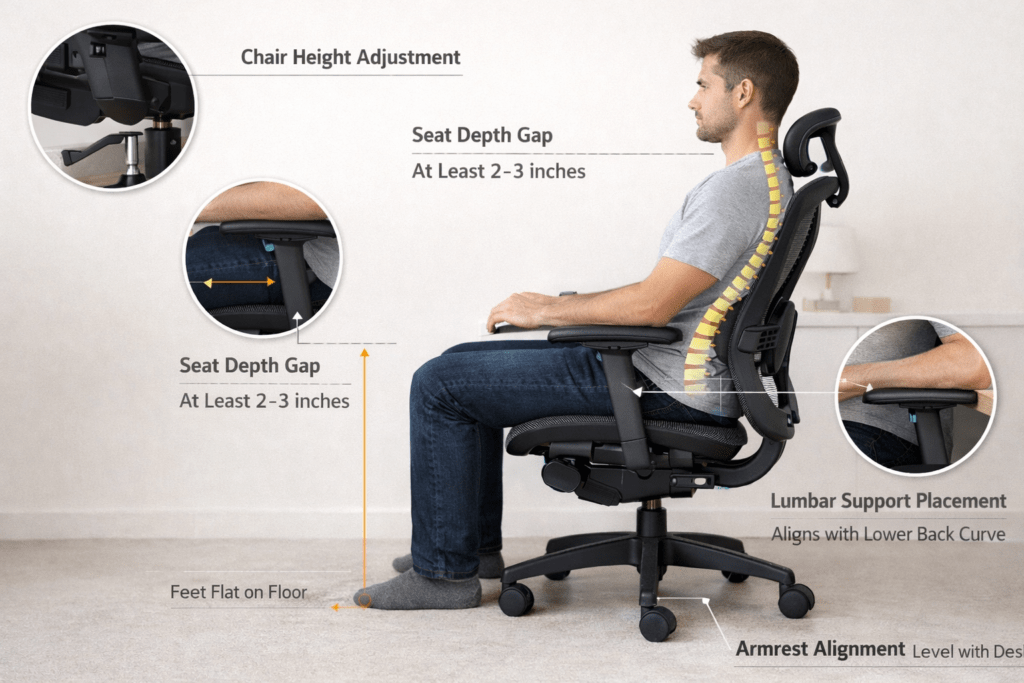
How to Adjust Your Chair for Comfortable Sitting Positions
Even the best posture fails if your chair setup is off.
Here’s how to adjust it properly.
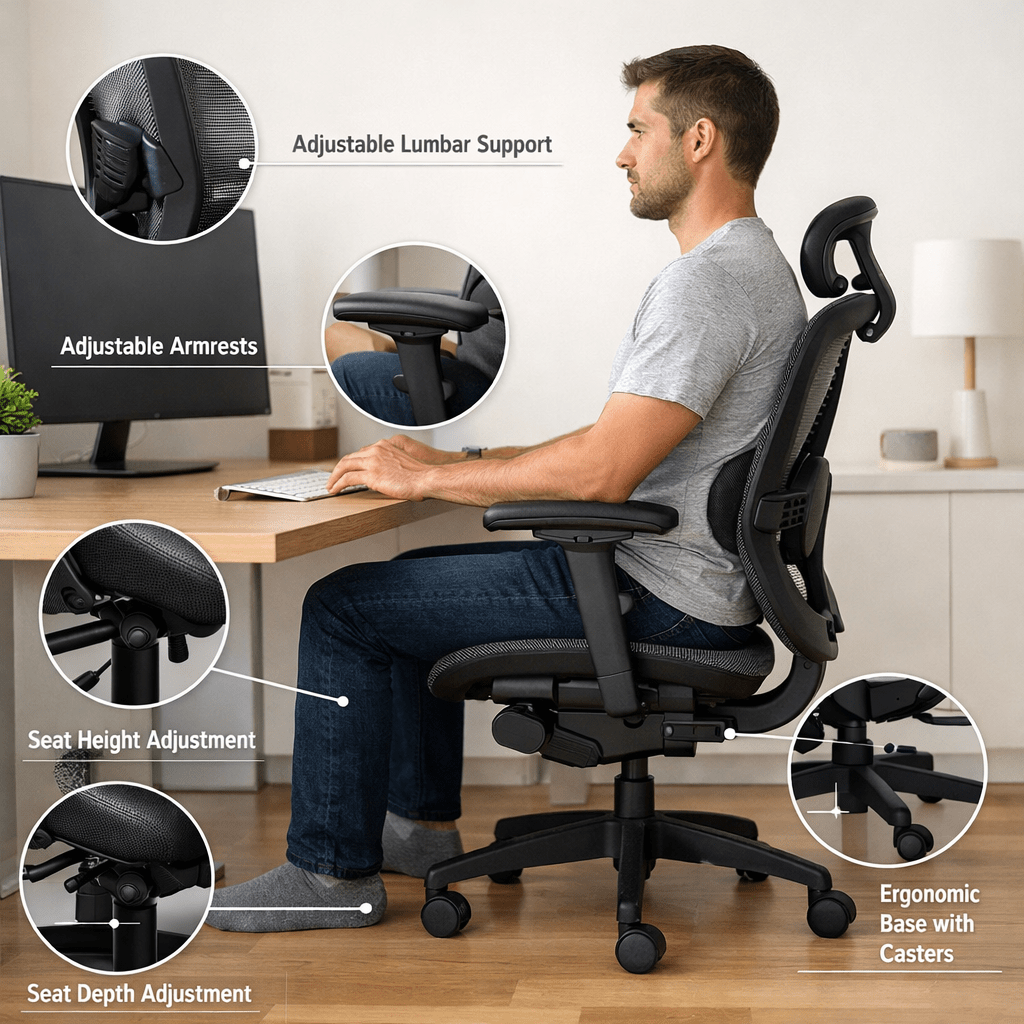
1. Seat Height
Your feet should rest flat on the floor.
If your feet dangle:
- Your thighs feel pressure.
- Circulation reduces
If your knees are too high:
- Your hips feel tight.
Adjust until your knees are level with your hips.
2. Seat Depth
There should be a small gap (2–3 fingers) between the edge of the seat and the back of your knees.
If the seat is too deep:
- It presses your thighs.
- You may lean forward.
If too short:
- You lose support
(You can link here to your seat depth guide.)
3. Lumbar Support
Your lower back has a natural curve.
Good lumbar support:
- Fills that curve
- Prevents slouching
- Reduces fatigue
Too much support feels aggressive, too little feels weak.
4. Armrests
Armrests should:
- Support your elbows lightly.
- Keep shoulders relaxed
- Stay level with your desk.
If too high:
- Shoulders lift
If too low:
- You lean sideways
(Internal link opportunity to your armrest article.)
5. Monitor Position
Your screen should be:
- At eye level
- About an arm’s length away
If too low:
- You bend your neck
If too high:
- You strain upward
How Often Should You Change Sitting Positions?
Even the most comfortable sitting positions should not last more than 30 minutes.
A simple rule:
- Change posture every 20–30 minutes
- Stand up every hour
- Stretch briefly
Small movements help prevent stiffness.
Common Mistakes That Destroy Comfort
Many people try hard but still feel discomfort because of these mistakes.
1. Sitting Too Straight and Rigid
Relax. Your body is not a statue.
2. Locking Knees
Keep your legs relaxed.
3. Leaning Forward All Day
This strains your neck and back.
4. Ignoring Foot Support
Feet need stability.
5. Thinking There Is One Perfect Position
There is not.
Comfort comes from variation.
Is There One Perfect Sitting Position?
No.
Your body changes during the day.
Morning posture feels different from evening posture.
Energy levels change. Muscle tension changes.
The goal is not perfection.
The goal is balance and movement.
Rotate between supported upright, slight recline, and dynamic shifts.
That is the real secret.
Who Needs Special Sitting Adjustments?
Some people need extra care.
If You Have Tailbone Pain
Avoid hard surfaces. Use a slight recline.
If You Have Lower Back Discomfort
Focus on lumbar support and recline.
If You Have Hip Tightness
Avoid crossing legs often. Open hip angle.
If You Sit 8+ Hours
Dynamic sitting becomes essential.
Frequently Asked Questions About Comfortable Sitting Positions
What is the most comfortable sitting position for long hours?
The best approach is rotating between supported upright and slight recline. No single position works all day. Movement keeps discomfort away.
How long can I sit before discomfort starts?
Most people feel stiffness after 20–30 minutes. Changing position regularly prevents this.
Is leaning back better than sitting straight?
A slight recline often reduces spinal pressure. Sitting perfectly straight all day can cause tension.
Why do I feel uncomfortable even in an ergonomic chair?
Because chairs help, but posture habits and lack of movement matter more. Even the best chair cannot fix static sitting
Should my feet always stay flat on the floor?
Yes. Stable feet improve balance and reduce strain on the hips and lower back.
Is cross-legged sitting bad?
Not always. It is fine for short periods. But doing it constantly may create an imbalance.
Final Thoughts
You do not struggle because you are sitting “wrong.”
You struggle because you are sitting too still.
Comfort does not come from forcing one perfect posture.
Comfort comes from understanding your body and adjusting often.
Start with:
- Proper chair setup
- Neutral spine
- Relaxed shoulders
- Feet grounded
- Small movements
Rotate between comfortable sitting positions instead of freezing in one.
Your body is designed to move.
When you respect that, discomfort slowly fades.
If you apply these simple adjustments today, your sitting experience will improve not just for one hour, but for the long term.