
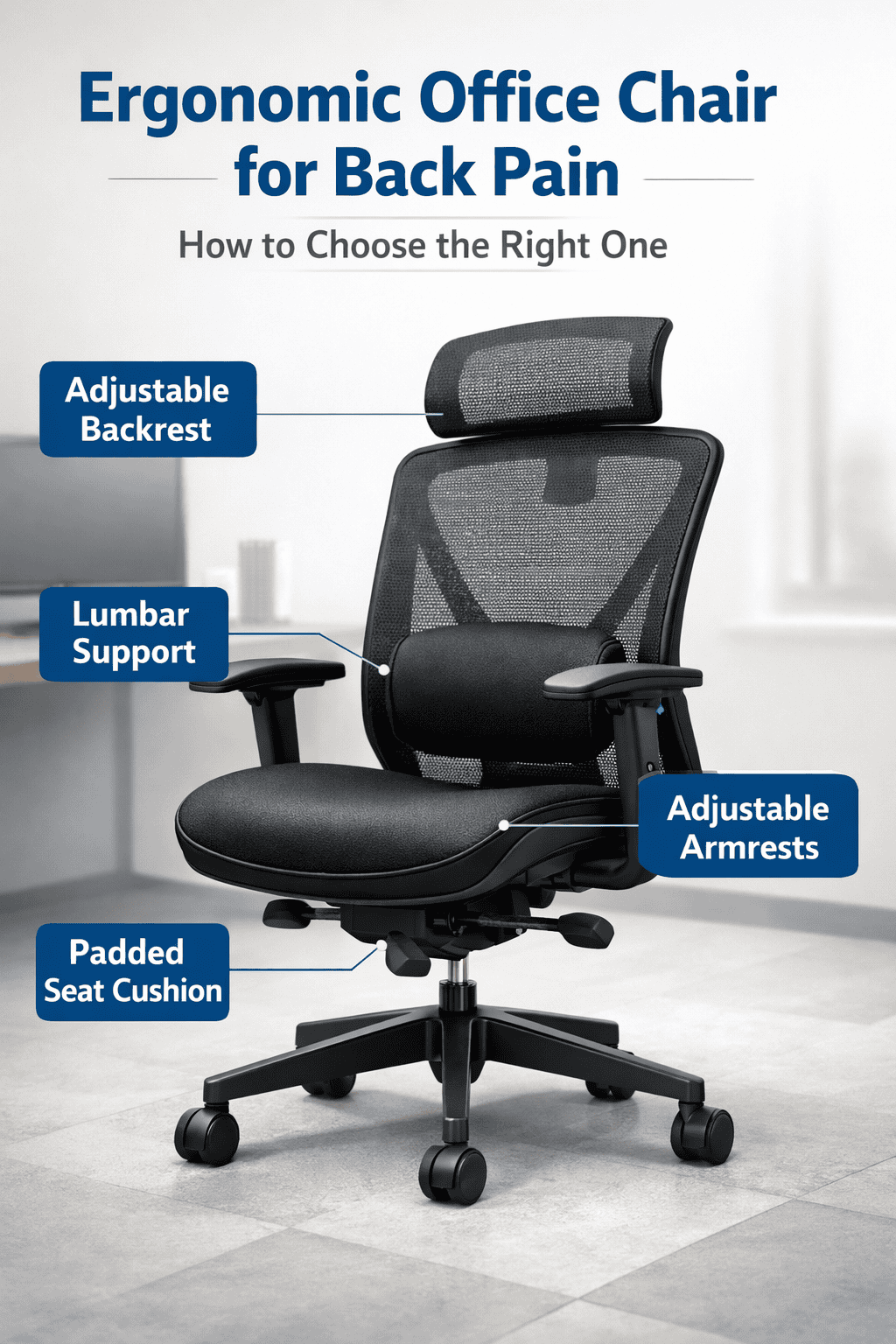
If you’re sitting in an “ergonomic” office chair and still dealing with back pain, you’re not alone. Many people invest in expensive chairs expecting relief, only to finish the day with stiffness, soreness, or lower back pressure. The truth is that not every ergonomic chair actually supports your back the way your body needs.
This guide explains why back pain happens while sitting, what truly makes an ergonomic office chair effective, and how to choose a chair that reduces back pain instead of making it worse.
Table of Contents
Why Sitting in the Wrong Chair Causes Back Pain
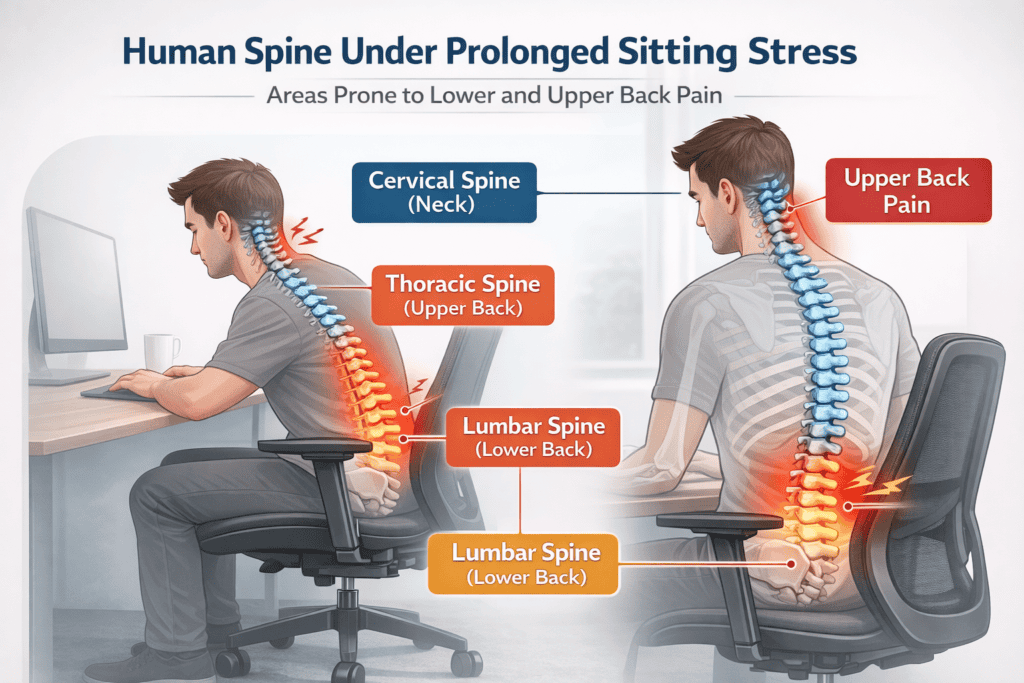
Sitting for long periods places more pressure on the spine than standing. When you sit, especially without proper support, the spinal discs in your lower back compress. Over time, this compression reduces flexibility and increases strain on surrounding muscles and ligaments.
Bad posture only exacerbates the issue. When you slouch, hunch over, or sit on a chair without back support, your spine loses its natural curve. When this occurs, muscles of the back have to work harder to hold the body upright, which leads to increased muscle fatigue and pain. A lot of people don’t know they have bad posture until discomfort becomes chronic.
Another is the line between passive Sitting and supported sitting. The static sitting method refers to sitting still for extended periods without adequate back support or movement. This restricts blood flow and tenses the muscles. Solid Sitting, however, promotes sitting on a proper chair and giving it slight movement, which will help reduce spine pressure and muscle strain in the body.
Sitting back pain can originate in either the upper or lower area of the spine. It’s more common for the lower back to experience strain than the other areas because it bears most of the sitting load. Upper back strain can happen when the shoulders round forward and tighten the neck and upper spine.
Prolonged sitting with poor posture increases pressure on spinal discs, which can contribute to back discomfort over time, according to workplace ergonomics guidance from OSHA.
What Makes an Office Chair Truly Ergonomic for Back Pain?
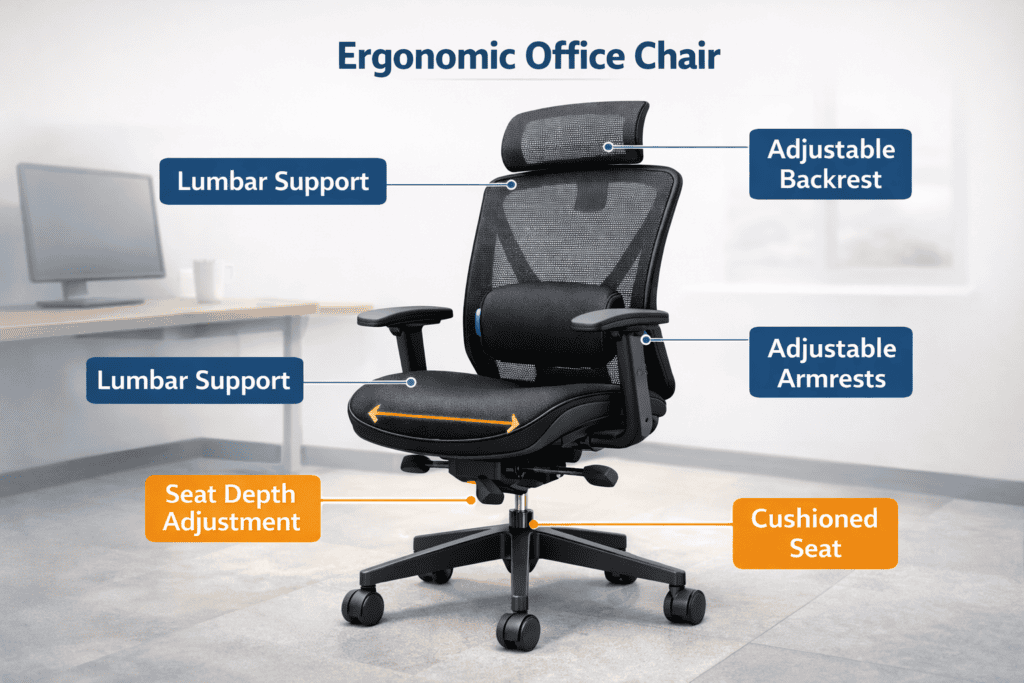
An office chair is ergonomic if it is designed to aid or relieve the body’s fatigue when sitting for extended periods. It can be moved into a natural posture, particularly including proper support of the spine while sitting in a mechanical chair. Simultaneously, the structure stretches itself in a comfortable state. The ideal ergonomic characteristics for those who are working with back pain can really help to reduce daily discomfort and muscle strain.
Lumbar Support (Most Important Feature)
Lumbar support assists in maintaining the natural inward curve of your lower spine. This region is typically left unsupported when sitting for extended periods of time, which can result in flattening your spine and stressing the muscles. A good lumbar support fills the gap between the chair and the lower back, keeping your spine in alignment (no pressure or pain) and your body relaxed.
Backrest Shape & Tilt
The shape and tilt of a chair’s backrest can determine how well it supports the entire spine. Curved backrest fits the natural shape of your spine and prevents you from slouching. A subtle tilt recline enables easing into a more relaxed position while still supporting the spine, decreasing disc pressure, and allowing muscles to relax, settling.
Seat Depth & Cushioning
It’s what allows your legs and lower body to feel supported or well-supported. You will be able to comfortably sit back and have a little space behind your knees for healthy circulation. The cushioning should be firm enough to support body weight on all contact points—not rock hard, and with no pressure points.
Armrest Impact on Back Health
The armrest of the chair can reduce the burden on the shoulders and back to ensure an effortless working experience. Correct arm rest adjustment will ensure your shoulders remain in a relaxed position and eliminate tension from filtering into the spine. Armrests that are too high or too low may compromise your posture, causing discomfort in your back.
Key Features to Look for in an Ergonomic Office Chair
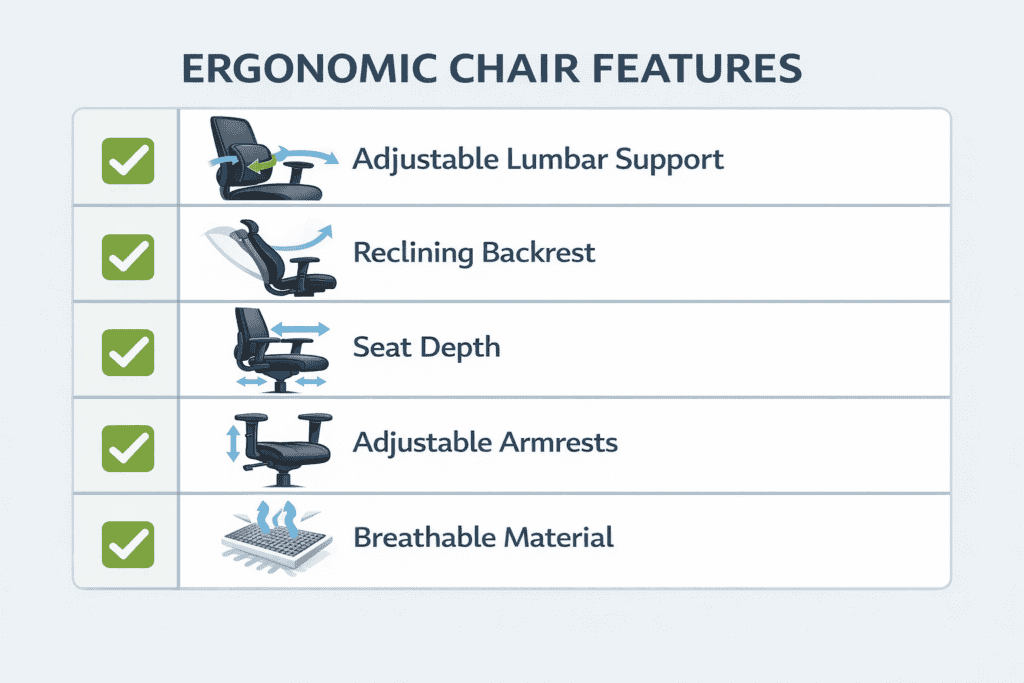
When choosing an ergonomic office chair, it is important to know the features that will enable you to make a rational and informed choice. These help with posturing, alleviate spinal stress, and increase comfort during long sitting sessions.
The ability to adjust the lumbar support is key. It looks good and maintains the lumbar in its natural curve, and can be adjusted to your body height or seated position. This takes some of the pressure off the spine and prevents slouching.
Recline and tilt lock features let the user recline with feet on the ground, while keeping the back of the chair perfectly aligned with the backrest. A slight recline takes thousands of pounds of pressure off your discs, allowing the spine to be in natural alignment and promoting blood flow. Tilt lock ensures the screen stays in place after adjustment to your desired angle.
Height-adjustable and slide seat position will help to ensure you are in the correct position for your feet on velcro straps so that they can rest flat on the floor. Proper seat depth avoids pressure on the back of the knees and equalizes body weight over the cushion surface.
Long-term comfort. Even the material and breathability are important to long-term comfort. Mesh and other breathable fabrics promote airflow to help keep you cool, so things don’t get too hot as you work. Quality cushioning prevents stress points from forming after sitting for extended periods of time.
Ergonomic Features for Back Pain
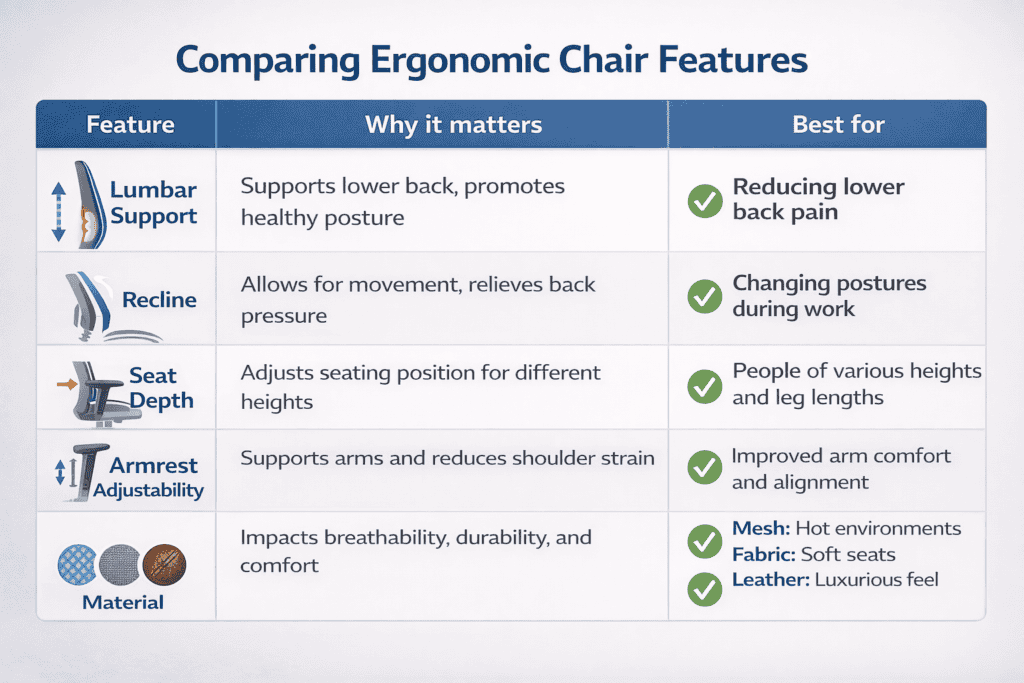
When choosing an office chair for back pain, it’s helpful to compare key ergonomic features at a glance. This makes decision-making easier and helps readers quickly identify which chair supports their needs.
| Feature | Purpose | Benefit for Back Pain |
|---|---|---|
| Adjustable Lumbar Support | Supports lower back curve | Reduces lower back strain |
| Recline & Tilt Lock | Controls backrest angle | Lowers spinal pressure |
| Seat Height & Depth | Fits body and desk | Prevents leg and hip tension |
| Armrests | Supports arms and shoulders | Reduces upper back and neck strain |
| Breathable Cushion/Material | Comfort during long sitting | Minimizes pressure points and heat buildup |
How to Choose the Right Chair Based on Your Back Pain
Lower back pain
Consider where and how you experience back pain when considering the best chair for you. If you experience lower back pain, choose a chair with an adjustable lumbar support that supports the natural curve of your spine. This also aids in relieving lower back pressure for long hours of sitting.
Upper back & neck pain
If the pain is in your upper back or shoulder, you will want to look for a chair with good back support and one with armrests that can be adjusted. These design elements also work to ensure that the shoulders remain relaxed, keeping any tension from traveling down your spine.
Sciatica/hip discomfort
For common back stiffness, seek a chair that offers a small recline and more adaptable support on the back side. This allows for small shifts while sitting, which will help to decrease muscle fatigue. Bottom line – the best chair is one that accommodates which area of your back/body hurts, fits your body well, and helps to promote good posture while allowing for movement.
Prolonged sitting can also affect areas beyond the lower back, and many people notice discomfort developing as hip pain from sitting during long workdays.
Step-by-Step Guide to Choosing the Right Chair
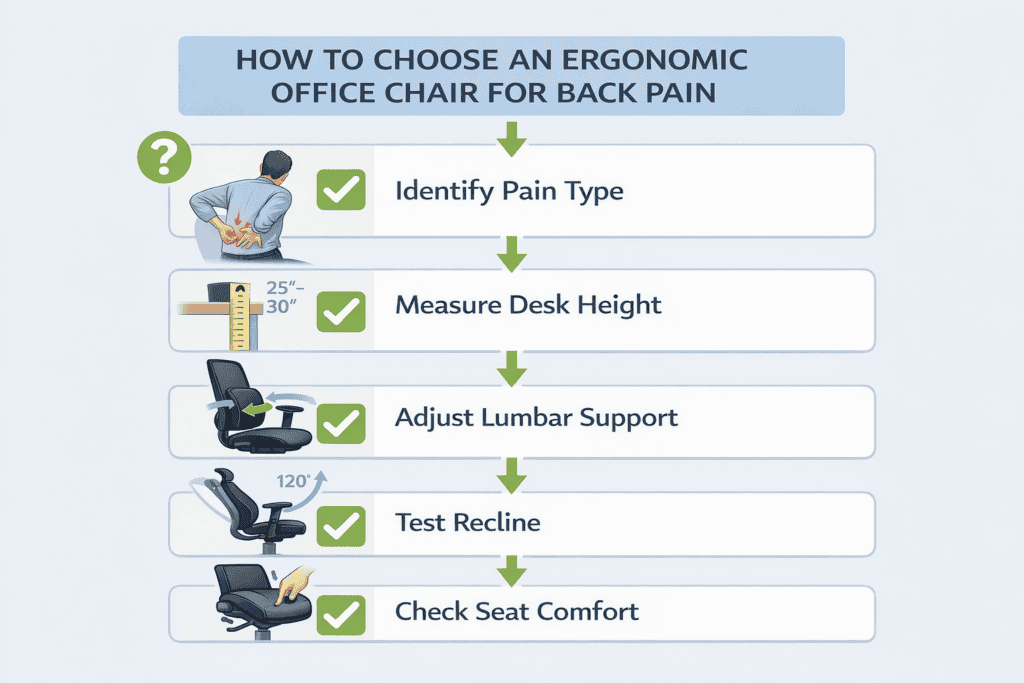
When you follow a simple step-by-step process, selecting the best ergonomic office chair is simple. This makes sure that the chair fits your back properly and provides exactly what you need from your day-to-day Sitting.
Step 1: Recognize Your Pain You Type
First, figure out where your pain is — lower back, upper back, neck, or hips. Being informed about this will allow you to concentrate on features such as lumbar support, back rest height, or even seat cushioning aimed at targeting the specific area of pain.
Step 2: Measure Desk & Sitting Height
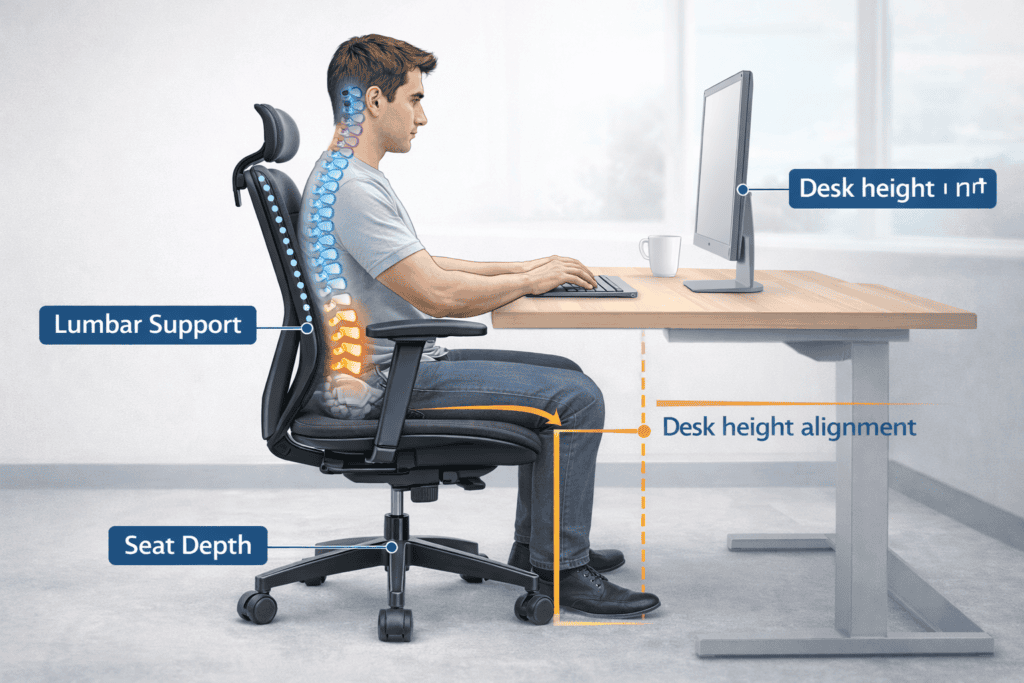
Take a look at the furniture height and how you would normally use it. Your feet should be flat on the floor, with your knees at or slightly below hip level. This guarantees correct posture and eases back pressure.
Step 3: Adjust Lumbar Support
If using a chair with back support, ensure that it is fully at the back of the chair, and angle your hips so you can feel like the curve in your lower spine is accommodated by the lumbar support. It should feel supportive, not like it is forcing you.
Step 4: Test Recline Range
A great ergonomic chair can also recline a bit between 100° and 110 °. Test the recline to see if it feels supportive but not unstable in your back.
Step 5: Check Seat Comfort
Make sure the seat feels firm but comfortable and supports your thighs uniformly without pressing against the back of the knees.
Why Some Ergonomic Office Chairs Still Cause Back Pain
An ergonomic chair is designed to support the body, but it does not automatically prevent back pain. Many people experience discomfort because the chair is not adjusted to their body or because they sit in the same position for too long. Even a well-designed chair can feel uncomfortable if the seat height, back support, or sitting habits are incorrect.
In many cases, ergonomic chairs cause back pain not because the chair is poorly made, but because posture, movement, and overall desk setup are overlooked. Small setup issues can quietly increase pressure on the lower back over time.
Common Mistakes People Make When Buying a Chair
Back pain is a burden to many due to the oversight that one makes while buying an office chair. Knowing these pitfalls helps you avoid awkwardness and maintain long-term sitting health.
Choosing price over ergonomics
One big mistake is to choose the price over ergonomics. A cheap chair may look nice, but doesn’t provide the good lumbar support or backrest shape—or, above all, seat cushioning—you need for lower-back comfort.
Ignoring adjustability
Failing to consider adjustability is another common error. Chairs whose lumbar support, seat height, or angle of recline cannot be adjusted will not accommodate different body types, resulting in discomfort and loss of efficacy.
Not matching the chair to the desk.
Failing to coordinate the chair with the desk can also have consequences. A seat that is too high or low relative to your desk incites bad posture, which will eventually put pressure on the spine and strain muscles.
Assuming the “ergonomic” label is enough
It is a risk to assume the “ergonomic” label alone is adequate. Many chairs advertise themselves as ergonomic, but unless you’ve had a chance to actually test features like lumbar support, seat depth, and armrest placement, they may not offer real benefits.
Finally, it’s important to test seat comfortbeforeo purchase. A good chair will provide support and even weight distribution, with no pressure points. If you do not take the time to inspect this for yourself, you will more than likely regret it over long-term back pain.
By steering clear of these errors, one is better able to choose a chair that supports their back health rather than just being “stylish.”
Ergonomic Features for Back Pain
When choosing an office chair for back pain, it’s helpful to compare key ergonomic features at a glance. This makes decision-making easier and helps readers quickly identify which chair supports their needs.
| Feature | Purpose | Benefit for Back Pain |
|---|---|---|
| Adjustable Lumbar Support | Supports lower back curve | Reduces lower back strain |
| Recline & Tilt Lock | Controls backrest angle | Lowers spinal pressure |
| Seat Height & Depth | Fits body and desk | Prevents leg and hip tension |
| Armrests | Supports arms and shoulders | Reduces upper back and neck strain |
| Breathable Cushion/Material | Comfort during long sitting | Minimizes pressure points and heat buildup |
Frequently Asked Questions (FAQ)
Do ergonomic chairs really help with back pain?
Yes—when properly adjusted. They support spinal alignment and reduce muscle strain, but movement and posture habits still matter.
What feature matters most?
Adjustable lumbar support. It maintains the lower spine’s natural curve.
Is mesh or cushion better?
Both have advantages. Mesh chairs allow for breathability and cooling, while cushioned chairs can feel plush and comfortable. It is a matter of preference as well as the length of time sitting.
For how many hours should I sit in an ergonomic chair
Even with a good chair, it is best to take breaks every 30–60 minutes. Getting up, stretching, or performing a short walk will stimulate the circulation, decrease stiffness, and improve the benefits of the chair.
Can an ergonomic chair correct posture for good?
No. While ergonomic chairs can promote better posture, to achieve long-term results, we need to incorporate intentional posture awareness, movement breaks, and optimal chair adjustment. Together, these tendencies spell long-term wellness for the spine.
Final Takeaway
Selecting a suitable ergonomic office chair for back pain is imperative for promoting good posture, preventing work-related injuries, and bringing long-term comfort in long-hour Sitting. The key is to match the chair’s features with your particular type of pain — lower back, upper back, neck, or hips. Variable lumbar support, a decent seat depth, and a supportive backrest are most effective when combined with good sitting habits (and taking regular breaks). By choosing a chair that is right for your body and pain issues, you can do your spine a favor, stave off discomfort, and build a healthier seated life.