
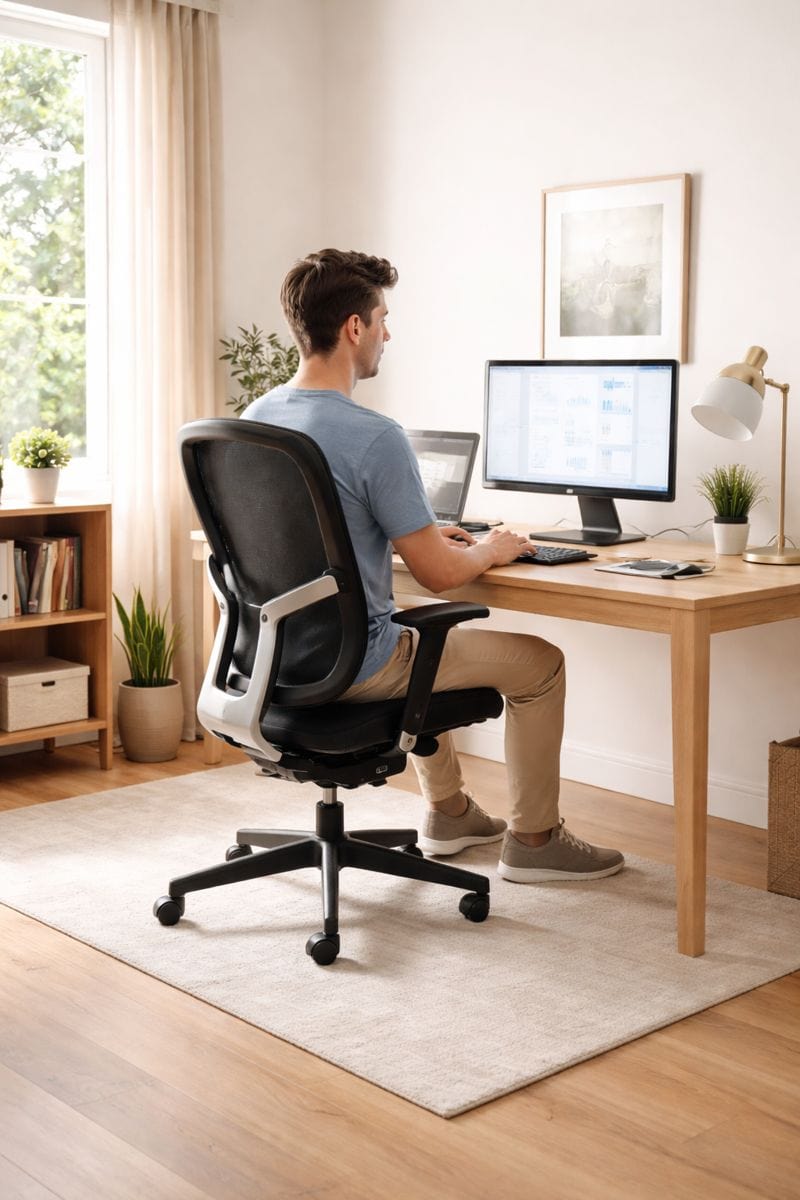
Many office workers think lower back pain is inevitable with desk jobs. In reality, it’s often how your workstation is set up—not just the hours you sit—that leads to pain.
If your chair is too high, your monitor makes you lean forward, your feet aren’t supported, your desk doesn’t fit, or you lack good lumbar support, your lower back can end up under extra stress during the workday.
If your lower back feels stiff or sore after hours at your desk, review your entire workstation rather than reaching for a quick fix. Start by adjusting your chair: Ensure your feet rest flat on the floor or on a footrest. This is a key first step toward relief, and addressing this can make a significant difference.
Introduction: Why People Are Confused About Lumbar Support
Many people buy an ergonomic chair or a lumbar cushion expecting instant relief. But after a few days, the pain is still there. Some people even feel more discomfort than before.
This creates confusion.
If lumbar support is supposed to help, why does my back still hurt?
The truth is simple: lumbar support is not magic. It doesn’t fix bad sitting habits, poor desk height, or long hours without movement. What it does do is support your lower back when everything else is set up correctly.
This guide explains lumbar support in a clear, honest way—no medical jargon, no exaggeration—so you know what helps, what doesn’t, and how to use lumbar support the correct way.
Many people blame lumbar support when back pain appears, but the issue is often bigger than that. In most cases, ergonomic chairs cause back pain not because of the support itself, but because of poor chair setup, posture habits, and prolonged sitting. Lumbar support only works when the rest of the sitting setup supports it properly.
Table of Contents
Why Sitting May Trigger Lower Back Pain
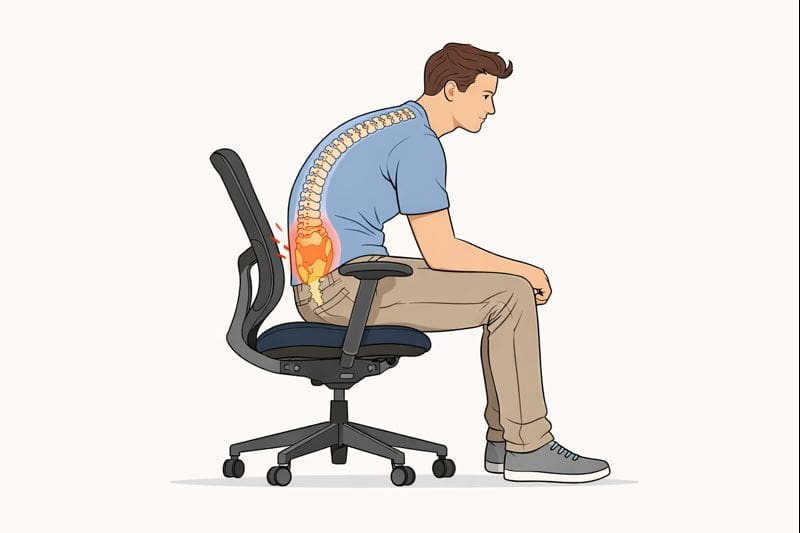
Your lower back is designed for movement. When you stay in one position too long, the muscles supporting your spine can become tired.
Many people spend hours working without realizing they’ve gradually shifted into a posture that strains their lower back. Small issues with your workstation can lead to these habits.
Common contributors include:
- Remaining in one position for extended periods
- Leaning forward toward the monitor
- Working with unsupported feet
- Slouching in the chair
- Sitting with insufficient lumbar support
- Using a workstation that does not fit the user’s body dimensions
You may not notice discomfort right away. It often builds up slowly over several hours and becomes most noticeable by the end of the workday.
How Your Desk Setup May Be Contributing to Lower Back Pain
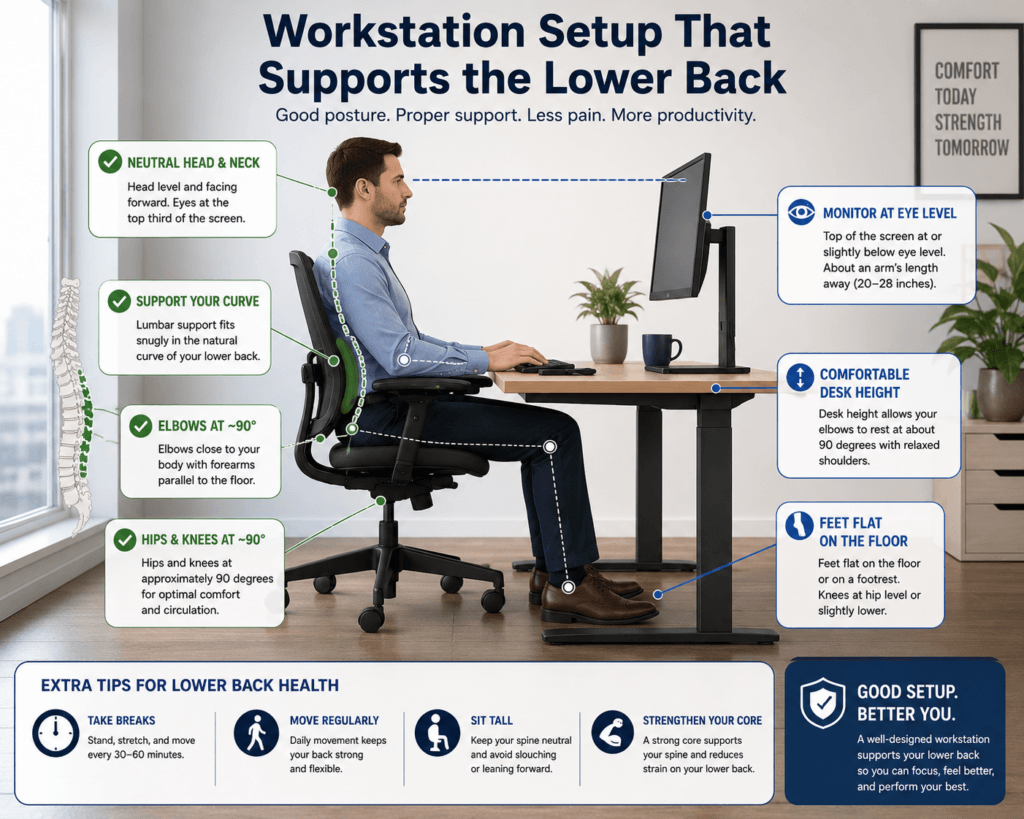
Before blaming your chair, evaluate your workstation as a whole.
Chair Height Problems
The height of your chair changes how your hips, knees, and pelvis are positioned.
When the chair is too high:
- Feet may not rest comfortably on the floor.
- Pressure increases under the thighs.
- Pelvic positioning may become unstable.
When the chair is too low:
- Knees rise higher than the hips.
- Slouching becomes more common.
- The lower back may lose natural support.
To support your lower back, always set your chair at a height that keeps your feet supported. This basic adjustment is crucial for comfort and minimizing strain.
Even excellent lumbar support becomes less effective if chair height changes throughout the day.
For most people, a comfortable desk height is around 28 to 30 inches (71 to 76 cm) from the floor to the top of the desk. To check, make sure you can type with your elbows at about a 90-degree angle and your shoulders relaxed. If your desk height cannot be changed, adjust your chair accordingly and add a footrest if needed. Prioritizing elbow position and relaxed shoulders helps optimize desk comfort. For more information on desk sizes, see your article on standard desk height.
Unsupported Feet Can Increase Lower Back Stress
Many people focus on their chair but forget to support their feet.
If your feet dangle or don’t rest evenly, your pelvis can shift during the day. These small changes can add extra strain to your lower back.
Before buying a new chair, use a footrest or adjust your chair height to keep your feet supported. Try a sturdy box, a stack of books, or an upside-down bin to support your feet and see if this eases your discomfort. Often, these practical fixes resolve lower back stress more effectively than purchasing new equipment.
Monitor Placement Influences Spinal Position
A monitor that sits too low often causes workers to lean forward.
This creates a chain reaction:
- Head moves forward
- Shoulders round
- Upper back collapses
- Lower back loses support.
Over time, the lower back absorbs more stress.
Your monitor should be placed directly in front of you at a height and distance that lets you sit comfortably upright. Avoid setups that force you to lean forward. Proper monitor placement is a primary recommendation for reducing spinal stress.
A monitor positioned too low can encourage forward leaning even when lumbar support is properly adjusted.
Desk Depth and Reach Distance Matter
A desk that is too shallow may place the monitor too close to the desk.
A desk that is too deep may encourage forward reaching.
Both situations can alter sitting posture and increase lower back loading.
An incorrect desk height may create awkward arm positioning that contributes to poor sitting posture.
Always consider desk depth and monitor distance together. Arrange them so that you don’t have to reach forward or lean in. Prioritizing both factors together is essential for avoiding lower back strain.
Common Workstation Problems That Lead to Lower Back Discomfort
Leaning Toward the Screen
Many office workers unconsciously move closer to the monitor as concentration increases.
If you frequently find yourself leaning forward, investigate:
- Monitor distance
- Screen height
- Text scaling
- Desk depth
Focus on improving your workstation arrangement rather than only correcting your posture. Adjusting equipment placement is more effective for lasting comfort and is a key recommendation for reducing lower back pain.
Reaching for the Keyboard
A keyboard positioned too far away encourages constant forward reaching.
If you reach forward for long periods, it can lead to ongoing tension in your back and shoulders.
Working From a Laptop Without External Accessories
Laptop screens are attached to keyboards.
This forces a compromise between:
- Comfortable screen height
- Comfortable typing position
To avoid lower back pain, use an external keyboard and raise your laptop screen to eye level. This setup allows for better posture and should be prioritized for remote work.
Remaining Motionless for Long Periods
Even the best workstation won’t solve problems if you sit still for too long.
Regular movement is critical for comfort at your desk. Set a reminder to change position or take short walks at least once every hour. This is a main recommendation for reducing lower back discomfort.
What Lumbar Support Is Designed to Do
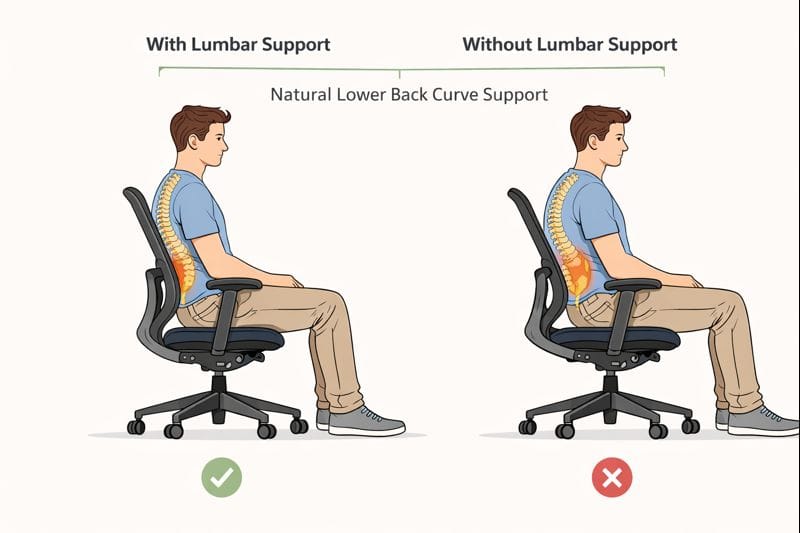
Lumbar support is designed to support the natural inward curve of the lower back. Its main job is to reduce muscle strain by helping the spine stay in a neutral position while sitting.
When lumbar support is positioned correctly, it can reduce pressure and help the back feel more relaxed. When positioned incorrectly, it can have the opposite effect and increase discomfort.
When used correctly, lumbar support can:
- Reduce pressure on lower back muscles
- Help you sit upright with less effort
- Reduce slouching over time
- Make extended sitting more comfortable
However, lumbar support does not:
- Cure back pain instantly
- Fix the poor desk height
- Replace movement or breaks
Think of lumbar support like a seatbelt. It helps when everything else is in place, but it cannot protect you if the setup is wrong.
Lower Back Pain Self-Assessment
The following questions can help identify whether your workstation may be adding to your discomfort.
Does the pain appear after several hours of desk work?
This usually means your workstation is causing fatigue rather than an immediate setup problem.
Does the discomfort improve after standing or walking?
If you feel better after moving, your sitting habits might be part of the problem.
Do you feel better on weekends?
If your discomfort goes away when you’re at your workstation, it’s time to take a closer look at your desk setup.
Do you frequently lean forward during work?
This could point to an issue with your monitor height, desk depth, or the ease of seeing your screen.
Do you shift positions constantly?
If you’re getting around, your chair might not fit well or provide enough support.
When Lumbar Support DOES Help Lower Back Pain
Lumbar support helps lower back pain in many everyday situations, especially for desk workers.
It is most helpful when:
- You sit for long hours at a desk
- Your chair has a flat or weak backrest
- Your pain is mild to moderate
- Your chair height and desk height are correct
Lumbar support is most helpful for people who sit at a desk for long hours, especially when the chair offers little or no lower-back support. In many standard office or dining chairs, the backrest is flat, which does not support the lower spine’s natural curve.
In these situations, lumbar support helps reduce the effort on the lower back muscles. Instead of your muscles working all day to hold posture, the support shares the load. Many people notice less stiffness by the end of the day and feel more comfortable staying upright.
Lumbar support works best when your feet are flat on the floor, and your hips are level with or slightly higher than your knees. When your sitting position is correct, the support can do its job without pushing your spine into an awkward position.
Also key is having an appropriate seat height. Lumbar support pays off most when your feet are flat on the floor, and your hips are even with or slightly above your knees. In this position, the support can do its job without jostling your spine into an uncomfortable position.
In these cases, lumbar support helps your lower back muscles relax. Instead of working all day to hold your posture, the support takes some of the load.
People often notice:
- Less stiffness at the end of the day
- Better sitting comfort
- Less urge to slouch
Lumbar support is invaluable when paired with:
- Correct seat height
- Feet flat on the floor
- Slight recline (not fully upright)
When these basics are in place, lumbar support works as intended.
When Lumbar Support Does NOT Help (or Makes Pain Worse)
This is the part most articles ignore.
Lumbar support can worsen lower back pain if misused.
Common mistakes include:
- Lumbar support too high or too low
- Too much pressure
- No movement at all
- Wrong chair height
Let’s do it:
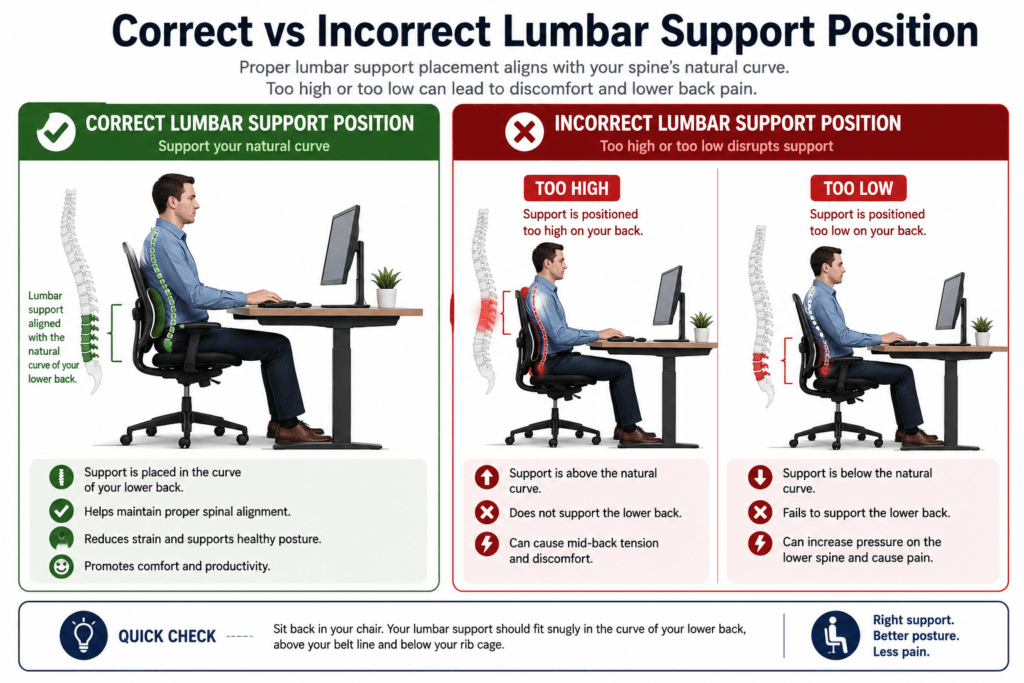
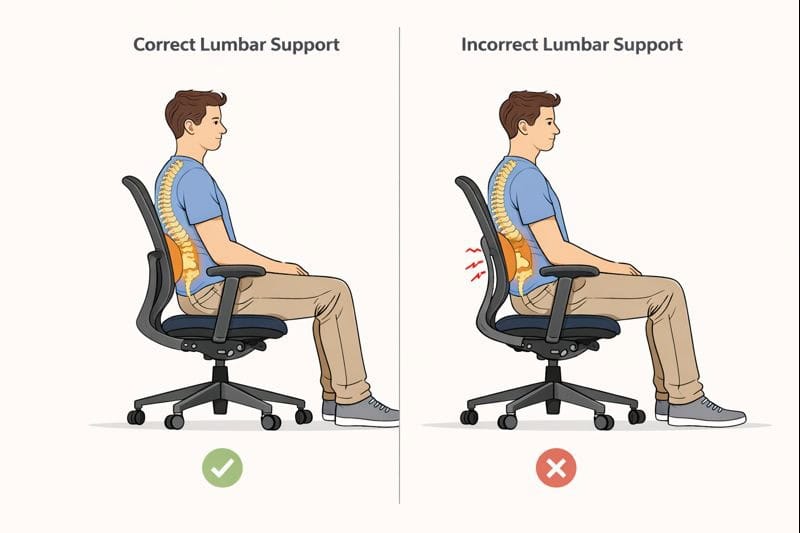
Back lumbar support does not necessarily alleviate low back pain. It also has the potential to exacerbate discomfort in some cases. Too much support is a frequent issue. Here, you want to make sure the lumbar support provides contact pressure without pushing too hard, because we know this can push our spine into an unnatural curve. This added pressure can lead to muscle tension rather than relaxation.
Another critical problem is incorrect height position. Your lumbar support should sit on the natural curve of your lower back, neither too high nor too low. If it pushes into the upper back or tailbone region, it can create additional tension and disturb spinal balance.
A poor desk configuration can also negate the impact of lumbar support. If your desk is too high or too low, your body will adjust — if you can handle it without leaning forward or slouching. Lumbar support alone won’t help in this situation. This is often related to an incorrect chair height, which in turn affects how your lower back rests against the chair.
Lastly, lumbar support is no substitute for movement breaks. Sitting in one spot for hours on end can stifle circulation and put pressure on the disks in your lower back. Pain can slowly accumulate without regular posture shifts and short breaks.
Lumbar support is most effective as part of a full ergonomic configuration, not as an antidote on its own.
Why an Ergonomic Chair Does Not Always Solve Lower Back Pain
Many people purchase an ergonomic chair expecting immediate relief.
Sometimes comfort improves.
Sometimes it does not.
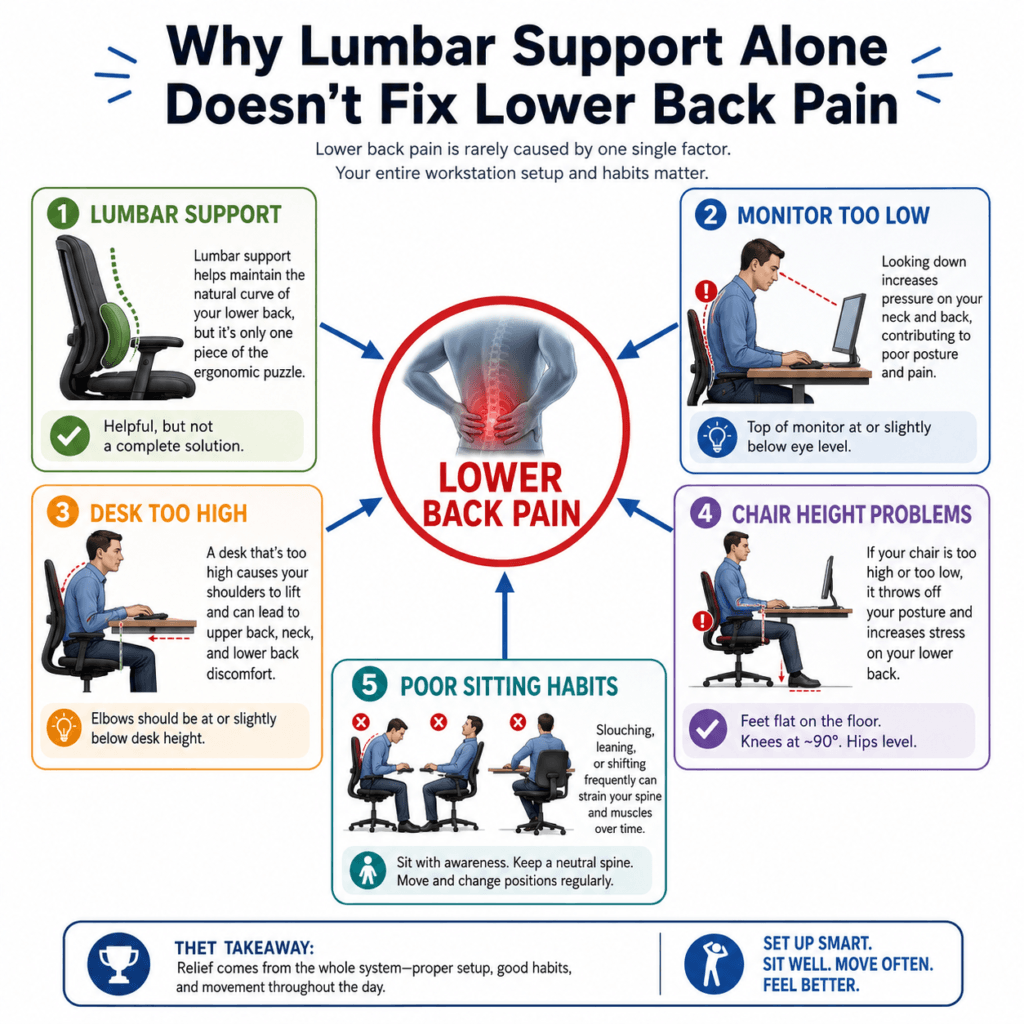
The reason is simple. Your chair is just one part of your entire workstation.
For example:
- A better chair cannot fix a monitor that is too low.
- A better chair cannot correct a desk that is too high.
- A better chair cannot fix other workstation issues, such as a low monitor, a high desk, or unsupported feet. Sometimes, a new ergonomic chair reveals additional workstation problems.
You might sit more upright in your new chair, but if your monitor, keyboard, and desk are still arranged for your old posture, problems can continue.
As a result, discomfort continues.
After considering chairs, let’s consider her lumbar support, which can help manage lower back pain.
Lumbar support can be beneficial when positioned correctly.
Its purpose is to support the natural curve of the lower back and reduce sustained muscular effort.
However, lumbar support isn’t the only option.
Common problems include:
- Lumbar support positioned too high
- Lumbar support positioned too low
- Excessively aggressive lumbar support
- Poor chair fit
Many workers blame lumbar support when the actual problem lies elsewhere within the workstation.
Look at your entire workstation setup, not just one element, if you want lasting relief from lower back pain. Address all key components for the best outcome.
How to Position Lumbar Support Correctly (Step-by-Step)
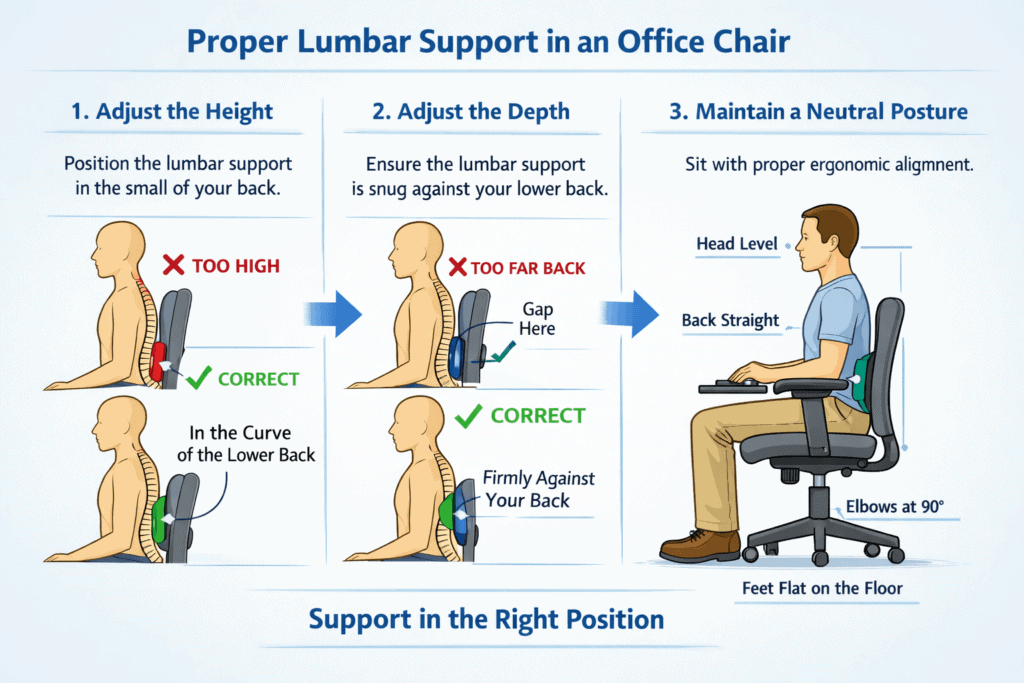
Proper lumbar support adjustment is easy, but it’s one of the most important. Here is how you can do so to get the most bang for your buck without making your back pain worse.
Correct positioning makes all the difference.
Step 1: Height alignment
Lean back in your chair and feel the natural curve in your lower back. The lumbar support should directly contour to this curve. If you feel like it’s pressing your upper back or pushing on your hips, the height is off.
Step 2: Depth pressure
Firm but gentle is how lumbar support should feel. It should fit snugly in the space between you and your chair, not be forced into a bulge. If you encounter sharp pressure, shorten the depth or move the support slightly.
Step 3: Recline angle
The slight recline reduces pressure on the spine. Rest back a bit, about 100–110 degrees. This way, the lumbar support can move with your body rather than against it.
Step 4: Sitting check
Once adjusted, stand or sit in a normal position for several minutes. The shoulders should feel relaxed, and the lower back supported (not tense). Check the height and pressure if you feel any discomfort.
Good lumbar posture is most effective when used along with sitting well and setting up your desk correctly.
A little goes a long way in terms of comfort when you can’t be bothered to move very much.
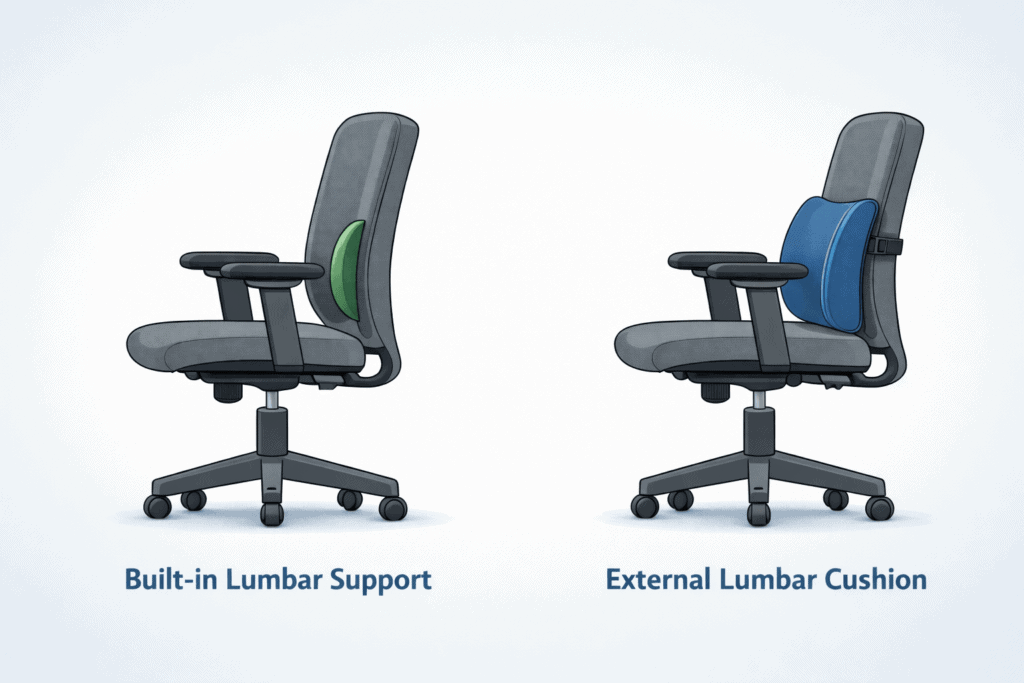
Built-in Lumbar Support vs Lumbar Cushions
There are two main types of lumbar support.
Built-in lumbar support
- Found in ergonomic office chairs
- Adjustable on better chairs
- More stable and consistent
Lumbar cushions
- Portable and affordable
- Useful for basic chairs
- Can shift if not positioned carefully
Let’s let down to explain.
Built-in lumbar support and lumbar cushions are both intended to support the lower back, but they serve different purposes. Chair built with lumbar support. This chair includes a built-in lumbar roll as an integral part. It tends to go up and down, and sometimes in and out. This one is for those who like to be well supported both in the room and at a desk.
External lumbar supports are separate attachments that also fit into the gap between the chair back and the seat. They are helpful if your hair doesn’t support much, like dining room chairs or basic office chairs. Cushions are also highly portable and can be placed on other surfaces for shared or short-term workspace environments.
Built-in support generally provides better alignment by moving with the chair and helping maintain good posture. Lumbar cushions, meanwhile, are flexible and inexpensive but must be placed appropriately, or you can apply the wrong pressure.
The correct choice varies based on your chair, sitting duration, and comfort level. When you understand how ergonomic chair back support works, you can pick the right option to support your posture properly rather than just fitting into one position.
Both approaches can help when used as directed, but neither is a substitute for good posture and frequent movement.
Lower Back Pain vs Tailbone Pain
Many office workers struggle to distinguish between lower back pain and tailbone discomfort.
Lower Back Pain
Typically occurs above the pelvis and may be associated with:
- Posture
- Muscle fatigue
- Lumbar support issues
- Forward leaning
Tailbone Pain
Typically occurs lower and is often associated with:
- Sitting pressure
- Cushion support
- Seat design
- Prolonged sitting duration
Distinguishing between lower back and tailbone pain helps identify which workstation changes to prioritize. Focus fixes based on your pain location for the most effective relief.
How Hip Position Influences Lower Back Comfort
Your hips and lower back work together when you sit.
When your hip position changes, your spine often moves differently, too.
Common workstation factors include:
Seat Height
A chair that is too low increases hip flexion.
Seat Depth
A seat that is too deep may cause users to slide forward.
Unsupported Feet
Poor lower-body positioning can alter pelvic alignment.
This is why hip pain and lower back pain often happen together.
Real-World Office Scenarios
Scenario 1: The New Chair That Didn’Didn’t
An employee purchases an expensive ergonomic chair but continues to use a low monitor.
The chair improves posture, yet the user now bends the neck and upper back forward to view the screen.
So even with a better chair, the discomfort remains.
Scenario 2: The Remote Worker Setup
A remote worker uses a dining table and a dining chair for eight hours per day.
The workstation lacks adjustability.
After a few months, lower back tiredness becomes a daily problem.
Simply buying a new chair often isn’t a solution; invest time in adjusting your entire workstation to provide proper support, particularly for the chair and monitor position.
Scenario 3: The Unsupported Feet Problem
A worker raises the chair to match the desk height.
Now the feet no longer rest comfortably on the floor.
Over time, your pelvis shifts, and you begin to feel lower back pain.
What Helps More Than Lumbar Support
Lumbar support helps—but these things matter even more:
- Correct desk height
- Proper chair height
- Regular movement breaks
- Changing posture during the day
Even with perfect lumbar support, sitting still for hours will cause discomfort.
Try this:
- Stand up every 30–60 minutes
- Stretch lightly
- Walk for 1–2 minutes
Let’s let down to explain.
Lumbar support helps, but it works best when paired with other basic habits. Proper chair height is one of the most critical factors. When your feet rest flat on the floor, and your knees sit slightly lower than your hips, pressure on the lower back is reduced.
Desk height also matters. If your desk is too high or too low, your posture suffers even with good lumbar support. Regular movement breaks are just as important. Standing up, stretching, or walking for a minute every 30–60 minutes helps prevent stiffness and muscle fatigue.
Finally, micro posture shifts matter. Small shifts, such as subtly leaning back or adjusting the foot position or shoulders, can activate the muscles without putting undue pressure on them. Yet these good habits can often compensate for the lack of lumbar support, particularly when sitting at a desk all day.
Common Mistakes That Make Lower Back Pain Worse
Buying Equipment Before Diagnosing the Problem
Many workers purchase new chairs before understanding the actual cause of discomfort.
Ignoring Monitor Position
Where you put your monitor affects your whole posture.
Assuming Lumbar Support Fixes Everything
Support can help, but it can’t fix other station problems.
Sitting for Hours Without Movement
Even the best workstation is more effective if you move and change positions regularly.
Working Too Far From the Keyboard
Reaching too far encourages poor posture and puts extra strain on your spine.
Quick Lower Back Pain Workstation Checklist

Use this checklist to evaluate your setup:
✓ Feet fully supported
✓ Chair height adjusted appropriately
✓ Monitor positioned at a comfortable viewing height
✓ Keyboard positioned within easy reach
✓ Lumbar support aligned correctly
✓ Shoulders relaxed while typing
✓ Desk dimensions support a comfortable posture
✓ Take regular movement breaks during the day, such as standing up, stretching, or walking for a few minutes every 30 to 60 minutes
✓ No excessive leaning toward the monitor
✓ Your workstation lets you sit in a neutral, comfortable position
Frequently Asked Questions
Why does my lower back hurt after sitting at a desk all day?
Lower back pain usually occurs from sitting too long, issues with your workstation setup, or not moving enough during the day.
Should lumbar support always touch your back?
It should gently support the lower back, not push hard or force the spine forward.
Can lumbar support make back pain worse?
Yes. If lumbar support is too firm or positioned incorrectly, it can increase pressure on the lower back.
Does lumbar support help lower back pain?
Lumbar support can help if it’s positioned correctly, but it’s one part of a good workstation setup.
Can a chair cause lower back pain?
Yes. If your chair is too high or too low, doesn’t support you well, or isn’t set up properly, it can cause pain.
Why does my back feel better when standing?
Standing changes how your spine carries weight and gets you moving, which can help relieve discomfort from sitting too long.
Can monitoring placement affect lower back pain?
Indirectly, yes. If your monitor isn’t positioned correctly, you might lean forward, which changes your posture and puts more stress on your lower back.
How often should I move during desk work?
Changing positions regularly and taking short movement breaks during the day is usually better than sitting still for long periods.
What is the best sitting posture for lower back comfort?
The best sitting posture is one in which your feet are supported, your shoulders are relaxed, and your spine feels comfortable and aligned.
Final Implementation Guidance
Lower back pain from sitting usually isn’t caused by just one thing. It often happens because several workstation problems add up over time.
Instead of changing just one thing, look at your whole workstation as a system. Chair height, monitor position, desk size, keyboard placement, foot support, and how often you move all affect how your lower back feels during the day.
The best ergonomic improvements come from figuring out which parts of your workstation are causing stress and making changes that help you feel better and work more comfortably. Start by fixing the area that feels most uncomfortable or makes you the most tired during your workday. Change one thing at a time, such as chair height, foot support, or monitor position, and see how it affects your comfort before moving on to the next. This step-by-step approach helps you focus your efforts and make the most helpful changes first.