

Repetitive motion with the hand is a common cause, and carpal tunnel syndrome can even occur due to sleeping on your wrist night after night. This guide is for office workers, people who work from home, and students — anyone who spends long hours typing at a keyboard or using a mouse. Here, you’ll learn how to prevent carpal tunnel by incorporating a few simple ergonomic habits that minimize wrist strain. This article is concerned with awareness and prevention, not diagnosis or treatment. By addressing posture, wrist position, and some of the habits in your day-to-day use of your hands, you can knock down risk early and shelter your hands before they develop intense discomfort.
Table of Contents
What Is Carpal Tunnel Syndrome?
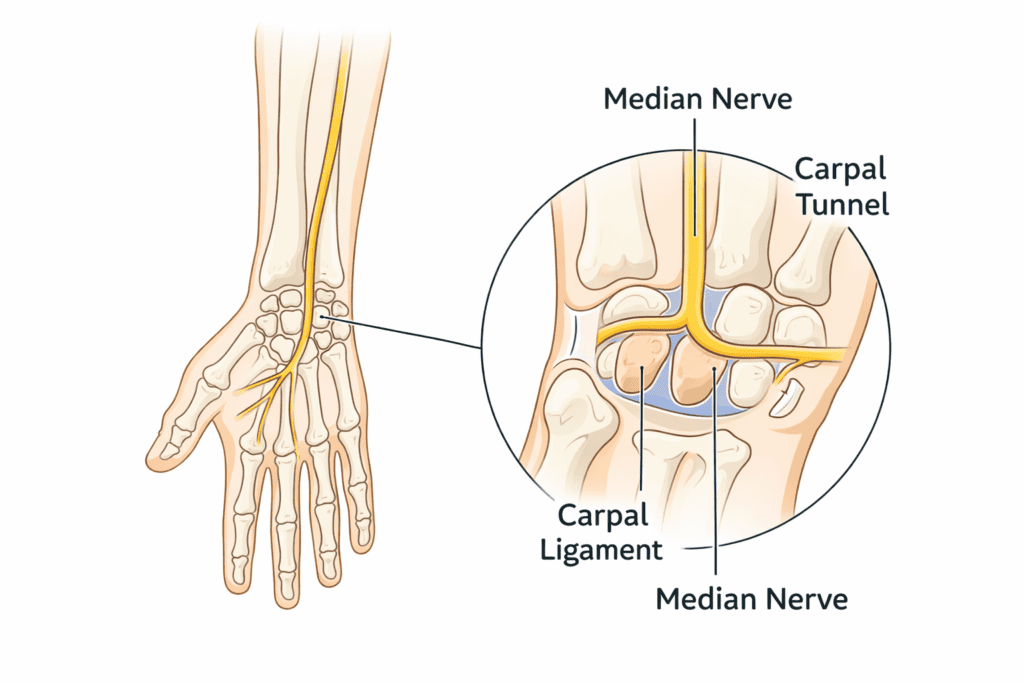
What happens inside the wrist
Carpal tunnel syndrome is caused by a nerve in your wrist being irritated or compressed. In the wrist, there is a narrow space called the carpal tunnel. This tunnel safeguards tendons and a major nerve, known as the median nerve, which you use to feel with and move your hand and fingers. When pressure mounts within that confined area, the nerve can become irritated.
Common early warning signs
Preshock notice can be slight and easy to overlook. Some people experience tingling, numbness, or a slight burning in the thumb, index finger, or middle finger. Some have weakness in their grip or pain after hours of typing. These are not immediately signs of something serious, but rather signals that wrist strain is building.
Why desk work increases risk
Risk is heightened by desk work, which can mean your wrists are in the same position for hours at a time. Repetitive wrist-bending and long periods of holding the joint still can occur when typing, clicking a mouse, or using a laptop trackpad. Inadequate posture, low desks, and unsupported arms can also make the pressure within the wrist worse. Knowing what carpal tunnel syndrome is can help focus on prevention early, when daily wrist strain hasn’t escalated into a long-term problem.
Why Desk Work and Repetitive Tasks Increase Risk
Repetitive motion problem
Desk jobs and repetitive motions are some of the big reasons we know there’s an added carpal tunnel risk. One important issue here is related to repeated movements. Repetitive typing, scrolling, and clicking or tapping keys over and over again make the same wrist muscles and tendons do their work without a break. This motion can eventually irritate the structures in the wrist.
Static wrist positions
A second problem is that the user’s wrists become static. A lot of people type or use a mouse with their wrists bent up, down, or sideways. It is caused by putting the wrist in the same position for too long, and this puts pressure on the carpal tunnel. Even when the movement is slight, hours of staying in one position add up to strain.
Long hours without recovery
Long work hours without recuperation are a large part of it, too. If you skip breaks, wrists never get a chance to relax and reset. Muscle fatigue, tendons stiffen to conserve energy, and the space around the nerve becomes more sensitive. If you’re only using a laptop, it’s even worse, since small keyboards and low screens can cause some pretty weird hand angles.
Desk work also contributes to bad posture: leaning forward, resting the wrists on hard surfaces. These behaviors could become familiar, but over time, lead to stress on the wrist. It’s easier to prevent risk if you know how desk work increases it. As the cause becomes clear, you can make early changes in habits that will allow your fans to reduce strain and support a lifetime of comfortable wrists without pain.
Preventing Carpal Tunnel With Proper Wrist Ergonomics
wrist position concept
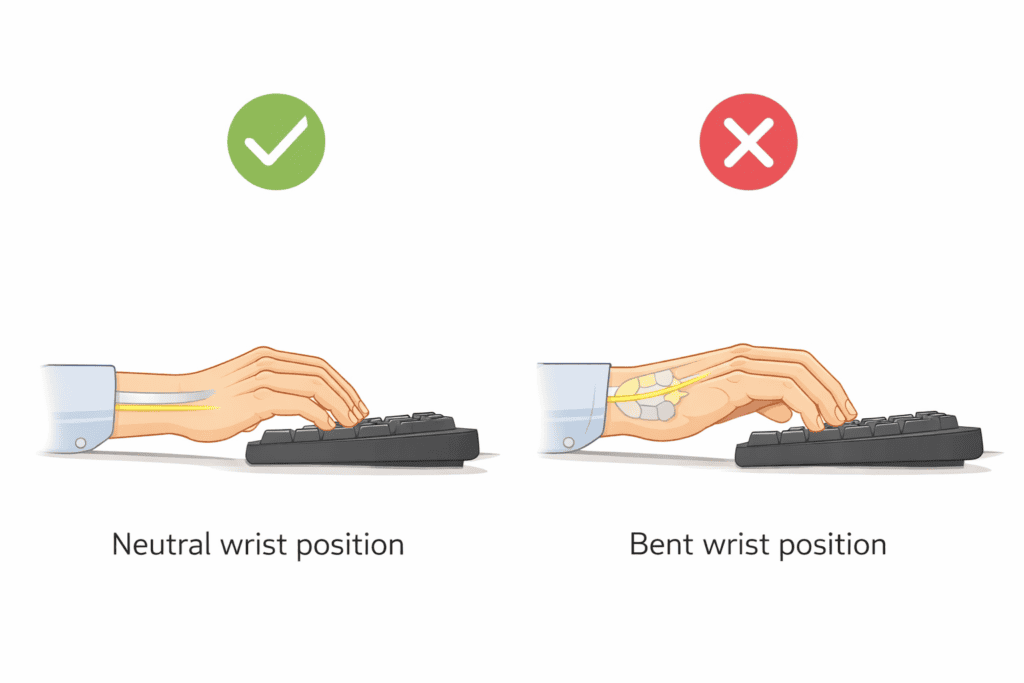
The best way to avoid carpal tunnel, it turns out, begins with learning that you are not a proper wrist ergonomics. The number-one concept is to keep your wrists in a neutral position. Neutral means with your wrist straight, not bent up, down, or sideways. Pressure inside the carpal tunnel remains low when your wrists can stay straight, making it easier to alleviate wrist fatigue if you work at a desk all day.
Keyboard & mouse height
A lot of people are bending their wrists without realizing it. This frequently occurs when the keyboard or mouse is too high or too low. When your keyboard is too high, your wrists curve upward. If it’s too low, your wrists will bend down. Both of these positions place the wrist nerve under more stress. Ideally, your keyboard and mouse should be positioned so that your forearms remain parallel to the desk, with your wrists straight while typing or clicking.
Avoiding wrist extension/flexion
Wrist extension and flexion are also common problems. Wrist extension is a flexor when the wrist is bent upward, and an extensor when it’s angled downward. These might seem like small positions, but maintaining them for hours on end can gradually aggravate the wrist. A good rule is to allow your hands to “float” over the keyboard, rather than resting your wrists on hard surfaces as you type.
How you use your mouse is just as important as how you type. The mouse should be near the keyboard so that your arm does not jut out to navigate. When you extend the arm, this bends the wrist at a weird angle that produces tension. Light grip pressure also helps. If the mouse is gripped tightly, extra pressure can be put on the wrist muscles.
If you’re feeling pain already, learning how to help wrist pain via better ergonomics is a wise next step. Minor adjustments, such as height and wrist angle, can reduce daily strain. Carpal tunnel doesn’t care how strong you are, it doesn’t care what tools you use, and treating carpal tunnel isn’t about brute force or expensive devices—it’s simply supporting your wrists to keep them straight, relaxed, and favoring the weight of your hands as often as possible!
Desk, Chair & Arm Positioning That Protects Your Wrists
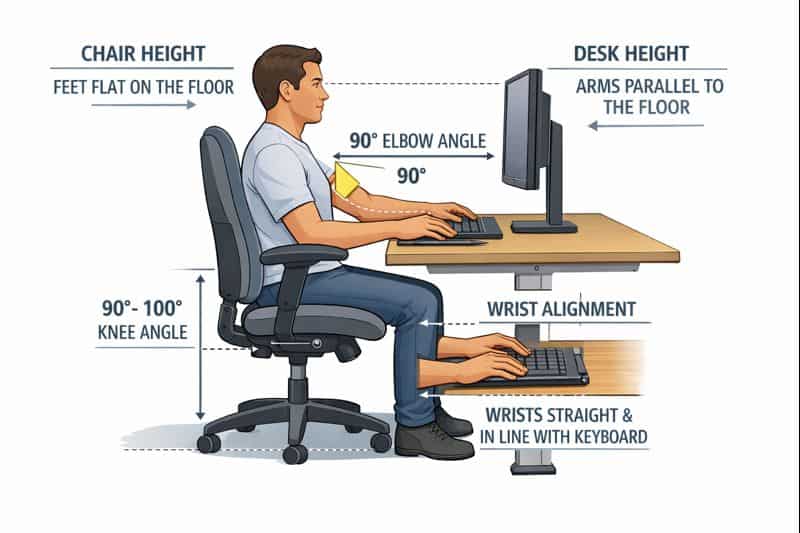
The wrist cannot be healthy when the forearm is not. You can protect your wrist when typing, working, and in daily life. It really comes down to arm support as a major driver. When arms are allowed to hang in the air, shoulder muscles contract and transfer tension down to the wrists. The right arm position assists in allowing the wrist to remain stable.
Your chair should be the same height as your desk. While you’re sitting, your elbows should be slightly above or level with the desk top. This permits your forearms to feel free supination without having to force the wrists up or down. If the chair is too low, the hands will arch up at the wrists. Elevate the chair, and shoulders rise as arms strain. Proper desk chair dimensions provide balance to this combination.
The elbow and wrist need to align as well. Your elbows will go no farther than your sides, making a soft “L” with the body. All the same, your arm, from elbow to wrist, should move in a straight line. The elbows flare outward, the wrists angle in your hand slightly,y pointing toward the face (inside).
Posture matters, too. Slumped posture or leaning forward causes body weight to be borne on the arms and wrists. When you sit up straight and lean back, the weight is spread out. Developing good, proper posture desk habits can help not only your back, but also your wrists.
Desk depth matters as well. A desk that’s too shallow will make wrists bend or rest against hard edges. Ample room that allows your forearms to rest naturally and comfortably while keeping your wrists straight. When your desk, chair, and wrist work together, so does your wrist strain. Its full-body modifications are supposed to make long-term wrist protection easier–and more effective.
Daily Habits That Help Prevent Carpal Tunnel Long-Term
Break frequency
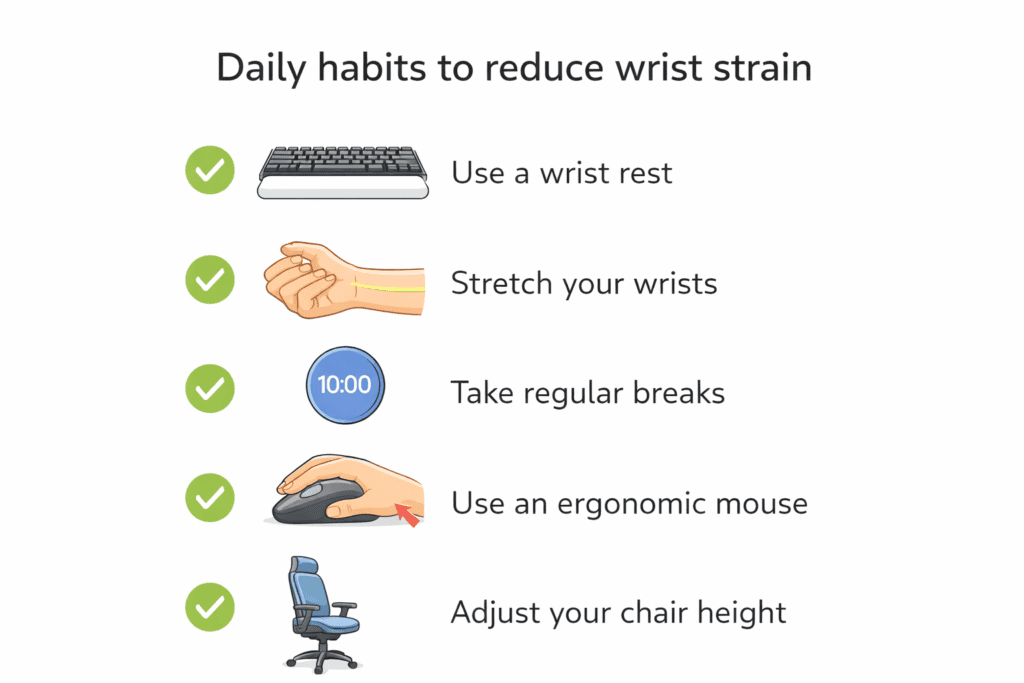
Long-term prevention of carpal tunnel is essentially a question of daily habits, not quick fixes. One of the most crucial tendencies is to take frequent breaks from repeated hand activities. This isn’t timing in the strict sense, or medical rules. It means only that you periodically let your hands and wrists take brief breaks so that they can relax and be rested. Even (or perhaps especially) a quick stand-up to shake out your hands or shift position can stave off that relentless strain.
Task variation
Task diversity is yet another strong habit. At the same time, repeating a movement over and over — such as typing, scrolling, or clicking — puts wrist muscles under constant strain. Seek to vary throughout your day. Shift between typing, reading, telephone calls, or gentle motion. This gives the hard-working muscles a break while remaining productive.
Reducing continuous strain
Reducing sustained strain also requires attending to the length of time you spend in a position and keeping your wrists bent at the same angle for many hours, which boosts pressure within the wrist. Minor movements, postural resets, and hand stretches to keep things from getting too tight. It is not perfection we are after; it is movement.
Daily awareness matters too. See how your wrists feel at the end of the day. A low-grade tightness is a frequent early indicator that habits need adjusting. “Your desk setup, not gripping your tools too hard, and slowing down any movements that are rushed all benefit long-term wrist comfort.
“When it comes to preventing carpal tunnel, it’s this consistency.” These jewelry-wearing habits might sound small, but when you adhere to them every day, they’ll help reduce wear and naturally tear on your wrist. Good habits overall will ultimately more effectively protect your wrists than any one product or shortcut.
Common Mistakes That Increase Carpal Tunnel Risk
Resting wrists on hard surfaces
A lot of people increase their chances and are not aware of it. One common one is leaning wrists on hard surfaces while typing or using a mouse. Sharp edges would dig into the wrist and restrict blood flow. This pressure eventually becomes tension or a burden rather than being supportive.
Ignoring mild discomfort
Another error is ignoring the pain. Little pains, numbness, or stiffness are frequently dismissed as common tiredness.” But these early warnings typically signal that the wrist is being stressed over and over. Ignore them, and it turns into pressure that builds up day by day. It is paying attention early that allows prevention.
Overusing wrist supports incorrectly.
I really don’t believe you should overuse wrist supports improperly. People feel useful when they wear wrist braces or supports, but wearing them all day for no reason weakens the natural use of the wrist. Supports are not designed to make up for good posture or proper desk setup. When used without instruction, they can actually promote bad habits rather than correcting them.
Some people also type harder or clench the mouse when focused. This merely puts more tension on stressed muscles. Efficient, safe movement is relaxed.
When you avoid these mistakes, you help protect your wrists for the long run. Prevention is best when you mitigate pressure, listen to your body, and fall back on healthy habits — not shortcuts or a constant stream of support tools.
Who Should Be Most Careful About Carpal Tunnel Prevention
Office workers
Some people must be extra cautious about preventing carpal tunnel because the things they do in daily life strain their wrists more. One of the most impacted groups is office workers. The hours of typing, mouse clicking, and limited movement are strenuous on the wrists. Without proper ergonomics and time breaks, strain accumulates little by little over time.
Gamers & creatives
Gamers and creative types are also at a higher risk.” Gaming, graphic design, video editing, and drawing often require quick, repeated hand motions and long periods of concentration. A lot of people grip controllers, mice, or styluses too hard without realizing it. The constant pulling adds pressure to my wrist, especially for long sessions.
Laptop-only users
Those who use only a laptop should be especially careful. Laptops, which keep the screen and keyboard attached in one immovable, inflexible unit, typically require people to twist their wrists into unnatural angles for typing. The wrist alignment is even worse if you work in bed, or from the couch, or from low tables. In the absence of external keyboards or a correct desk height, wrist fatigue starts to set in.
These are not groups that need to fear, but they are communities that need to be reminded. There are also other small changes you can make to your daily activities — improving posture, taking short breaks, and ensuring hands are kept toned down — that could have a significant impact on preventing carpal tunnel before pain sets in.
FAQs About Preventing Carpal Tunnel
Is there an ergonomic solution to avoiding Carpal Tunnel?
Yes, carpal tunnel can be prevented largely through ergonomics. It also helps to keep your wrists straight, the desk and chair at the right height, and the keyboard and mouse in a good position. Good ergonomics reduces the daily load, thus contributing to the preservation of the wrist over time.
Is typing really the cause of carpal tunnel?
It is not about typing per se, but a lot of hours sitting incredibly long without breaks may increase the risk. The root of the problem, really, is repetitive motion combined with lousy wrist positioning. Keeping a relaxed hand position, good posture, and moving regularly are all very beneficial in reducing strain.
Should I wear wrist braces all the time?
Wearing wrist braces throughout the day is not generally advised for prevention. They can restrict movements and, if worn excessively, can weaken the wrist muscles. They should be used as temporary analgesics or for certain activities, but the primary focus should always be posture, movement, and ergonomic habits.
How soon can prevention matter?
Preventive action can make a difference as early as possible, before pain sets in. Simple habits like fixing wrist position, taking breaks, and minimizing tension prevent strain from accumulating. It’s easier and more effective to begin early than to wait until discomfort begins.
When should I see a doctor?
If wrist pain persists or if you experience numbness or tingling in your hands when using the keyboard and mouse, seek medical advice. Chronic symptoms, nocturnal pain, or weakness should be treated symptomatically. A pro can guide you in making the next safe steps without guessing.
Final Thoughts: Prevention Is About Small Daily Adjustments
Preventing carpal tunnel is not a matter of fear or radical changes to the way you work. It’s just about tiny changes you can make day after day to minimize wrist strain over time. Small habits like keeping wrists unlocked, not gripping too tightly, alternating tasks, and taking small breaks all help to add up. The majority of wrist issues develop slowly, making prevention most effective when you start it early.
Good ergonomics is not about being perfect — it’s about being mindful. Being mindful of your hands throughout the day’s tasks can help you make adjustments before discomfort becomes an issue. Maintain mindfulness to protect your wrists naturally over the long term, and achieve comfort without unnecessary strain or medical claims.