
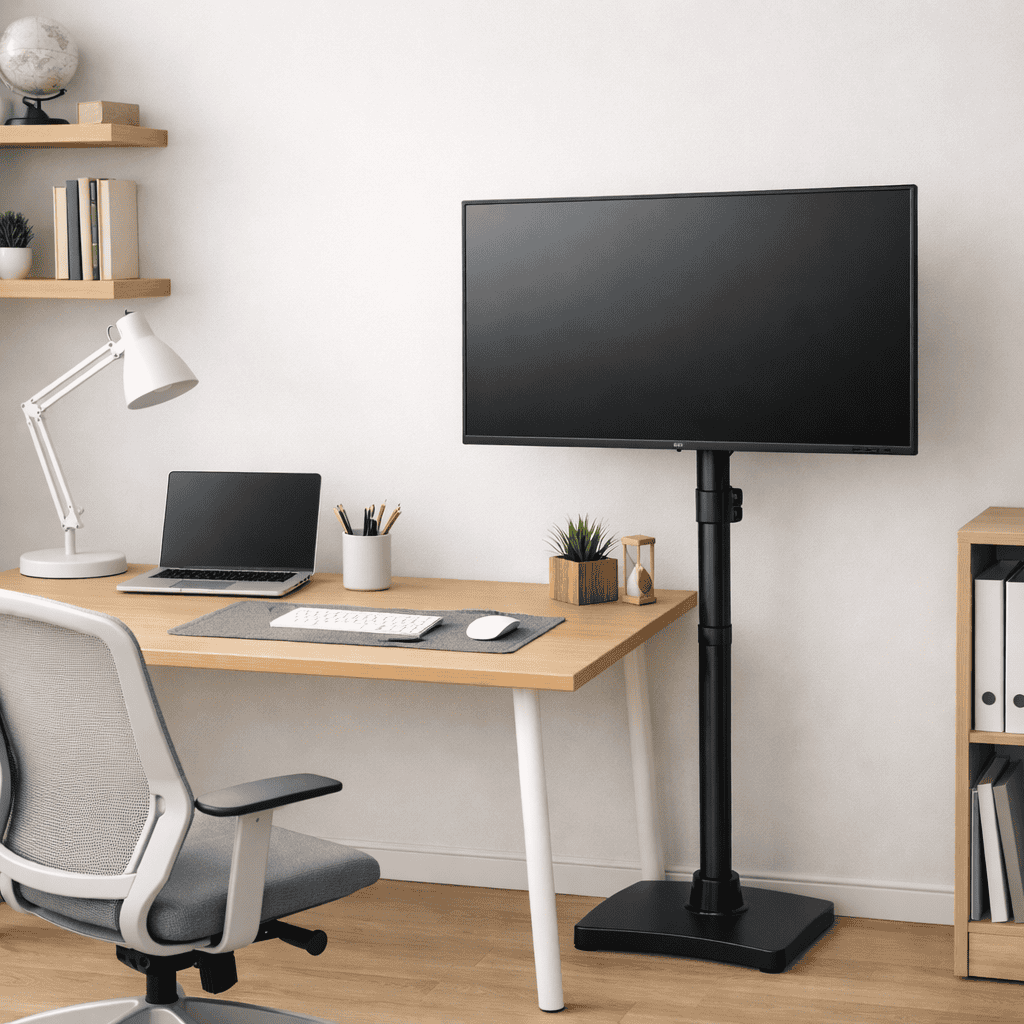
A monitor floor stand guide is a practical way to adjust the TV to the ideal height without requiring a desk or wall mounting. This guide breaks down what a monitor floor stand is, how it will improve your setup and why it’s necessary for comfortable work and posture. Small screen height and cluttered desk space are problems for many people, and floor stands can target both of these challenges. It doesn’t matter whether you sit at a desk, utilize a stand-up configuration, or require greater flexibility in screen placement. Details about monitor floor stands help streamline your work process.
Table of Contents
What Is a Monitor Floor Stand?
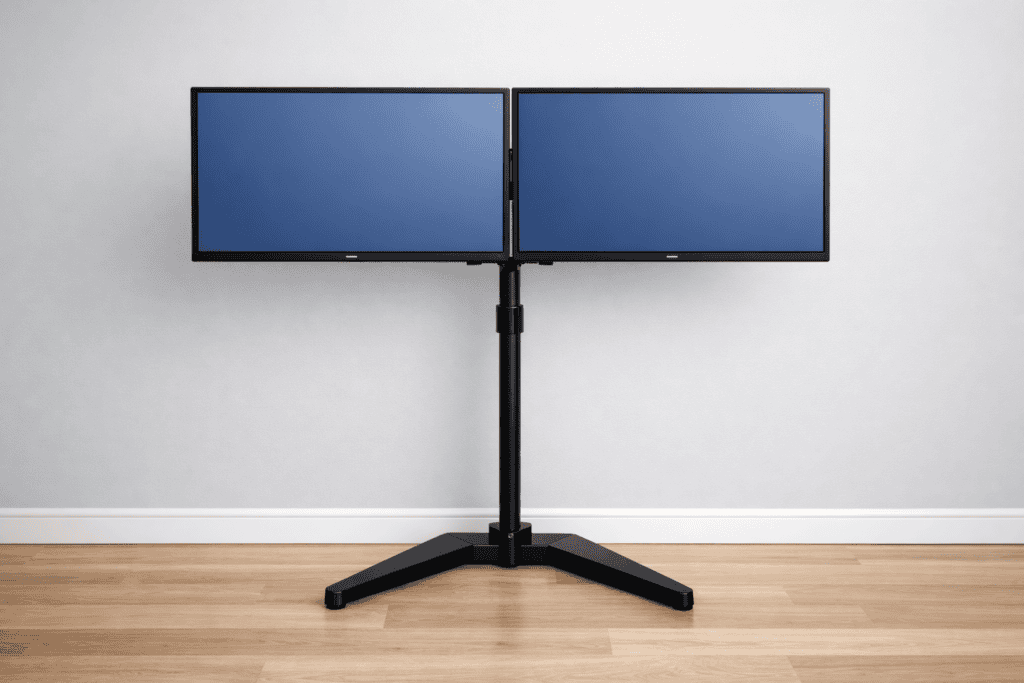
A monitor floor stand is a type of freestanding fixture to display one or more monitors at eye level, but not mounted on the wall or desk. It sits directly on the ground and props the monitor up with a vertical pole or stand. The monitor is attached with a regular VESA mount, common to any modern screen.
A floor stand is not affected by desk thickness and edge support, as a desk mount is. This makes it great for glass desks, slender desks, or situations where desk-mounted arms simply won’t work. Most floor stands are adjustable in height, which means that users can sit or stand while raising and lowering the screen.
Monitor floor stands are frequently used in home offices, music or recording studios, workstations, and even schools. They are also popular for people who frequently change desk layouts or use adjustable-height desks. Some are stationary, others have wheels so they can be moved easily.
Floor stands are also helpful ergonomically speaking, as it’s much more comfortable having the monitor up to your eye line. It decreases neck bending, holding shoulders in an uncomfortable position, and if spending long periods looking up or down, it can cause eye strain. When properly assembled, a monitor floor stand promotes better posture and tidier desk organization without having to drill holes or use sacrificial brackets on your work surface.
How a Floor Stand Differs From Desk Arms & Wall Mounts
Floor stand monitors mainly vary in installation and usage applications. Desk arms clamp to the desk, restricting where they can be placed, and are not suitable for thin or delicate surfaces. Wall mounts save desk space, but do require drilling and permanent installation. A floor stand does not require drilling, and no desk clamp is needed.
Being floor standing it provides you with more flexibility of placement and adjustment in height. Floor stands are also more easily portable or relocated, making them great for dynamic or temporary work environments.
Types of Monitor Floor Stands
There are different monitor floor stands available for different requirements. For one monitor, Single monitor stands support a single screen and are widely used in home offices. Double monitor floor stands double-sided screen holder, which can be used for multi-tasking or many industrial purposes.
Stands stand on the floor and have wheels for moving from room to room or changing seating arrangements. Fixed floor stands are for stationary positions; they do not move but concentrate only on stability.
Different models serve different functions, but they all want to give a good elevation of your screen as well as decrease the pile-up on a messy desk. Which one is best for you depends on screen size, the configuration of your workspace, and how often you move your setup around.
Why Use a Monitor Floor Stand? (Real Ergonomic Benefits)
A monitor floor stand brings real ergonomic benefits to the table, especially for those who have daily screen time measured in hours. One of the key benefits is better positioning of screens. Yet many desk and monitor arrangements make it so the monitors are set either too low or too close, which results in neck bending and eye strain. The monitor stand elevates the monitor to an optimal viewing height.
- Another benefit is desk freedom. Once you remove the monitor from your desk, there is room for a keyboard, notebook, and an appropriate arm position. This makes for better desk ergonomics overall and frees up your work area.
- It can also be useful, for adjustable and standing desks in particular, to use a monitor floor stand. Monitor elevates easily on the desk as the height is adjusted, and stays at the same viewing distance because it’s always centered on your desk, saving valuable workspace for you. This would be impossible with a normal VESA mount. This makes transitioning from sitting to standing as smooth and comfortable as it gets.
- Stability is another advantage. High-quality floor stands are made with sturdy bases that minimize screen wobble. It helps keep a consistent image throughout a programme, and is especially useful for large passes. Overall, a monitor floor stand offers better posture, a tidier workspace, and adaptable ergonomic arrangements without drilling into the walls.
Improves Monitor Height & Eye Alignment
A monitor floor stand makes it easier to set the screen such that when you look at it, your eyes hit the upper part of the display. This eliminates the requirement to move your head up or down when working. Correct eye positioning reduces strain on the neck and shoulders, especially during extended work periods.
Because numerous floor stands are adjustable, it is easy for users to set the screen at a comfortable sitting or standing position. This flexibility helps to promote a healthier posture and aids in keeping a neutral head position throughout your day.
Saves Desk Space & Improves Desk Ergonomics
Clear up the desk for your other gear by elevating your monitor with a floor stand. It has the extra space to make keyboard and mouse use more comfortable, and it helps your arms remain in a more relaxed position while typing. “Plus, you minimize a lot of awkward reaching and twisting on a clean desk.”
It’s much easier to be neat and ergonomic with less stuff to keep on the desk. This simple step can help comfort and focus without changing the desk.
Ideal for Standing & Adjustable Desks
What’s more, monitor floor stands are particularly good with standing or adjustable desks. And as the desk rises or lowers, your monitor stays at the right eye-level—rather than moving with the desk. This keeps the angle at which you view photos consistent and, therefore, more comfortable.
This configuration allows the user to go from a sitting position to a standing one without tilting the screen up and down all day. It enables smooth transitions, improved posture, and mitigates the stresses of a long or adjustable workday.
How to Set the Correct Height Using a Monitor Floor Stand
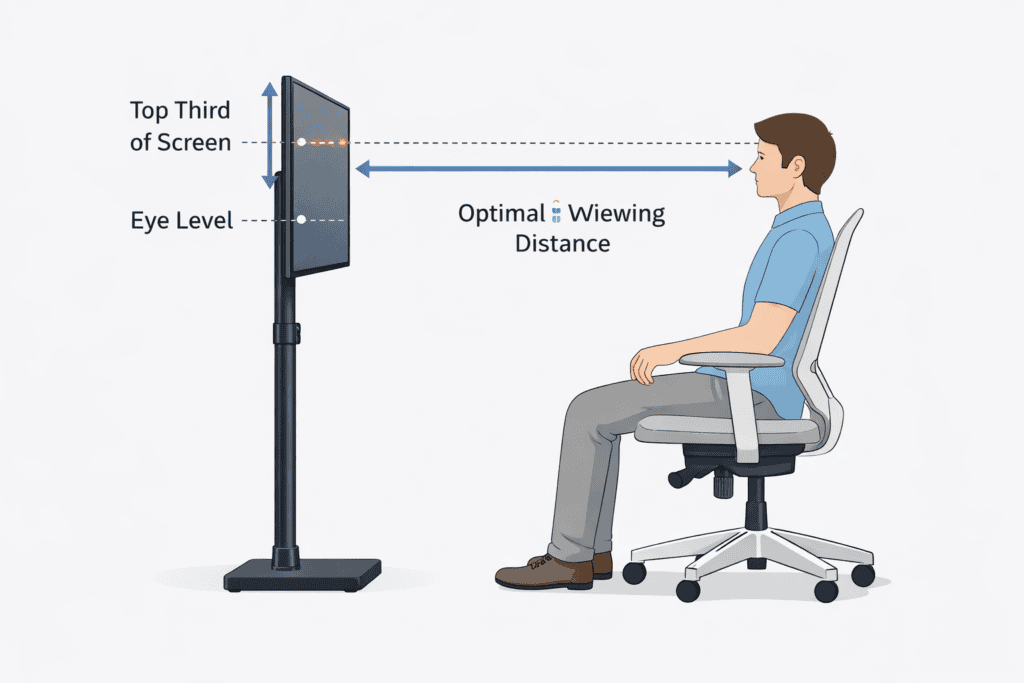
Getting the right height on a monitor floor stand is one of the most crucial aspects for an ergonomic desk setup. An adjusted monitor minimizes the neck, eye, and posture strain that can accumulate over long periods of screen time. Floor stands allow you more flexibility in adjusting height and distance than desk-mounted monitors do.
The idea’s straightforward: Your screen should be level with your eyes, without making you tilt your head up or bend your neck down. Begin by standing or sitting in your typical work position, and simply change the height of the stand rather than changing your body to accommodate the screen. This helps maintain a neutral, relaxed spine.
If you have a sit-stand desk, treat the monitor height separately from desk height. The monitor should be mounted to the arms of the desk so that as you adjust the height, the monitor stays at eye level, regardless of its position being up or down. Now with 2 screens, it’s even more crucial to keep them aligned, as turning your head and getting uneven shoulder strain sucks. Height is ideal and only takes a few minutes to set up; it can save long-term discomfort at the cost of daily discomfort at your workspace.
Ideal Monitor Height for Eye Level
The perfect monitor height is with the top of the screen at, or slightly below, your eye level. Take your focus straight ahead and directly at the screen; your eyes should be resting naturally in the upper third of the screen. This stance is healthy for the head and does not compress pressure on the neck.
To get this right, sit or stand up and relax your shoulders. Sit in a chair and set the monitor floor stand so you don’t have to tip your head. For a more detailed explanation, you may want to jump over to this internal guide on Ideal Monitor Height, which walks through eye-level rules and whatnot. Tiny height adjustments can sometimes mean a world of difference in comfort over the course of long work sessions.
Viewing Distance & Neck Angle
Reading from a Book or Device: Look at an open book resting on your lap with the spine farthest from you.
Distance is as important to the view as height. The majority of people find that the monitor is a comfortable distance away when situated an arm’s length, typically 20 to 30 inches. If the screen’s too close, you’re making your eyes work harder. If your butt is very far back, you should be slumping forward without realizing it.
Your neck should remain in a neutral position, which isn’t pushed forward or tipped backward. Position the floor stand so that the screen is at a slight adjustment to your natural eye level.
Dual Monitor Height Alignment Tips
In the case of a dual monitor, try to make sure both screens are at equal levels. The edges at the top should be even so that there is no twisting of your neck. If you favor one screen, put it straight in front of you and angle the other slightly.
When wearing properly, neck twisting pain and shoulder strain are minimized. For more complex designs, use your inner Dual Monitor Setup Desk manual to correctly align the height and spacing.
Stability & Safety Factors Most People Ignore
When you are using a monitor floor stand, then height is not the only thing that matters – stability does too! An unstable stand can wobble, move, and even fall over (particularly with larger monitors). Not only is this uncomfortable for one’s work or home, but poses safety hazards.
In order to get your stable configuration right, it is important to choose the correct base and weight capacity. The stand should be sturdy enough that the frame will not wobble if you adjust or touch the monitor. The floor should be level without any obstructions. That might disturb the balance.
Safety is also a factor, and one which can be influenced by how cables are controlled. Loose cords can tug at the screen or be a tripping hazard . The routing is smart; it keeps the setup clean and prevents any unwanted movement. By being mindful of these aspects, you can keep your monitor floor stand easy to use and safe daily.
Base Design, Weight & Balance
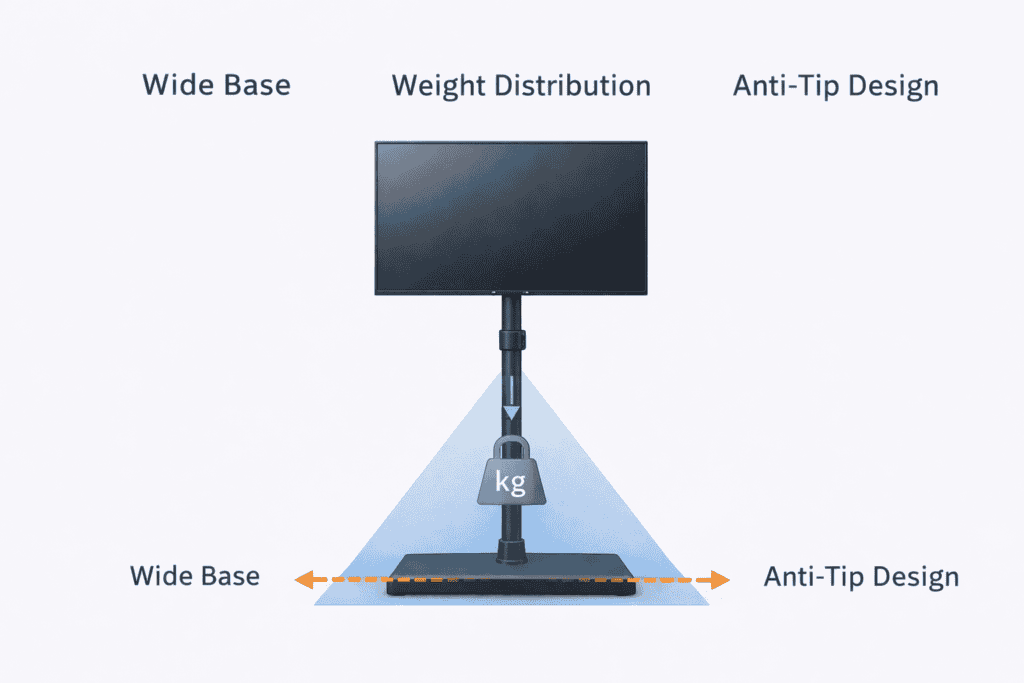
A stable base is what underpins a safe monitor floor stand. Bigger bases improve stability and less the chance of tipping over. Your stand should be rated to carry the full weight of your monitor and any other devices.
Larger or more curved screens tend to feel a bit more secure on heavier bases. Always follow weight limits, and ensure the stand sits flat on the floor. Nice balance, protecting your monitor and desktop.
Preventing Wobble & Tip-Over Risk
Wobble is typically caused by overloading the stand or setting it up on an irregular surface. Make certain that all screws are tightened and that height adjustments are locked firmly. Keep the stand away from heavily trafficked areas where it can be bumped.
If your stand has adjustable legs or leveling feet, apply them. Increasing stability limits the movement of the screen, and inhibition of potential screen rock due to its built-in resistance minimizes the risk of tipping for comfortable daily use.
Safety: A cord management system helps keep the sad iron out of children’s hands, eliminating a deadly hazard that all smart users appreciate.
Cable Management for Safety
Flying cables can pull the monitor and impact stability. Run all cables through the frame of the stand and secure with clips or zip ties. To avoid tripping, be sure to keep cords clear of walkways.
Neat cable management not only enhances safety but also keeps your setup looking clean and organized. A clean installation allows to keep the monitor floor stand to stay stable and stress-free time after time.
Monitor Floor Stand vs Desk Mount vs Wall Mount
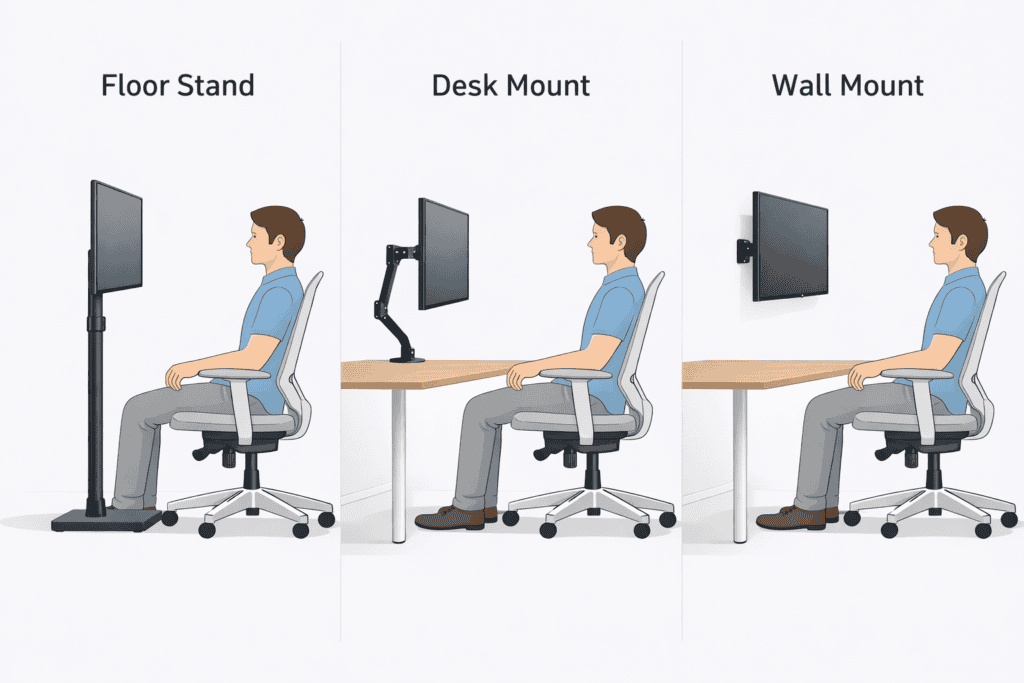
between a monitor floor stand, desk mount, or wall mount will become easier when you figure out your space, work style, and ergonomic requirements. Each approach supports your monitor differently and has its own effects on posture, flexibility, and the layout of your desk. Knowing the difference can save you from a terrible setup that’s either hurting your neck or taking up space you could be using instead.
A monitor floor stand rests on the floor and provides adjustable height and position changes with no drilling or clamping. Desk mounts mount directly to the desk, freeing up surface space but relying on a strong and thick desk. And then there’s the wall mount: It makes for a cleaner look but offers far less adjustability once it’s up.
Even from an ergonomic perspective, adaptability reigns supreme. Floor stands are timeless for moveable systems, sit-stand desks, or shared workspace. Desk mounts work great on modern minimal desks, and wall mounts are a good option for more permanent setups where you seldom move the screen position. There’s no one-size-fits-all answer to the material question; rather, it depends on how easy or hardscape your body finds it not to slump when you’re sitting and staring at a screen for hours on end.
When a Floor Stand Is the Best Choice
If your desks are quite small or they can’t take on a clamp mount, a monitor floor stand is the best option for you. It’s a good match for adjustable, standing, and large or heavy monitors. They are also a good choice for renters, as they don’t require any drilling.
If you change the height or position of the monitor often, a floor stand offers little more flexibility than wall brackets. It’s great for any ergonomic/gaming desk with comfort and posture in mind.
Limitations You Should Know
Limits with This Research Potential drawbacks or opportunities this research does not address.
Monitor floor stands waste floor space, which can feel bulky in small rooms. Less expensive models may wobble if the base isn’t sturdy. They do, however, have to be put in the right place so you don’t trip over the base or cables.
For those who prefer an ultra minimal look, there might be something even more fitting than a wall mount: a floor stand. The stand that you get is obviously important because performance and stability matter!
Which Setup Is Best for Small Rooms
Lift the monitors off your desk. Deskmounts are a great way to save space, particularly in a small room. Wall mounts are great if the position of your monitor will never change.
It’s still possible to make free-standing speakers work in the room with careful placement near walls or corners. The ideal setup puts space, safety, and ergonomic comfort before awkward body positioning.
Who Should Use a Monitor Floor Stand?
Monitor floor stands are not for everyone, but they can be a very useful accessory for some. Those who have difficulty with the height of their monitors, desk space, or varying work positions will likely get the most out of this. The floor stand permits exact screen height and distance, so that one is assured of always enjoying the best posture and eye level to focus on the display.
Particularly when conventional desk clips or wall mounts are not suitable due to desk thickness, sharing desks, or room setup. Floor stands will also hold larger screens, which can be dangerous on flimsy desks. Neck pain, eye strain, and poor posture can be added to the equation when sitting down for long work stretches, but you may find that proper monitor placement makes a world of difference.
For those of you who are having problems with computer-related aches and pains, this arrangement can also work in your favor with exercises mentioned in Dry Eyes, Headache & Fatigue, which mostly tend to result from improper screen alignment.
Remote Workers & Home Offices
Many remote workers are sitting at desks not intended for prolonged use. Try a monitor floor stand if your screen is too high and too far away, but new office chairs—or even a couch—are out of the question. And it can work well in home offices, where flexibility and comfort take priority over set layouts.
Dual Monitor & Ultrawide Users
It’s easy for desks or mounts to be overtaken by large or dual monitors. The floor securely holds the weight of your heavy screens and can be easily adjusted for optimal alignment. This helps prevent neck rotation and any tilt differences in multitasking.
People With Neck or Eye Strain
A higher monitor is beneficial for users who have neck discomfort and eye strain. Precise Eye-Level – Floor stand allows you to position the display directly at eye level, helping to reduce strain on your eyes and neck related to long screen time and poor posture.
Common Mistakes to Avoid
Using a monitor floor stand can be game-changing when it comes to your comfort, but little setup missteps can erase that advantage. Most people just think about putting the monitor any old “higher” without considering how it affects posture, viewing distance, and overall stability. Others lose sight of the fact that a floor stand is just one component of a full ergonomic presentation, not a package deal.
Another problem is selecting a stand that looks nice, but does not adequately support the size or weight of the monitor. This may cause wobbles of screens, poor height matching, and uncomfortable positions over time. Staying away from these mistakes allows you to actually get the ergonomic benefit of using a floor stand rather than creating other problems. Hang on, height, chair supports, and stand compatibility make quite a difference in keeping your view comfortable and healthy each time you power up.
Setting the Monitor Too High
By positioning the monitor vertically too high, you put your neck into a position to tilt up for long periods of time. This creates tension in the neck and strain on the shoulders, especially when we are concentrating. Many people assume “higher is better,” but it’s not just about height. The screen’s top should be at or slightly below eye level, with your neck relaxed.
Ignoring Desk & Chair Ergonomics
Poor seating or desk height can’t be fixed by a floor stand. If your chair doesn’t support you properly or your desk is at the wrong height, it can still be uncomfortable. The height of the monitor has to be in concert with your seating arrangements. The Good Ergonomic Chair Back Support also assists in sitting up straight and allows the monitor to be placed where it should be in order to actually reduce strain.
Choosing the Wrong Stand for Monitor Size
Not all floor stands can carry all the monitors. For larger or ultrawide screen sizes, the base has to be stronger and have a higher weight capacity. The use of a cheap stand may cause wobbling or dropping height risks. Be sure to know your monitor’s size and weight, and always match the stand with the correct size and strength.
FAQs (People Also Ask)
Are the monitor floor stands stable?
Yes, good floor stands for monitors are stable if they have a wide, weighted base and are balanced. The stability is up to the stand’s construction and the weight of the monitor. By fastening the stand and organizing cables, you can eliminate wobble during use other things you get from a more permanent installation.
Can you put a floor stand on a standing desk?
Yes, floor monitor stands are very suitable for standing desks. They offer independent height adjustment, letting you keep the screen at eye level as you transition between a sitting and standing desk. This versatility makes them a perfect option for adjustable desk users.
Does Do floor work with dual monitors?
Many floor stands are outfitted for dual monitors, but they need to be able to handle the weight and width combined. Dual-monitor floor stands assist with balancing both screens side by side and minimizing neck rotation. Check arm reach, height coverage, and stability before using two screens.
Which is better, a floor stand or a desk mount?
It’s ideal to use with a floor stand when you are low on desk space or the desk doesn’t accommodate clamps. The desk mount is great for sturdy desks. The ideal choice varies according to room dimensions, desk stability, and how frequently you mix up your setup.
Final Thoughts
A monitor floor stand can be a great way to add comfort to your screen if you use it right. The right height, stability, and alignment are more important than looks or ease of use. The stand should complement your desk, chair, and posture — not outweigh them.
Avoiding the common mistakes when selecting a stand and making sure it’s well-suited to your monitor and computer allows for all-day screen use with less strain. An ergonomic-first mentality preserves your neck, eyes and posture for years to come. Small accommodations can lead to increased comfort and sharpness every single day.